
应用镜像变换翻转/反射QML控件
应用镜像变换翻转/反射QML控件
提问于 2018-12-09 10:28:36
可以在QML中水平翻转/反射形状项。例如,我的形状如下:
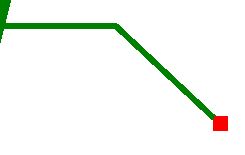
我是否可以水平地翻转/反映它以产生:
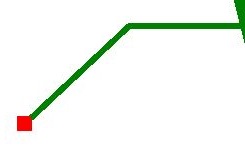
我知道我可以编辑我的QML代码来绘制不同的线条,但是如果可能的话,只使用QML动画或者其他什么东西就会简单得多。
Shape {
    id: annotationHLine;
    anchors.left: annotationShp.right;
    anchors.top: annotationShp.top;
    anchors.topMargin: annotationShp.height * 0.5;

    ShapePath {
        strokeWidth: 2;
        strokeColor: "Green";
        fillColor: "transparent";
        startX: -slant; startY: 0;
        PathLine { x: relativeTargetX*0.5; y: 0 }
        PathLine { x: relativeTargetX; y: relativeTargetY }
    }
}回答 2
Stack Overflow用户
回答已采纳
发布于 2018-12-09 11:14:28
是的,您可以,只需将水平镜像转换矩阵设置为形状:
transform: Matrix4x4 {
      matrix: Qt.matrix4x4(-1, 0, 0, 0, 0, 1, 0, 0, 0, 0, 1, 0, 0, 0, 0, 1)
    }
编辑:
x的位置并没有真正改变,它仍然是一样的,只是对象现在是用转换呈现的。您可以通过在矩阵的顶部堆叠一个转换来弥补这一点:
transform: [
  Matrix4x4 {
    matrix: Qt.matrix4x4(-1, 0, 0, 0, 0, 1, 0, 0, 0, 0, 1, 0, 0, 0, 0, 1)
  },
  Translate {
    x: annotationHLine.width
  }
]
编辑2:
实际上,您可以将翻译合并到原始矩阵中,以简化一些事情:
transform:  Matrix4x4 {
    matrix: Qt.matrix4x4( -1, 0, 0, but.width, 0, 1, 0, 0, 0, 0, 1, 0, 0, 0, 0, 1)}
}Stack Overflow用户
发布于 2019-05-07 09:36:44
您可以使用转换和缩放。
transform: Scale{ xScale: -1 }页面原文内容由Stack Overflow提供。腾讯云小微IT领域专用引擎提供翻译支持
原文链接:
https://stackoverflow.com/questions/53691351
复制相关文章
相似问题
腾讯云开发者

Copyright © 2013 - 2026 Tencent Cloud. All Rights Reserved. 腾讯云 版权所有
深圳市腾讯计算机系统有限公司 ICP备案/许可证号:粤B2-20090059  粤公网安备44030502008569号
腾讯云计算(北京)有限责任公司 京ICP证150476号 | 京ICP备11018762号