
离子和电子应用没有启动。错误启动应用程序,无法在{}找到模块
离子和电子应用没有启动。错误启动应用程序,无法在{}找到模块
提问于 2018-12-07 09:16:15
我一直试图将一个离子应用程序转换成一个桌面应用程序,但似乎找不到解决方案。每当我运行electron .时,都会弹出一个这样的消息
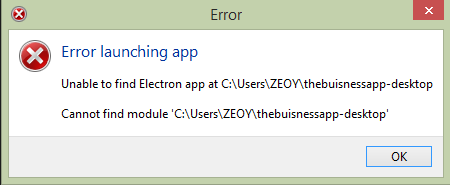
我已经将我的主脚本添加到我的package.json中,并添加了一个定制的build命令,它构建了我的应用程序,然后运行电子。我的package.json看起来像这样
{
"name": "businessapp-desktop",
"version": "0.0.1",
"author": "Ionic Framework",
"homepage": "http://ionicframework.com/",
"private": true,
"scripts": {
  "start": "ionic-app-scripts serve",
  "clean": "ionic-app-scripts clean",
  "build": "ionic-app-scripts build",
  "lint": "ionic-app-scripts lint",
  "electon-serve": "ionic-app-scripts build && electron ."
},
"main":"electron/electron.js",
"dependencies": {
  "@angular/animations": "5.2.11",
  "@angular/common": "5.2.11",
  "@angular/compiler": "5.2.11",
  "@angular/compiler-cli": "5.2.11",
  "@angular/core": "5.2.11",
  "@angular/forms": "5.2.11",
  "@angular/http": "5.2.11",
  "@angular/platform-browser": "5.2.11",
  "@angular/platform-browser-dynamic": "5.2.11",
  "@ionic-native/core": "~4.17.0",
  "@ionic-native/splash-screen": "~4.17.0",
  "@ionic-native/status-bar": "~4.17.0",
  "@ionic/pro": "2.0.3",
  "@ionic/storage": "2.2.0",
  "ionic-angular": "3.9.2",
  "ionicons": "3.0.0",
  "rxjs": "5.5.11",
  "sw-toolbox": "3.6.0",
  "zone.js": "0.8.26"
},
"devDependencies": {
  "@ionic/app-scripts": "3.2.1",
  "electron": "^3.0.10",
  "typescript": "~2.6.2"
},
"description": "An Ionic project"
}我的electron.js看起来像这样
const electron = require('electron');
// Module to control application life.
const app = electron.app;
// Module to create native browser window.
const BrowserWindow = electron.BrowserWindow;

const path = require('path');
const url = require('url');

// Keep a global reference of the window object, if you don't, the window
will
// be closed automatically when the JavaScript object is garbage collected.
let mainWindow;

function createWindow() {
    // Create the browser window.
    mainWindow = new BrowserWindow({width: 1200, height: 700});

    // and load the index.html of the app.
    const startUrl = process.env.ELECTRON_START_URL || url.format({
            pathname: path.join(__dirname, '/../www/index.html'),
            protocol: 'file:',
             slashes: true
        });
    mainWindow.loadURL(startUrl);
    // Open the DevTools.
    mainWindow.webContents.openDevTools();

    // Emitted when the window is closed.
    mainWindow.on('closed', function () {
        // Dereference the window object, usually you would store windows
        // in an array if your app supports multi windows, this is the time
    // when you should delete the corresponding element.
    mainWindow = null
})
}

// This method will be called when Electron has finished
// initialization and is ready to create browser windows.
// Some APIs can only be used after this event occurs.
app.on('ready', createWindow);

// Quit when all windows are closed.
app.on('window-all-closed', function () {
// On OS X it is common for applications and their menu bar
// to stay active until the user quits explicitly with Cmd + Q
if (process.platform !== 'darwin') {
    app.quit()
}
});

app.on('activate', function () {
// On OS X it's common to re-create a window in the app when the
// dock icon is clicked and there are no other windows open.
if (mainWindow === null) {
    createWindow()
}
});

// In this file you can include the rest of your app's specific main process
// code. You can also put them in separate files and require them here.我已经用npm i --save-dev electron安装了电子依赖项,但是每当我尝试运行electron . (如教程这里中所述)时,我就会得到上面的错误。
如果能提供任何帮助,我将不胜感激。
回答 1
Stack Overflow用户
回答已采纳
发布于 2018-12-08 11:46:58
终于修好了。问题是排版的。我的应用程序无法到达main.js,因为文件路径是错误的。如果您有类似的问题,请检查您的文件路径。
页面原文内容由Stack Overflow提供。腾讯云小微IT领域专用引擎提供翻译支持
原文链接:
https://stackoverflow.com/questions/53666474
复制相关文章
相似问题
腾讯云开发者

Copyright © 2013 - 2026 Tencent Cloud. All Rights Reserved. 腾讯云 版权所有
深圳市腾讯计算机系统有限公司 ICP备案/许可证号:粤B2-20090059  粤公网安备44030502008569号
腾讯云计算(北京)有限责任公司 京ICP证150476号 | 京ICP备11018762号