
AmCharts 4:网格步骤
AmCharts 4:网格步骤
提问于 2018-12-06 19:57:31
我正在制作一个极坐标来显示卫星。
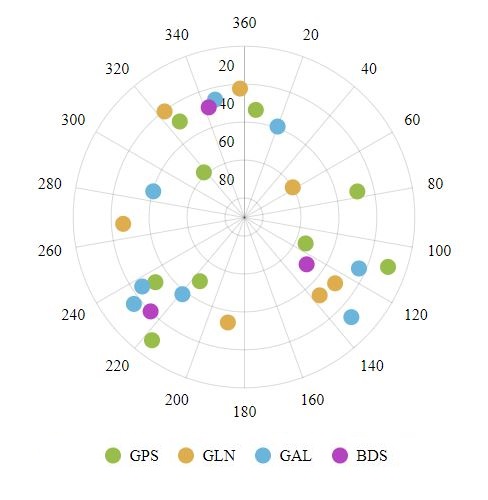
但是我想要网格大小显示在45度的台阶上。我尝试了很多图表4功能,但它不起作用。
我得到的最接近的解决方案是使用minGridDistance使用10度的步骤,并将标签格式化为只显示30倍的倍数,因为它不适用于45的倍数,这是一个奇数。
这是我的密码:
  private configureChart() {
    this.series = {};

    const chart = this.chart = am4core.create('chartdiv', am4charts.RadarChart);

    /* Create axes */
    const xAxis = chart.xAxes.push(new am4charts.ValueAxis<am4charts.AxisRendererCircular>());
    xAxis.renderer.axisFills.template.disabled = true;
    xAxis.renderer.minLabelPosition = 0.01;

    // xAxis.renderer.minGridDistance = 10;

    // xAxis.formatLabel = (value: number) => {
    //   if (value % 30 === 0) {
    //     return value.toString();
    //   }
    // };

    xAxis.strictMinMax = true;
    xAxis.max = 360;
    xAxis.min = 0;

    const yAxis = chart.yAxes.push(new am4charts.ValueAxis<am4charts.AxisRendererRadial>());
    yAxis.renderer.labels.template.verticalCenter = 'bottom';
    yAxis.renderer.labels.template.horizontalCenter = 'right';
    yAxis.renderer.minLabelPosition = 0.01;
    yAxis.renderer.inversed = true;
    yAxis.strictMinMax = true;
    yAxis.max = 90;
    yAxis.min = 0;

    this.createSeries('GPS', 'GP', '#98BD4A');
    this.createSeries('GLN', 'GL', '#DEAE4E');
    this.createSeries('GAL', 'GA', '#6BB4DB');
    this.createSeries('BDS', 'BD', '#B543C1');

    /* Add legend */
    chart.legend = new am4charts.Legend();

    /* Add cursor */
    chart.cursor = new am4charts.RadarCursor();
  }

  private createSeries(title: string, key: string, color: string) {
    const chart = this.chart;

    /* Create and configure series */
    const series = chart.series.push(new am4charts.RadarSeries());
    series.fill = am4core.color(color);
    series.dataFields.valueX = 'azimuth';
    series.dataFields.valueY = 'elevation';
    series.sequencedInterpolation = true;
    series.sequencedInterpolationDelay = 10;
    series.strokeOpacity = 0;
    series.name = title;
    series.data = [];

    const circleBullet = series.bullets.push(new am4charts.CircleBullet());
    circleBullet.circle.strokeOpacity = 0;
    circleBullet.circle.radius = 8;
    circleBullet.tooltipText = `SAT PRN {prn}
    Azim: {azimuth}º
    Elev: {elevation}º
    Stat: {snr}dBHz`;

    this.series[key] = series;
}回答 1
Stack Overflow用户
回答已采纳
发布于 2018-12-07 19:13:58
1)通过设置axis.grid.template.disabled = true; 2)将AxisRanges添加到所需的值,从而完全禁用网格。更多关于范围的信息:https://www.amcharts.com/docs/v4/concepts/axes/axis-ranges/
页面原文内容由Stack Overflow提供。腾讯云小微IT领域专用引擎提供翻译支持
原文链接:
https://stackoverflow.com/questions/53658763
复制相关文章
相似问题
腾讯云开发者

Copyright © 2013 - 2026 Tencent Cloud. All Rights Reserved. 腾讯云 版权所有
深圳市腾讯计算机系统有限公司 ICP备案/许可证号:粤B2-20090059  粤公网安备44030502008569号
腾讯云计算(北京)有限责任公司 京ICP证150476号 | 京ICP备11018762号