
Matplotlib -提取三维多边形图的二维轮廓
我有一个由一组Poly3DCollection定义的3D图。集合中的每个多边形都包含一个3D简单元素列表(一个单纯形=4个点),如下所示。
[[[21096.4, 15902.1, 74.3],
  [21098.5, 15904.3, 54.7],
  [21114.2, 15910.1, 63.0],
  [21096.4, 15902.1, 74.3]],
  ...
 [[21096.4, 15902.1, 74.3],
  [21114.8, 15909.9, 91.3],
  [21114.2, 15910.1, 63.0],
  [21096.4, 15902.1, 74.3]]]
在这些集合中,我绘制了一个三维网格,给出了这个结果。
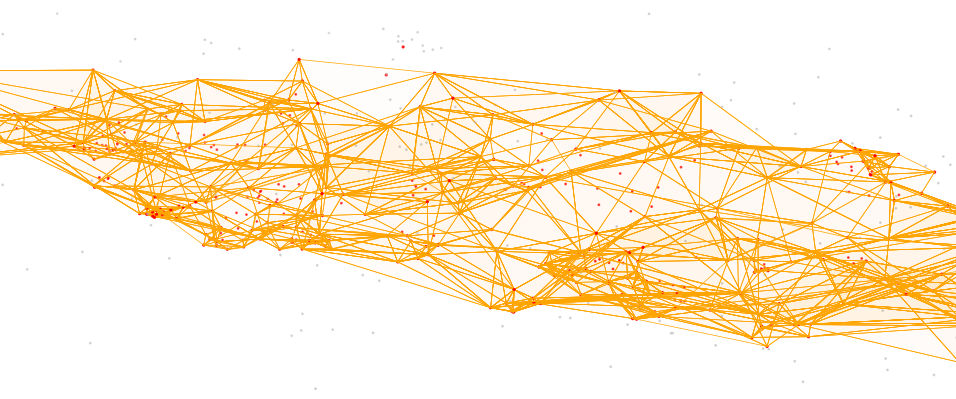
我想确定这个三维网格的轮廓时,投影在2D屏幕上的绘图,以突出它。理想情况下,它会给我一些类似的东西
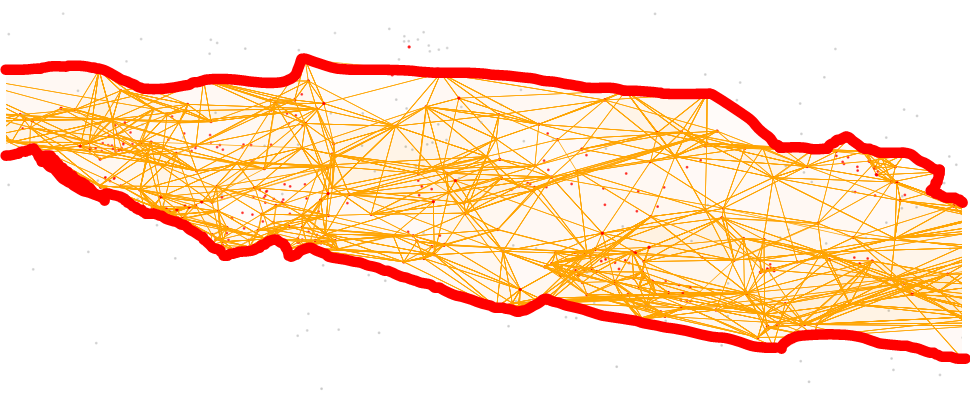
有什么方法可以做到这一点吗?
为了达到这个目标,我在想
- 获得我的3D点的2D坐标,一旦投影在可视化平面上,将每个点乘以一个投影矩阵,这个投影矩阵是matplotlib最终渲染所必需的,或直接从matplotlib内部获取投影的2D坐标,我不知道这是否可能。
- 一种二维轮廓检测算法在二维坐标检测中的应用
- 将步骤2中找到的2D轮廓添加到现有的3D绘图中。
但是,我没有找到从matplotlib Axes3D对象公开的接口实现此轮廓检测的任何方法。
只要我能完成二维轮廓的绘制,无论是直接在原始的3D数据集和投影上,还是从matplotlib Axes3D对象上确定它,对我来说都无关紧要。
回答 1
Stack Overflow用户
发布于 2018-12-07 21:09:55
事实证明,这比我最初预期的要复杂得多。我解决这个问题的方法是首先把物体旋转成正面视图(根据Axes3D elev和azim角度),把它投影到y-z平面上,计算2D轮廓,重新添加第三维空间,然后将现在的三维轮廓旋转回当前的视图。
旋转部分可以用简单的矩阵运算来完成,只需注意x、y和z轴在旋转前可能被拉伸,并且不需要拉伸。
投影部分有点棘手,因为我不知道有什么聪明的方法可以找到这么多点的外部点。因此,我通过分别计算每个单纯形的投影来解决这个问题,计算它们的二维凸包(使用scipy),将它们转换成shapely多边形,最后计算所有这些多边形的并。然后,我添加了丢失的x坐标,并将整个事物旋转回当前视图。
默认情况下,Axes3D对象使用透视图,导致对象的实际轮廓与计算的投影不完全对齐。可以通过使用正交视图(使用ax.set_proj_type('ortho')设置)来避免这种情况。
最后,一旦图像被旋转,就需要更新大纲/投影。因此,我将整个函数添加到this example之后的事件队列中。
如果还有其他问题,请问。
from mpl_toolkits.mplot3d import Axes3D
from mpl_toolkits.mplot3d.art3d import Poly3DCollection, Line3DCollection
from matplotlib import pyplot as plt
import numpy as np

from shapely.geometry import Polygon
from scipy.spatial import ConvexHull

from scipy.spatial import Delaunay

##the figure
fig, ax = plt.subplots(subplot_kw=dict(projection='3d'))

##generating some random points:
points = np.random.rand(50,3)
xmin,xmax = 0,100
ymin,ymax = -10,10
zmin,zmax = -20,20
points[:,1] = (points[:,1]*(ymax-ymin)+ymin) * np.sin(points[:,0]*np.pi)
points[:,2] = (points[:,2]*(zmax-zmin)+zmin) * np.sin(points[:,0]*np.pi)
points[:,0] *= 100


##group them into simlices
tri =  Delaunay(points)
simplex_coords = np.array([tri.points[simplex] for simplex in tri.simplices])

##plotting the points
ax.scatter(points[:,0], points[:,1], points[:,2])

##visualizing simplices
line_coords = np.array(
    [[c[i],c[j]] for c in simplex_coords for i in range(len(c)) for j in range(i+1,len(c))]
)
simplex_lines = Line3DCollection(line_coords, colors='k', linewidths=1, zorder=10)
ax.add_collection3d(simplex_lines)

##adjusting plot
ax.set_xlim([xmin,xmax])
ax.set_xlabel('x')
ax.set_ylim([2*ymin,2*ymax])
ax.set_ylabel('y')
ax.set_zlim([2*zmin,2*zmax])
ax.set_zlabel('z')


def compute_2D_outline():
    """
    Compute the outline of the 2D projection of the 3D mesh and display it as
    a Poly3DCollection or a Line3DCollection.
    """

    global collection
    global lines
    global elev
    global azim

    ##remove the previous projection (if it has been already created)
    try:
        collection.remove()
        lines.remove()
    except NameError as e:
        pass


    ##storing current axes orientation
    elev = ax.elev
    azim = ax.azim

    ##convert angles
    theta = -ax.elev*np.pi/180
    phi = -ax.azim*np.pi/180

    #the extend of each of the axes:
    diff = lambda t: t[1]-t[0]
    lx = diff(ax.get_xlim())
    ly = diff(ax.get_ylim())
    lz = diff(ax.get_zlim())

    ##to compute the projection, we 'unstretch' the axes and rotate them
    ##into the (elev=0, azmi=0) orientation
    stretch = np.diag([1/lx,1/ly,1/lz])
    rot_theta = np.array([
        [np.cos(theta), 0, -np.sin(theta)],
        [0, 1, 0],
        [np.sin(theta), 0,  np.cos(theta)],
    ])
    rot_phi = np.array([
        [np.cos(phi), -np.sin(phi), 0],
        [np.sin(phi),  np.cos(phi), 0],
        [0,0,1],
    ])
    rot_tot = np.dot(rot_theta,np.dot(rot_phi,stretch))

    ##after computing the outline, we will have to reverse this operation:
    bstretch = np.diag([lx,ly,lz])
    brot_theta = np.array([
        [ np.cos(theta), 0, np.sin(theta)],
        [0, 1, 0],
        [-np.sin(theta), 0, np.cos(theta)],
    ])
    brot_phi = np.array([
        [ np.cos(phi),  np.sin(phi), 0],
        [-np.sin(phi),  np.cos(phi), 0],
        [0,0,1],
    ])
    brot_tot = np.dot(np.dot(bstretch,brot_phi),brot_theta)

    ##To get the exact outline, we will have to compute the projection of each simplex
    ##separately and compute the convex hull of the projection. We then use shapely to
    ##compute the unity of all these convex hulls to get the projection (or shadow).
    poly = None
    for simplex in simplex_coords:
        simplex2D = np.dot(rot_tot,simplex.T)[1:].T
        hull = simplex2D[ConvexHull(simplex2D).vertices]
        if poly is None:
            poly = Polygon(hull)
        else:
            poly = poly.union(Polygon(hull))

    ##the 2D points of the final projection have to be made 3D and transformed back
    ##into the correct axes rotation
    outer_points2D = np.array(poly.exterior.coords.xy)
    outer_points3D = np.concatenate([[np.zeros(outer_points2D.shape[1])],outer_points2D])
    outer_points3D_orig = np.dot(brot_tot, outer_points3D)

    ##adding the polygons
    collection = Poly3DCollection(
        [outer_points3D_orig.T], alpha=0.25, facecolor='b', zorder=-1
    )
    ax.add_collection3d(collection)

    ##adding the lines
    lines = Line3DCollection(
        [outer_points3D_orig.T], alpha=0.5, colors='r', linewidths=5, zorder=5
    )
    ax.add_collection3d(lines)


def on_move(event):
    """
    For tracking rotations of the Axes3D object
    """

    if event.inaxes == ax and (elev != ax.elev or azim != ax.azim):
        compute_2D_outline()
    fig.canvas.draw_idle()

##initial outline:
compute_2D_outline()

##the entire thing will only work correctly with an orthogonal view
ax.set_proj_type('ortho')

##saving ax.azim and ax.elev for on_move function
azim = ax.azim
elev = ax.elev

##adding on_move to the event queue
c1 = fig.canvas.mpl_connect('motion_notify_event', on_move)

plt.show()
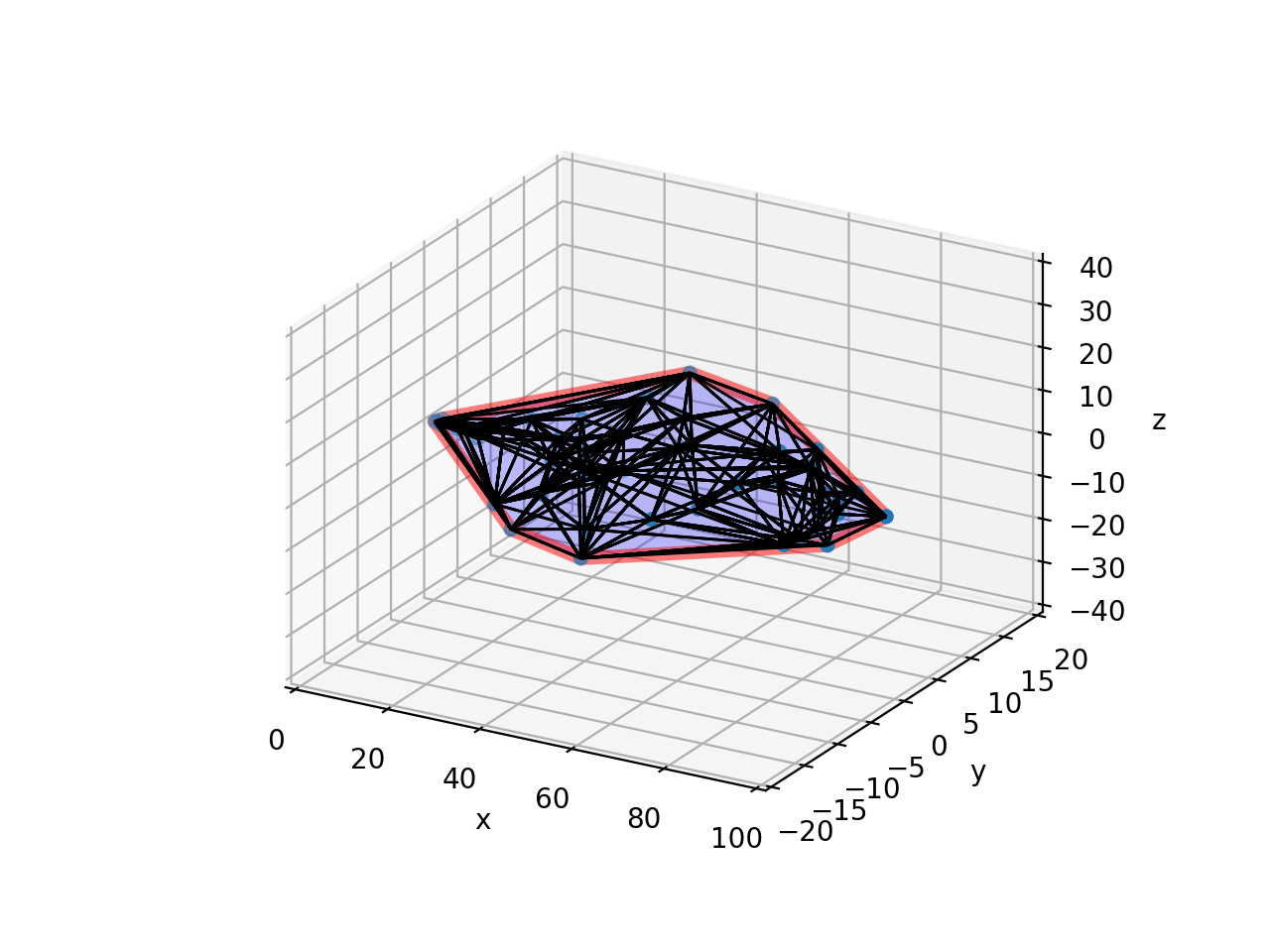
最后的结果(包含一些生成的随机数据)如下所示:
https://stackoverflow.com/questions/53652749
复制相似问题
腾讯云开发者

Copyright © 2013 - 2026 Tencent Cloud. All Rights Reserved. 腾讯云 版权所有
深圳市腾讯计算机系统有限公司 ICP备案/许可证号:粤B2-20090059  粤公网安备44030502008569号
腾讯云计算(北京)有限责任公司 京ICP证150476号 | 京ICP备11018762号