
有什么方法来隐藏周日的标题,在余烬-权力日历下拉?
我在我的应用程序中使用ember-power-calendar插件来避免ember-bootstrap date-picker,因为它有jQuery小部件。日历运行得非常好。但我有一个要求,在工作日的标题(星期日,星期一..saturday)需要隐藏。
{{#power-calendar
  center=fixedDummyDate
  selected=fixedDummyDate
  onSelect=(action 'selectDate' value='date')
  as |calendar|}}
    {{calendar.days}}
{{/power-calendar}}
交付产出
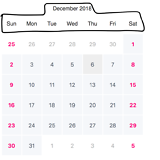
预期产出
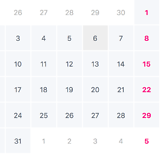
回答 2
Stack Overflow用户
发布于 2018-12-07 20:03:47
目前,我找到了一种将css类添加到power日历以隐藏工作日标题的方法。
CSS样式:
.no-weekdays {
   .ember-power-calendar-weekdays {
       display: none;
    }
}
模板:
{{#power-calendar class="no-weekdays"
   selected=abcDate
   onSelect=(action 'selectDate' value='date')
   as |calendar|}}
   {{calendar.days}}
{{/power-calendar}}
还有其他隐藏头的方法吗?
Stack Overflow用户
发布于 2018-12-06 07:20:40
事实上,官方指南中有一个与你要求的相似的例子。你在Basic-customization>days link上查过例子了吗?
尽管如此,让我解释一下你将如何处理这个问题。你需要把星期日和星期一从日历上删除。您需要自定义days-component of power-calendar。为此,您可以传递自己的组件;假设自定义组件的名称是days-without-monday-sunday。那么您对power-calendar的使用将是:
{{#power-calendar
    center=fixedDummyDate
  selected=fixedDummyDate
  onSelect=(action 'selectDate' value='date')
  daysComponent="days-without-monday-sunday"
  as |calendar|}}
    {{calendar.days}}
{{/power-calendar}}现在,让我们考虑一下定制的days-without-monday-sunday。我们可以在addon中重用现有的power-calendar/days组件。我们需要从周头行中消除Sunday和Monday。因此,让我们定义组件的js文件:
import Days from 'ember-power-calendar/components/power-calendar/days'

export default Days.extend({
    // eliminate monday and sunday from the weekdays already constructed ad power-calendar-days
    weekdaysWithoutMondayAndSunday: Ember.computed('weekdays', function() {
        return this.get('weekdays').slice(2,7)
    })
});现在让我们定义days-without-monday-sunday的模板。我们将在标题行中使用weekdaysWithoutMondayAndSunday,并从呈现中消除Monday和Sunday天:
<div class="ember-power-calendar-row ember-power-calendar-weekdays">
  {{#each weekdaysWithoutMondayAndSunday as |wdn|}}
    <div class="ember-power-calendar-weekday">{{wdn}}</div>
  {{/each}}
</div>
<div class="ember-power-calendar-day-grid" onkeydown={{action "onKeyDown" calendar}}>
  {{#each weeks key='id' as |week|}}
    <div class="ember-power-calendar-row ember-power-calendar-week" data-missing-days={{week.missingDays}}>
      {{#each week.days key='id' as |day|}}
        {{#if (monday-sunday-checker day)}}
          <button type="button"
            data-date="{{day.id}}"
            class="ember-power-calendar-day {{if onSelect 'ember-power-calendar-day--interactive'}} {{if day.isCurrentMonth 'ember-power-calendar-day--current-month' 'ember-power-calendar-day--other-month'}} {{if day.isSelected 'ember-power-calendar-day--selected'}} {{if day.isToday 'ember-power-calendar-day--today'}} {{if day.isFocused 'ember-power-calendar-day--focused'}} {{if day.isRangeStart 'ember-power-calendar-day--range-start'}} {{if day.isRangeEnd 'ember-power-calendar-day--range-end'}}"
            onclick={{action calendar.actions.select day calendar}}
            onfocus={{action 'onFocusDay' day}}
            onblur={{action 'onBlurDay'}}
            disabled={{day.isDisabled}}>
            {{#if hasBlock}}
              {{yield day publicAPI}}
            {{else}}
                {{day.number}}
            {{/if}}
          </button>
        {{/if}}
      {{/each}}
    </div>
  {{/each}}
</div>不要因为模板的复杂性而分心;我直接从addon本身复制它;看见。周一和周日淘汰的棘手之处在于{{#if (monday-sunday-checker day)}}。为了做到这一点,我们可以创建一个名为monday-sunday-checker的定制助手。该助手的实现可以是:
import Ember from 'ember';

export function mondaySundayChecker(params/*, hash*/) {
  console.log(params[0])
  const day = Ember.get(params[0], 'moment').format('dddd')
  return day !== 'Monday' && day !== 'Sunday';
}

export default Ember.Helper.helper(mondaySundayChecker);我已经为您创建了一个转盘来说明这一点;但是由于缺少css定义,它看起来并不好;但是它至少会给您一个想法。希望这能有所帮助。
https://stackoverflow.com/questions/53643322
复制相似问题
腾讯云开发者

Copyright © 2013 - 2026 Tencent Cloud. All Rights Reserved. 腾讯云 版权所有
深圳市腾讯计算机系统有限公司 ICP备案/许可证号:粤B2-20090059  粤公网安备44030502008569号
腾讯云计算(北京)有限责任公司 京ICP证150476号 | 京ICP备11018762号