
(eSIM Integration iOS)如何使用受限API "addPlan“在iOS设备中启用eSIM配置文件
在到处搜索之后,我发现有一种方法可以使用下面的API在eSIM中添加iPhone
func addPlan(with: CTCellularPlanProvisioningRequest, completionHandler: (CTCellularPlanProvisioningAddPlanResult) -> Void)我不知道为什么,但是完成处理程序不返回CTCellularPlanProvisioningAddPlanResult的结果,只打印以下错误。
Domain=NSCocoaErrorDomain Code=4099 "The connection to service named
com.apple.commcenter.coretelephony.xpc was invalidated." UserInfo=
{NSDebugDescription=The connection to service named
com.apple.commcenter.coretelephony.xpc was invalidated.
我想知道这个API是如何工作的,您可以看到下面的代码
let ctpr = CTCellularPlanProvisioningRequest()
ctpr.address = "SMDP+"
ctpr.confirmationCode = ""
ctpr.eid = ""
ctpr.iccid = ""

let ctcp =  CTCellularPlanProvisioning()
ctcp.addPlan(with: ctpr) { (result) in
    print(result)
}
我正在使用CoreTelephony框架
任何帮助都会成为学徒
在检查了其他应用程序后,我发现GigSky也在做同样的事情,谁知道他们做得如何?
更新:
到目前为止,我发现了下面的权利请求URL检查
https://developer.apple.com//contact/request/esim-access-entitlement
我请求了,但苹果没有回应。
回答 2
Stack Overflow用户
发布于 2020-02-11 05:05:53
通过这个过程,您可以将eSIM功能集成到iOS应用程序中。
步骤1
使用您的开发人员帐户请求eSIM权限从这里提出请求
步骤2
经过一段时间(对我来说,花了几个月的时间),苹果将批准这项权利,你可以检查苹果是否已经批准了你的应用程序配置文件设置中的权利
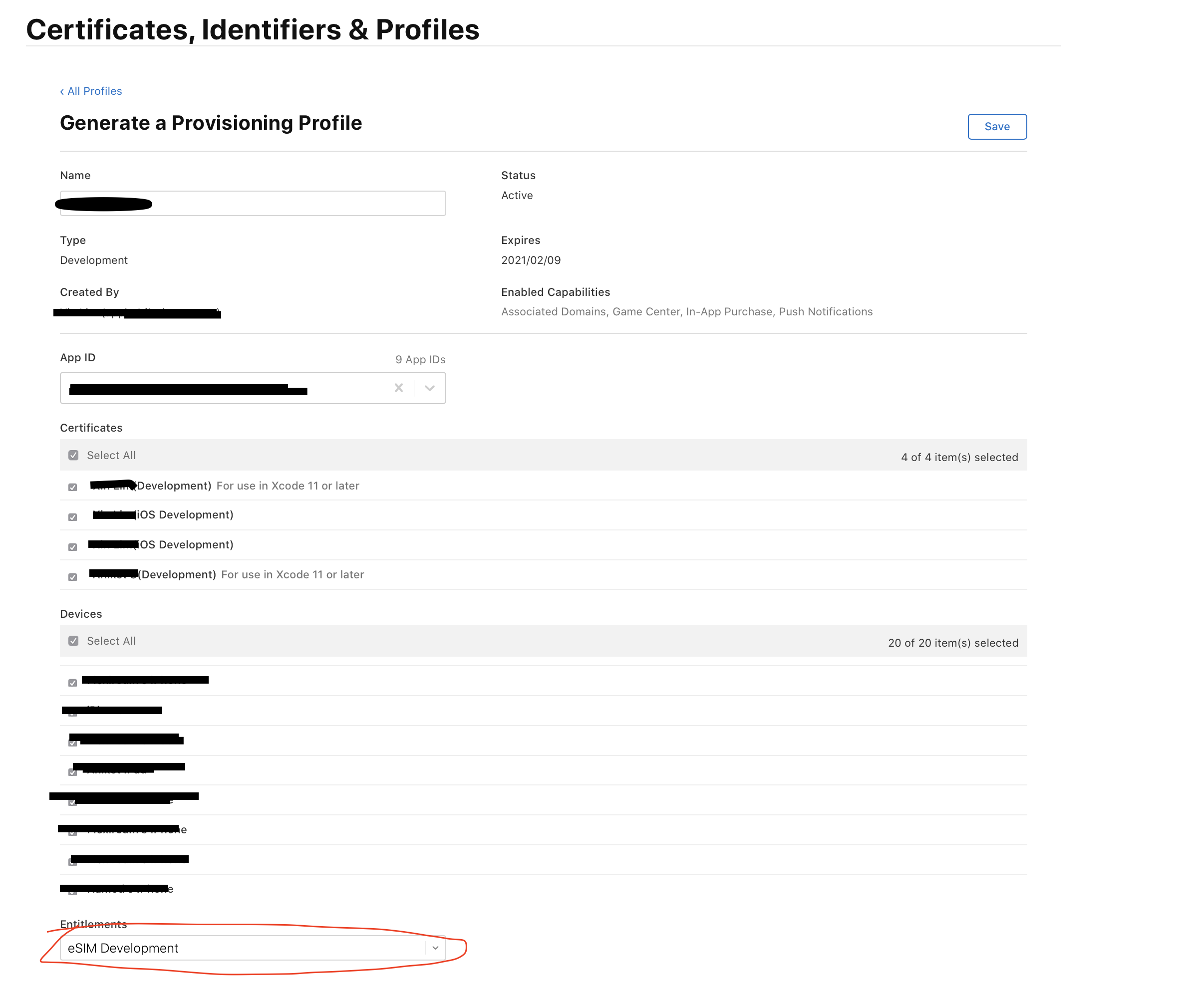
步骤3
下载App和分发配置文件(通过选择eSIM权限作为步骤2)。
步骤4
用以下键和值更新您的info.plist
<key>CarrierDescriptors</key>

<array>
     <dict>
     <key>MCC</key> //Mobile country code
         <string>’mnc value’</string>
     <key>MNC</key> // Mobile network code
         <string>’mnc value’</string>
     </dict>
</array>
<key>com.apple.security.network.server</key>
<true/>
<key>com.apple.security.network.client</key>
<true/>
<key>com.apple.CommCenter.fine-grained</key>
<array>
    <string>spi</string>
    <string>sim-authentication</string>
    <string>identity</string>
</array>
<key>com.apple.wlan.authentication</key>
<true/>
<key>keychain-access-groups</key>
<array>
    <string>apple</string>
    <string>com.apple.identities</string>
    <string>com.apple.certificates</string>
</array>
<key>com.apple.private.system-keychain</key>
<true/>
步骤5 (可以是可选的)
用以下键和值更新您的{appname}.entitlements
<key>com.apple.CommCenter.fine-grained</key>
<array>
    <string>public-cellular-plan</string>
</array> 步骤6代码添加eSIM配置文件
 let ctpr = CTCellularPlanProvisioningRequest()
 let ctpr = CTCellularPlanProvisioningRequest()
 ctpr.address = "Your eSIM profile address"
 ctpr.matchingID = "Confirmation id"

 if #available(iOS 12.0, *) {
        let ctcp =  CTCellularPlanProvisioning()
        ctcp.addPlan(with: ctpr) { (result) in
            switch result {
            case .unknown:
                self.showGenericSingleButtonCustomAlert(description: "Sorry unknown error")
            case .fail:
                self.showGenericSingleButtonCustomAlert(description: "Oops! something went wrong")
            case .success:
                self.showGenericSingleButtonCustomAlert(description: "Yay! eSIM installed successfully")
            @unknown default:
                self.showGenericSingleButtonCustomAlert(description: "Oops! something went wrong")
            }
        }
}Stack Overflow用户
发布于 2018-12-17 09:42:18
此API仅适用于运营商。你需要从苹果公司获得一个特殊的权利,才能在你的应用程序中调用它,否则你会得到你提到的错误。
只是为了澄清一些关于eSIMs的内容;有几种方法可以将eSIM添加到设备中:
- 大多数运营商现在实现的最简单的方式是从设备设置中扫描QR代码,这不需要在运营商的应用程序上进行任何开发工作。
- 另一种方法是使用运营商应用程序安装eSIM配置文件,这只能通过苹果提供的特殊权利来完成。该权利允许您调用您在问题中提到的
CTCellularPlanProvisioning.addPlan(with: )API。
https://stackoverflow.com/questions/53605419
复制相似问题
腾讯云开发者

Copyright © 2013 - 2026 Tencent Cloud. All Rights Reserved. 腾讯云 版权所有
深圳市腾讯计算机系统有限公司 ICP备案/许可证号:粤B2-20090059  粤公网安备44030502008569号
腾讯云计算(北京)有限责任公司 京ICP证150476号 | 京ICP备11018762号