
c# wpf列表视图复选框项
c# wpf列表视图复选框项
提问于 2018-11-29 14:33:14
我实现了照片预览的Listview。
<xctk:MaterialListBox InkEffectBrush="CornflowerBlue"  IsInkEffectActive="True" Background="Transparent" x:Name="TvBox" ScrollBar.Scroll="TvBox_Scroll" ScrollViewer.ScrollChanged="TvBox_ScrollChanged" GiveFeedback="TvBox_GiveFeedback"  AllowDrop="False" PreviewMouseLeftButtonDown="TvBox_PreviewMouseLeftButtonDown" PreviewMouseMove="TvBox_PreviewMouseMove" Margin="0,0,0,10" HorizontalAlignment="Stretch">
            <xctk:MaterialListBox.ItemContainerStyle>
                <Style TargetType="{x:Type xctk:MaterialListBoxItem}">
                    <Setter Property="Height" Value="100" />
                    <Setter Property="VerticalAlignment" Value="Top" />
                </Style>
            </xctk:MaterialListBox.ItemContainerStyle>
            <xctk:MaterialListBox.ItemsPanel>
                <ItemsPanelTemplate>
                    <UniformGrid Columns="4" Background="#00FFFFFF"/>
                </ItemsPanelTemplate>
            </xctk:MaterialListBox.ItemsPanel>
            <xctk:MaterialListBox.ItemTemplate>
                <DataTemplate>
                    <StackPanel Orientation="Vertical" >
                        <Image Height="100" Width="200" Source="{Binding ImageData}"  Stretch="Uniform" />
                        <xctk:MaterialCheckBox Background="BlueViolet" Content="Выбрать" Click="MaterialButton_Click" HorizontalAlignment="Center" Height="35" Margin="0,20" Width="130"/>
                    </StackPanel>
                </DataTemplate>
            </xctk:MaterialListBox.ItemTemplate>
        </xctk:MaterialListBox>
我需要一个复选框在上面的图像。
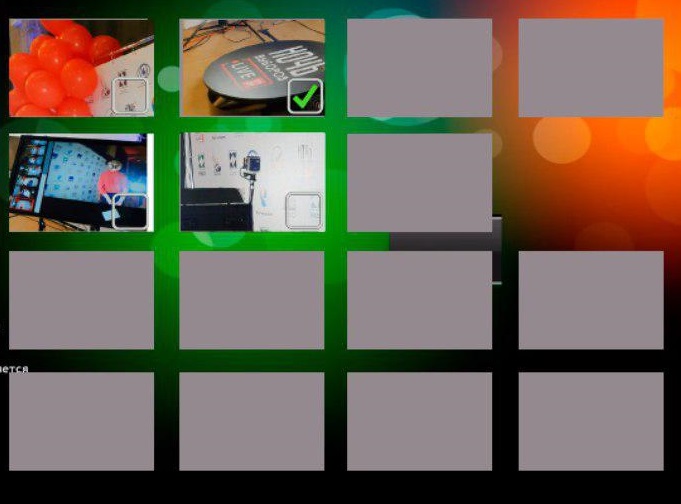
请迅速解决这个问题。提前谢谢你。
回答 2
Stack Overflow用户
回答已采纳
发布于 2018-11-29 16:12:17
您正在使用StackPanel将其组合到控件。StackPanel的目的是在其内部堆叠控件,因此,即使使用Zindex,它们也不会重叠。
我使用网格和Panel.ZIndex,以使控件重叠,使用边距设置相应的复选框对图像。
      <ListBox.ItemTemplate>
            <DataTemplate>
                <Grid>
                    <Image Panel.ZIndex="1"  Height="100" Width="200"  Source="Koala.jpg"  Stretch="Uniform" >
                    </Image>
                    <CheckBox Panel.ZIndex="2"  Background="BlueViolet" Content="Выбрать"   Margin="0,20" HorizontalAlignment="Center" Height="35" Width="130">
                    </CheckBox>

                </Grid>
            </DataTemplate>
</ListBox.ItemTemplate>Stack Overflow用户
发布于 2018-11-29 14:59:44
看一看帆布板
您应该能够将图像和复选框放在画布面板中,并相应地设置它们的左上角和ZIndex属性
页面原文内容由Stack Overflow提供。腾讯云小微IT领域专用引擎提供翻译支持
原文链接:
https://stackoverflow.com/questions/53541347
复制相关文章
相似问题
腾讯云开发者

Copyright © 2013 - 2026 Tencent Cloud. All Rights Reserved. 腾讯云 版权所有
深圳市腾讯计算机系统有限公司 ICP备案/许可证号:粤B2-20090059  粤公网安备44030502008569号
腾讯云计算(北京)有限责任公司 京ICP证150476号 | 京ICP备11018762号