
如何使ImageSpan按基线对齐
问题:为什么ImageSpan ALIGN_BASELINE没有准确地对齐基线,以及如何解决这个对齐问题?
在我的活动中,我创建了一个SpannableString,并将字符串的一部分替换为ImageSpan。ImageSpan使用24x24像素纯黑色png图像,并设置为ALIGN_BASELINE。
public class MainActivity extends AppCompatActivity {
    @Override
    protected void onCreate(Bundle savedInstanceState) {
        super.onCreate(savedInstanceState);
        setContentView(R.layout.activity_main);

        TextView myTextView = findViewById(R.id.myTextView);
        SpannableString ss = new SpannableString("Hello world!");

        Drawable d = ContextCompat.getDrawable(this, R.drawable.box);
        d.setBounds(0, 0, d.getIntrinsicWidth(), d.getIntrinsicHeight());
        ImageSpan imageSpan = new ImageSpan(d, ImageSpan.ALIGN_BASELINE);
        ss.setSpan(imageSpan, 2, 5, Spannable.SPAN_INCLUSIVE_EXCLUSIVE);

        myTextView.setText(ss);
    }
}我的布局中有两个视图:一个TextView和一个View来显示基线
<?xml version="1.0" encoding="utf-8"?>
<android.support.constraint.ConstraintLayout
    xmlns:android="http://schemas.android.com/apk/res/android"
    xmlns:app="http://schemas.android.com/apk/res-auto"
    android:layout_width="match_parent"
    android:layout_height="match_parent">

    <TextView
        android:id="@+id/myTextView"
        android:layout_width="wrap_content"
        android:layout_height="wrap_content"
        android:background="#ff9800"
        android:textSize="48sp"
        app:layout_constraintBottom_toBottomOf="parent"
        app:layout_constraintLeft_toLeftOf="parent"
        app:layout_constraintRight_toRightOf="parent"
        app:layout_constraintTop_toTopOf="parent" />

    <View
        android:layout_width="match_parent"
        android:layout_height="1px"
        app:layout_constraintLeft_toLeftOf="parent"
        app:layout_constraintRight_toRightOf="parent"
        app:layout_constraintBaseline_toBaselineOf="@id/myTextView"
        android:background="#de4caf50"/>

</android.support.constraint.ConstraintLayout> 如您所见,这条线与TextView的基线正确地对齐,但ImageSpan略低于基线。
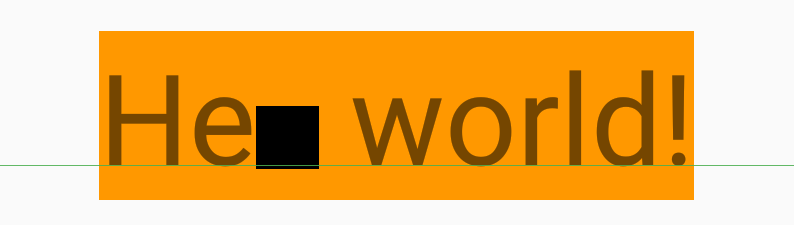
回答 2
Stack Overflow用户
发布于 2018-12-06 02:24:07
那只是,嗯,错了。由于ALIGN_BASELINE的定义如下,该绘图的垂直放置是关闭的:
一个常量,表示这个跨度的底部应该与周围文本的基线对齐。
这显然是不可能发生的。看看这篇文章的结尾,看看到底出了什么问题。为了解决这个问题,我建议采取以下措施:
// Override draw() to place the drawable correctly when ALIGN_BASELINE.
ImageSpan imageSpan = new ImageSpan(d, ImageSpan.ALIGN_BASELINE) {
    public void draw(Canvas canvas, CharSequence text, int start,
                     int end, float x, int top, int y, int bottom,
                     @NonNull Paint paint) {
        if (mVerticalAlignment != ALIGN_BASELINE) {
            super.draw(canvas, text, start, end, x, top, y, bottom, paint);
            return;
        }
        Drawable b = getDrawable();
        canvas.save();
        // If we set transY = 0, then the drawable will be drawn at the top of the text.
        // y is the the distance from the baseline to the top of the text, so
        // transY = y will draw the top of the drawable on the baseline. We want the             // bottom of the drawable on the baseline, so we subtract the height
        // of the drawable.
        int transY = y - b.getBounds().bottom;
        canvas.translate(x, transY);
        b.draw(canvas);

        canvas.restore();
    }
};
这段代码产生了以下图像,我认为是正确的。
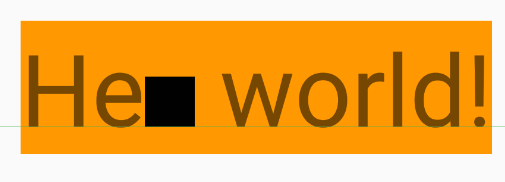
为什么没有在基线上绘制框?
下面是从DynamicDrawableSpan#draw()绘制框的源代码
public void draw(@NonNull Canvas canvas, CharSequence text,
        @IntRange(from = 0) int start, @IntRange(from = 0) int end, float x,
        int top, int y, int bottom, @NonNull Paint paint) {
    Drawable b = getCachedDrawable();
    canvas.save();
    int transY = bottom - b.getBounds().bottom;
    if (mVerticalAlignment == ALIGN_BASELINE) {
        transY -= paint.getFontMetricsInt().descent;
    }
    canvas.translate(x, transY);
    b.draw(canvas);
    canvas.restore();
}以及DynamicDrawableSpan#draw()的文档。draw()唯一令我们感兴趣的论点是bottom。
底部int:线的底部。
对于所使用的解决方案代码和仿真器,transY由DynamicDrawableSpan计算为94,即盒将从顶部绘制94个像素。top为178个,而基线定义为零,因此178-94= 84像素,即盒子或b.getBounds().bottom的高度。这个检查过了。
在同一仿真器中的DynamicDrawableSpan#draw()中,底部= 224,而可绘制的高度仍为84,如上面所示。为什么是最低224呢?这是字体的线条高度。
transY现在计算为224-84=140个像素.这将把盒子的底部放在线的底部,但低于基线。
还作了一次调整:
transY -= paint.getFontMetricsInt().descent;在测试中,paint.getFontMetricsInt().descent是41岁,所以transY现在是99岁。由于94是正确的答案,99放置框5个像素过低,这就是你看到的。
有关Android字体度量的描述,请参见Android 101:排版。
Stack Overflow用户
发布于 2018-12-05 17:01:38
没有看到drawable的xml,我会说这行是错误的
d.setBounds(0, 0, d.getIntrinsicWidth(), d.getIntrinsicHeight());原因如下:
Drawable.getIntrinsicHeight()返回-1,getIntrinsicWidth()也是如此。
这意味着使用以下参数调用setBounds():
d.setBounds(0, 0, -1, -1);

/**
 * Specify a bounding rectangle for the Drawable. This is where the drawable
 * will draw when its draw() method is called.
 */
public void setBounds(int left, int top, int right, int bottom) {
... // implementation
}
编辑:
package android.graphics.drawable;

public abstract class Drawable {

...


/**
     * Returns the drawable's intrinsic height.
     * <p>
     * Intrinsic height is the height at which the drawable would like to be
     * laid out, including any inherent padding. If the drawable has no
     * intrinsic height, such as a solid color, this method returns -1.
     *
     * @return the intrinsic height, or -1 if no intrinsic height
     */
    public int getIntrinsicHeight() {
        return -1;
    }

}https://stackoverflow.com/questions/53541301
复制相似问题
腾讯云开发者

Copyright © 2013 - 2026 Tencent Cloud. All Rights Reserved. 腾讯云 版权所有
深圳市腾讯计算机系统有限公司 ICP备案/许可证号:粤B2-20090059  粤公网安备44030502008569号
腾讯云计算(北京)有限责任公司 京ICP证150476号 | 京ICP备11018762号