
如何使SCNNode面向ARAnchor
如何使ARNode指向ARAnchor
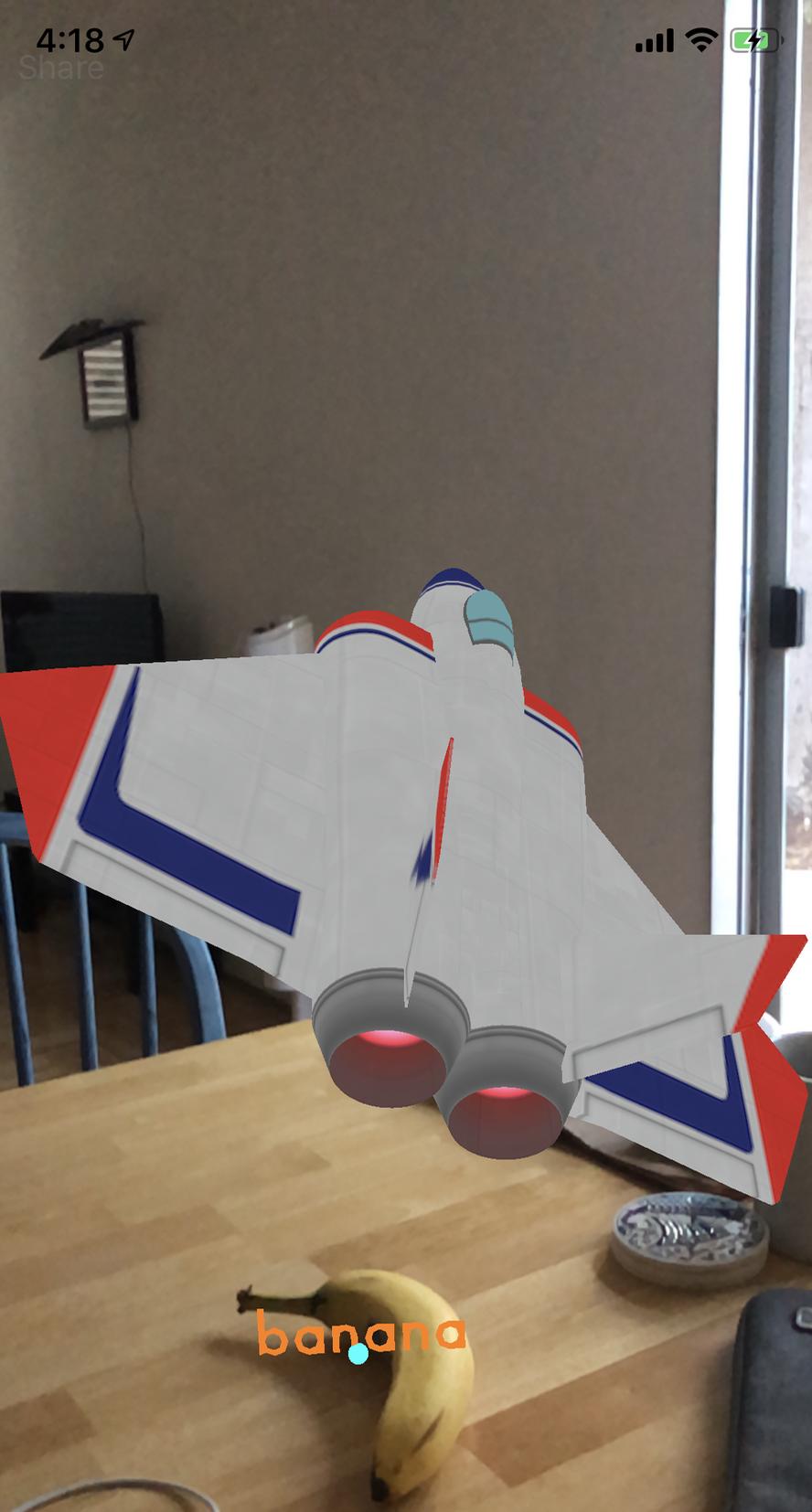
我想使用art.scnassets/ship.scn显示在屏幕的中心,并指向我刚刚放置在场景中某个地方的对象。
/// ViewController Class
func placeObject() {
    let screenCentre : CGPoint = CGPoint(x: self.sceneView.bounds.midX, y: self.sceneView.bounds.midY)
    guard let hitTestResult = sceneView.hitTest(screenCentre, types: [.featurePoint]).first else { return }

    // Place an anchor for a virtual character.
    let anchor = ARAnchor(name: identifierString, transform: hitTestResult.worldTransform)
    sceneView.session.add(anchor: anchor)
    // add to item model
    ItemModel.shared.anchors.append((identifierString, anchor)

}

func showDirection(of object: ARAnchor) { // object: saved anchor

    if !Guide.shared.isExist {
        let startPoint = SCNVector3(0, 0 , -1)
        let targetPoint = SCNVector3(object.transform.columns.3.x, object.transform.columns.3.y, object.transform.columns.3.z)

        let guideNode = Guide.shared.setPosition(from: startPoint, to: targetPoint)

        // add the ship in the center of the view
        sceneView.pointOfView?.addChildNode(guideNode)

    }
}
/// Guide Class
func setPosition(from start: SCNVector3, to target: SCNVector3) -> SCNNode {
    isExist = true
    guideNode.position = start
    targetPosition = target

    // create target node from saved anchor
    let desNode = SCNNode()
    desNode.position = targetPosition

    let lookAtConstraints = SCNLookAtConstraint(target: desNode)
    guideNode.constraints = [lookAtConstraints]

    return guideNode
}

// MARK: - ARSCNViewDelegate
func renderer(_ renderer: SCNSceneRenderer, didAdd node: SCNNode, for anchor: ARAnchor) {
    if let name = anchor.name, name.hasPrefix(identifierString) {
        // Create 3D Text
        let textNode: SCNNode = createNewBubbleParentNode(identifierString)
        node.addChildNode(textNode)
    }

}我试过SCNLookAtConstraint,但是它不像预期的那样工作,有什么建议吗?
回答 3
Stack Overflow用户
发布于 2018-12-07 06:11:59
我注意到,当我的手机的方向与地平线平行时,SCNLookAtConstraint就能工作。(屏幕朝上)
而这一行代码就是神奇的!!guideNode.pivot = SCNMatrix4Rotate(guideNode.pivot, Float.pi, 0, 1, 1)
如果你感兴趣,请看这里。
 public func showDirection(of object: arItemList) {

    guard let pointOfView = sceneView.pointOfView else { return }

    // remove previous instruction
    for node in pointOfView.childNodes {
        node.removeFromParentNode()
    }

    // target
    let desNode = SCNNode()
    let targetPoint = SCNVector3.positionFromTransform(object.1.transform)
    desNode.worldPosition = targetPoint

    // guide
    let startPoint = SCNVector3(0, 0 , -1.0)
    let guideNode = loadObject()
    guideNode.scale = SCNVector3(0.7, 0.7, 0.7)
    guideNode.position = startPoint

    let lookAtConstraints = SCNLookAtConstraint(target: desNode)
    lookAtConstraints.isGimbalLockEnabled = true
    // Here's the magic
    guideNode.pivot = SCNMatrix4Rotate(guideNode.pivot, Float.pi, 0, 1, 1)

    guideNode.constraints = [lookAtConstraints]
    pointOfView.addChildNode(guideNode)
}Stack Overflow用户
发布于 2018-12-06 09:55:29
我不知道这会不会对你的情况有所帮助。(若否,我会删除我的答覆)
所以我也面临过同样的问题。我正在两个SCNVector对象之间画墙。问题是墙壁是双面的,所以在某些情况下,摄像机可见的部分被翻转。
就像你从两个向量中画出墙,然后用相同的欧拉角添加另一个节点(平面节点),节点(平面)垂直翻转。
我已经寻找了许多解决方案,尝试了很多事情,但这对我是有用的。
class func node(from:SCNVector3,
                to:SCNVector3,height:Float,needToAlignToCamera:Bool) -> SCNNode {
    let distance = MathHelper().getMeasurementBetween(vector1: from, and: to)

    let wall = SCNPlane(width: CGFloat(distance),
                        height: CGFloat(height))
    wall.firstMaterial = wallMaterial()
    let node = SCNNode(geometry: wall)

    // always render before the beachballs
    node.renderingOrder = -10


    // HERE IS MAGIC LINES
    //============================================

    let normalizedTO = to.normalized()
    let normalizedFrom = from.normalized()
    let angleBetweenTwoVectors = normalizedTO.cross(normalizedFrom)

    var from = from
    var to = to

    if angleBetweenTwoVectors.y > 0 && needToAlignToCamera {
        let temp = from
        from = to
        to = temp
    }
    //============================================


    node.position = SCNVector3(from.x + (to.x - from.x) * 0.5,
                               from.y + height * 0.5,
                               from.z + (to.z - from.z) * 0.5)

    // orientation of the wall is fairly simple. we only need to orient it around the y axis,
    // and the angle is calculated with 2d math.. now this calculation does not factor in the position of the
    // camera, and so if you move the cursor right relative to the starting position the
    // wall will be oriented away from the camera (in this app the wall material is set as double sided so you will not notice)
    // - obviously if you want to render something on the walls, this issue will need to be resolved.


    node.eulerAngles = SCNVector3(0, -atan2(to.x - node.position.x, from.z - node.position.z) - Float.pi * 0.5, 0)


    return node
}
扩展
func cross(_ vec: SCNVector3) -> SCNVector3 {
        return SCNVector3(self.y * vec.z - self.z * vec.y, self.z * vec.x - self.x * vec.z, self.x * vec.y - self.y * vec.x)
    }

func normalized() -> SCNVector3 {
        if self.length() == 0 {
            return self
        }

        return self / self.length()
}Stack Overflow用户
发布于 2018-11-29 15:03:03
ARKit更新通过委托方法renderer(_ renderer: SCNSceneRenderer, nodeFor anchor: ARAnchor) -> SCNNode?提供的锚和相应节点的位置。
因此,您的约束思想是正确的,但是您需要通过委托方法提供节点,而不是直接将它们添加到场景中。
差不多吧-
    func renderer(_ renderer: SCNSceneRenderer, nodeFor anchor: ARAnchor) -> SCNNode? {
        switch anchor {
        case MyAnchor:
          let constraint = // ...
          let node = // ...
          node.constraints = [constraint]
          return node
        default:
          return nil
        }
}https://stackoverflow.com/questions/53530244
复制相似问题
腾讯云开发者

Copyright © 2013 - 2026 Tencent Cloud. All Rights Reserved. 腾讯云 版权所有
深圳市腾讯计算机系统有限公司 ICP备案/许可证号:粤B2-20090059  粤公网安备44030502008569号
腾讯云计算(北京)有限责任公司 京ICP证150476号 | 京ICP备11018762号