
在Qt设计器和verticalLayout程序中,PyQt的大小是不同的。
在QtDesigner5.9中,verticalLayout In test.ui与窗口边缘有一定的距离,但在加载test.ui后,在main.py中使用PyQt 5.11.3,verticalLayout扩展到窗口的边缘。
main.py
    #!/usr/bin/python3
import sys
from PyQt5.QtWidgets import QApplication, QMainWindow
from PyQt5.uic import loadUi

class MainWindow(QMainWindow):
    def __init__(self, parent=None):
        super().__init__()
        loadUi("test.ui", self)

def main():
    app = QApplication(sys.argv)
    main_window = MainWindow(app)
    main_window.show()
    sys.exit(app.exec_())


if __name__ == "__main__":
main()
test.ui
<?xml version="1.0" encoding="UTF-8"?>
<ui version="4.0">
 <class>MainWindow</class>
 <widget class="QMainWindow" name="MainWindow">
  <property name="geometry">
   <rect>
    <x>0</x>
    <y>0</y>
    <width>350</width>
    <height>257</height>
   </rect>
  </property>
  <property name="windowTitle">
   <string>Test</string>
  </property>
  <widget class="QWidget" name="centralwidget">
   <layout class="QGridLayout" name="gridLayout_2">
    <item row="0" column="0">
     <layout class="QVBoxLayout" name="verticalLayout">
      <property name="leftMargin">
       <number>0</number>
      </property>
      <property name="topMargin">
       <number>0</number>
      </property>
      <item>
       <spacer name="verticalSpacer_2">
        <property name="orientation">
         <enum>Qt::Vertical</enum>
        </property>
        <property name="sizeHint" stdset="0">
         <size>
          <width>20</width>
          <height>40</height>
         </size>
        </property>
       </spacer>
      </item>
      <item>
       <widget class="QGroupBox" name="groupBox">
        <layout class="QGridLayout" name="gridLayout">
         <item row="1" column="1">
          <widget class="QSpinBox" name="spinBox">
           <property name="maximum">
            <number>100000</number>
           </property>
           <property name="value">
            <number>1000</number>
           </property>
          </widget>
         </item>
         <item row="1" column="0">
          <widget class="QLabel" name="label_2">
           <property name="text">
            <string>Test</string>
           </property>
           <property name="alignment">
            <set>Qt::AlignRight|Qt::AlignTrailing|Qt::AlignVCenter</set>
           </property>
          </widget>
         </item>
         <item row="0" column="1">
          <widget class="QComboBox" name="comboBox">
           <property name="currentText">
            <string/>
           </property>
          </widget>
         </item>
         <item row="0" column="0">
          <widget class="QLabel" name="label1">
           <property name="text">
            <string>Test</string>
           </property>
           <property name="alignment">
            <set>Qt::AlignRight|Qt::AlignTrailing|Qt::AlignVCenter</set>
           </property>
          </widget>
         </item>
        </layout>
       </widget>
      </item>
      <item>
       <spacer name="verticalSpacer">
        <property name="orientation">
         <enum>Qt::Vertical</enum>
        </property>
        <property name="sizeHint" stdset="0">
         <size>
          <width>20</width>
          <height>40</height>
         </size>
        </property>
       </spacer>
      </item>
      <item>
       <widget class="QPushButton" name="pushButton">
        <property name="layoutDirection">
         <enum>Qt::LeftToRight</enum>
        </property>
        <property name="text">
         <string>Test</string>
        </property>
       </widget>
      </item>
     </layout>
    </item>
   </layout>
  </widget>
  <widget class="QMenuBar" name="menubar">
   <property name="geometry">
    <rect>
     <x>0</x>
     <y>0</y>
     <width>350</width>
     <height>28</height>
    </rect>
   </property>
  </widget>
  <widget class="QStatusBar" name="statusbar"/>
 </widget>
 <resources/>
 <connections/>
</ui>QtDesigner5.9中的test.ui屏幕截图:
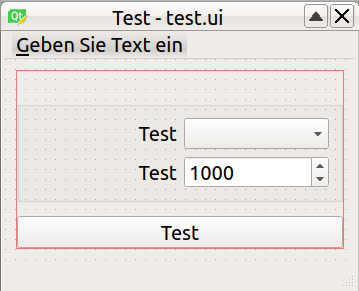
main.py加载test.ui的截图
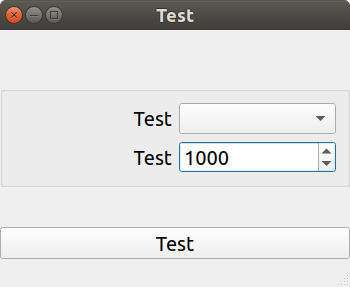
这种行为的原因是什么?
回答 2
Stack Overflow用户
发布于 2018-11-25 18:19:48
如果您检查uic.loadUi()的代码,您将发现以下代码:
uiparser.py
class UIParser(object):
    # ...
    def createLayout(self, elem):
        # ...
        margin = -1 if self.stack.topIsLayout() else self.defaults['margin']
        margin = self.wprops.getProperty(elem, 'margin', margin)
        left = self.wprops.getProperty(elem, 'leftMargin', margin)
        top = self.wprops.getProperty(elem, 'topMargin', margin)
        right = self.wprops.getProperty(elem, 'rightMargin', margin)
        bottom = self.wprops.getProperty(elem, 'bottomMargin', margin)
        # A layout widget should, by default, have no margins.
        if self.stack.topIsLayoutWidget():
            if left < 0: left = 0
            if top < 0: top = 0
            if right < 0: right = 0
            if bottom < 0: bottom = 0

    def topIsLayoutWidget(self):
        # A plain QWidget is a layout widget unless it's parent is a
        # QMainWindow or a container widget.  Note that the corresponding uic
        # test is a little more complicated as it involves features not
        # supported by pyuic.

        if type(self[-1]) is not QtWidgets.QWidget:
            return False

        if len(self) < 2:
            return False

        parent = self[-2]

        return isinstance(parent, QtWidgets.QWidget) and type(parent) not in (
                QtWidgets.QMainWindow,
                QtWidgets.QStackedWidget,
                QtWidgets.QToolBox,
                QtWidgets.QTabWidget,
                QtWidgets.QScrollArea,
                QtWidgets.QMdiArea,
                QtWidgets.QWizard,
QtWidgets.QDockWidget)这个问题是由topIsLayoutWidget()函数引起的,因为父函数将引用用作基础的小部件,在本例中,MainWindow遵从isinstance(parent, QtWidgets.QWidget) and type (parent) not in (QtWidgets.QMainWindow, ...)所以topIsLayoutWidget()将返回True,因此,由于这些属性不存在,因此将更新为0,从而通过消除默认值(9、9、9、9)来建立对contentsMargins的应用,但对于Qt设计器来说,contentsMargins还没有更新以维护其默认值。
因此,最后是一个pyqt bug,它也指向了注释中的内容:
# ... Note that the corresponding uic
# test is a little more complicated as it involves features not
# supported by pyuic.*
因此,有几种解决方案:
- 移除: 如果self.stack.topIsLayoutWidget():如果左< 0:左=0如果顶部< 0: top =0如果右边< 0:右=0如果底部< 0:底部=0
- 使用
uic.loadUiType(): #!/usr/bin/python3 3从PyQt5 import QtCore、QtWidgets、uic Ui_Interface、_= uic.loadUiType('test.ui')类MainWindow(QtWidgets.QMainWindow、Ui_Interface):def __init__(self,parent=None):.__init__(家长) self.setupUi(self) def main():app = QtWidgets.QApplication(sys.argv) main_window = MainWindow() main_window.show() sys.exit(app.exec_)如果__name__ == "__main__":main()
我更喜欢第二种解决方案,因为不应该修改源代码。
https://stackoverflow.com/questions/53469563
复制相似问题
腾讯云开发者

Copyright © 2013 - 2026 Tencent Cloud. All Rights Reserved. 腾讯云 版权所有
深圳市腾讯计算机系统有限公司 ICP备案/许可证号:粤B2-20090059  粤公网安备44030502008569号
腾讯云计算(北京)有限责任公司 京ICP证150476号 | 京ICP备11018762号