
画布请求在滑块输入到javascript变量的框架外的动画
我有个帆布元素。它基于艺术消失点绘制了一些线条。
我正试图从一个单一的消失点画一座房子(目前它只是一个盒子)。框的大小由一个delta变量决定。如果手动更改该值,它将执行以下操作:
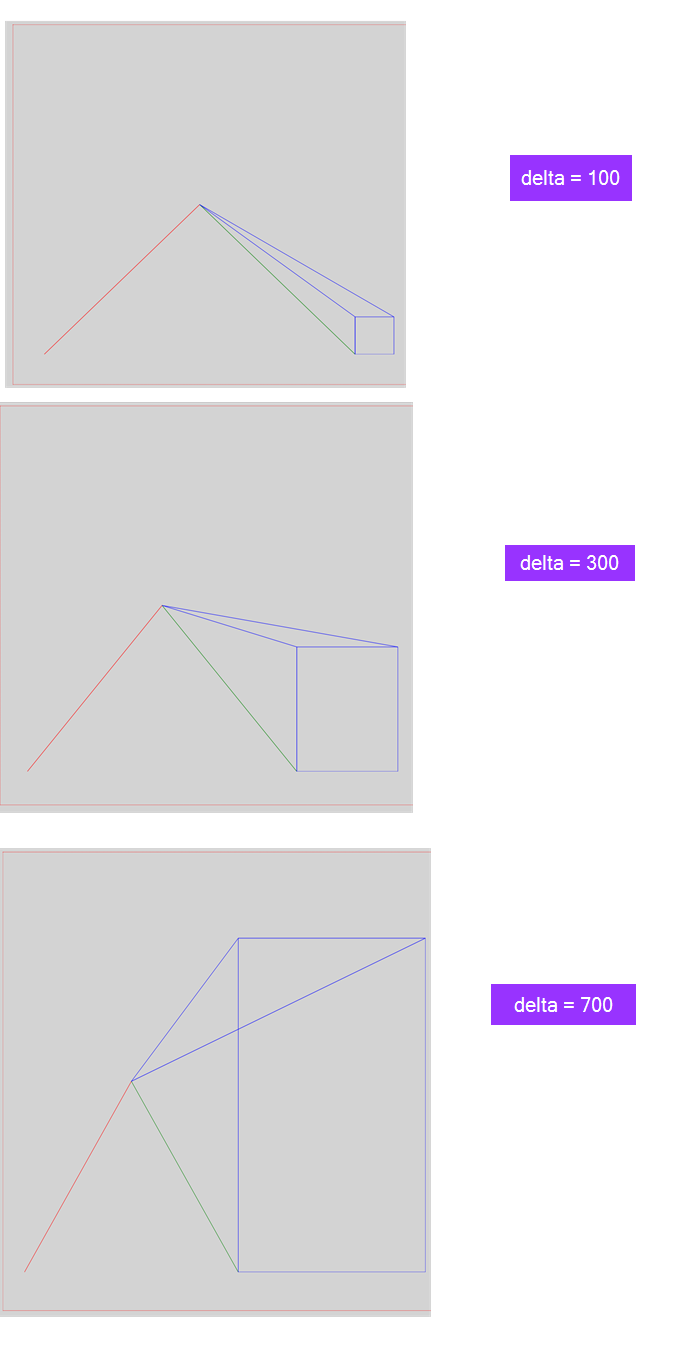
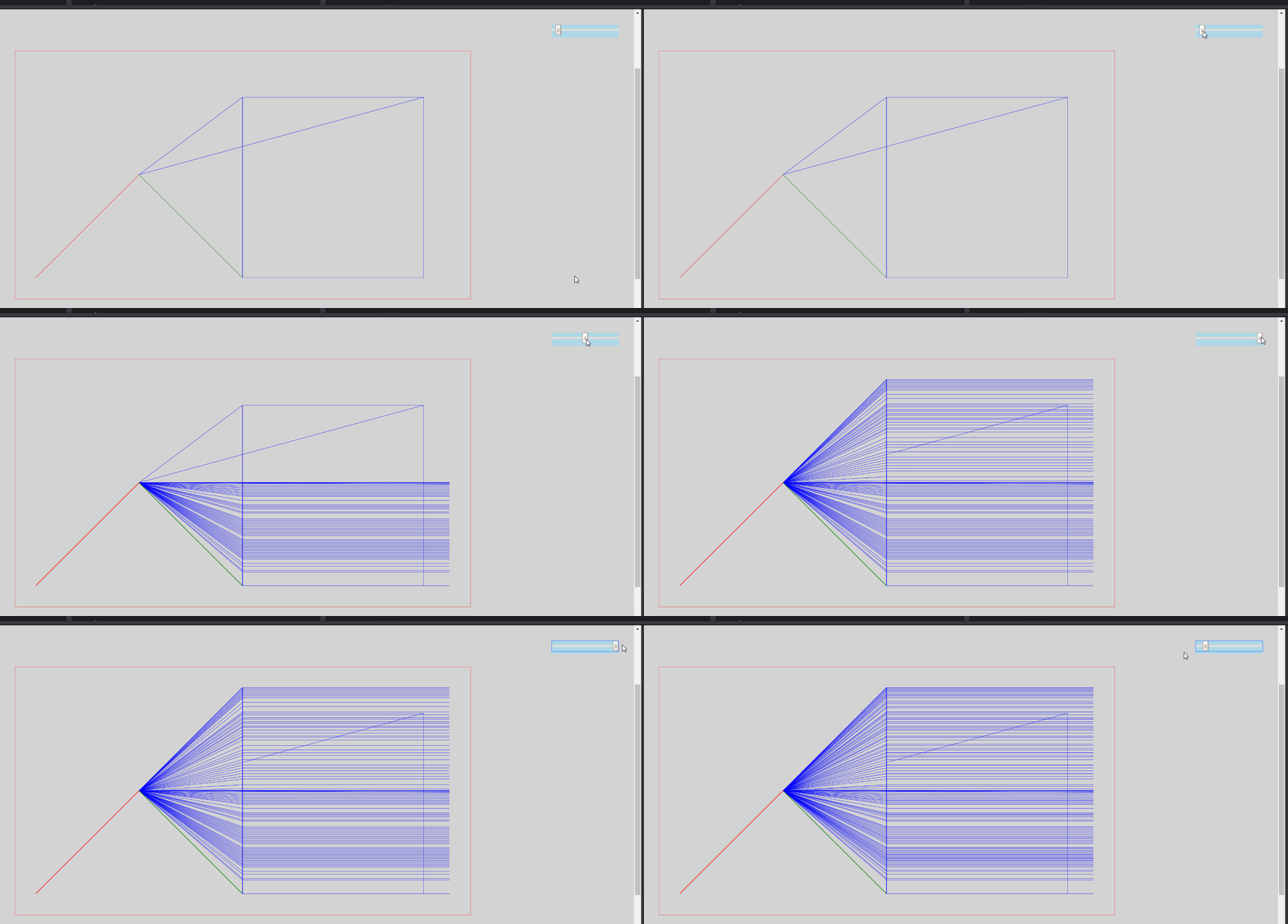
我想要一个改变delta变量的滑块。但我得到了一些很奇怪的效果。也就是说,线是从框架的右边画出来的。我到处转储console.log语句,但仍然找不到问题(如何调试画布问题?)
var canvas = document.querySelector("canvas");

canvas.width = window.innerWidth;
canvas.height = window.innerHeight;

canvas.width = 1600;
canvas.height = 800;

var ct = canvas.getContext("2d");

// TODO
// 1. Make a center point
// 2. Draw lines jutting from center
// 3. Draw a line parallel to canvas bottom
// 4. Draw an adjoining item upward

// x, y
// right, down

// Nomenclature
// x0a
// coordinate type, vanishingPt#, endPtName

// Vanishing point 0
var x0 = 400;
var y0 = 400;

// Vanishing point end 0a
var x0a = 0;
var y0a = 2 * y0;

// Vanishing point end 0b
var x0b = 2 * x0;
var y0b = 2 * y0;

// Define delta
var delta = 700;

function init() {
  console.log(delta, "delta");
  console.log(x0b, "x0b");
  console.log(y0b, "y0b");
  console.log(x0, "x0");
  console.log(y0, "y0");
  // First Line
  ct.beginPath();
  ct.moveTo(x0, y0);
  ct.lineTo(x0a, y0a);
  ct.strokeStyle = 'red';
  ct.stroke();

  // Second Line
  ct.beginPath();
  ct.moveTo(x0, y0);
  ct.lineTo(x0b, x0b);
  ct.strokeStyle = 'green';
  ct.stroke();

  // House based on second Line
  ct.beginPath();
  ct.moveTo(x0b, y0b); // starting point
  ct.lineTo(x0b + delta, y0b); // right x+100
  ct.lineTo(x0b + delta, y0b - delta); // up y-100
  ct.lineTo(x0b, y0b - delta); // left x-100
  ct.lineTo(x0b, y0b); // down y+100
  ct.lineTo(x0b, y0b - delta); // back up y-100
  //calculate
  ct.lineTo(x0, y0);
  ct.lineTo(x0b + delta, y0b - delta);
  ct.strokeStyle = 'blue';
  ct.stroke();
}

init();

var slider = document.getElementById("myRange");

slider.oninput = function () {
  delta = this.value;
  requestAnimationFrame(init()); // redraw everything
}body {
background-color: lightgray;
display: flex;
justify-content: center;
align-items: center;
}
.slideContainer {
position: fixed;
right: 30px;
top: 30px;
background-color: lightblue;
z-index: 20;
}
canvas {
border: 1px dotted red;
padding: 80px;
background-color: lightgray;
transform: scale(0.5);
}<!DOCTYPE html>
<html>
<head>
<link rel="stylesheet" href="style.css" />
</head>
<body>
<div class="wrapper">
<div class="slideContainer">
<input type="range" min="1" max="800" value="50" class="slider" id="myRange">
</div>
<canvas id="canvas"></canvas>
</div>
<script src="script.js"></script>
</body>
</html>
回答 2
Stack Overflow用户
发布于 2018-11-25 12:34:09
与输入事件解耦呈现
你的问题已经被回答了,但你的问题有一些不好的练习部分需要指出,否则它们就会被复制。
oninput是鼠标移动驱动的事件。
不要从鼠标移动事件的结果的任何事件调用呈现函数或requestAnimationFrame。许多设备上的鼠标移动事件可以以远高于显示速率(每秒1000次)的速度触发。该显示器每60秒只能显示1帧,更多的画图将不会被看到,并可以咀嚼客户的电池。
如果从鼠标驱动的输入事件中调用requestAnimationFrame,则最终会排队许多呈现以进行下一次显示刷新,并且由于requestAnimationFrame试图平衡负载,它可能会对下一个帧进行队列呈现,因此最新的更新可能会延迟2个显示帧。大多数框架将永远不会被看到,你仍然咀嚼权力。
使用信号量和标准呈现循环来监视信号量,只在需要时重绘,并且每个帧只重绘一次。(见示例)
不要缩小画布。
除非您将画布转换为动画的一部分,否则不要通过CSS规则transform: scale(0.5); (或任何其他缩放方法)来缩小呈现性能,如果您将显示的画布大小减半,就意味着您需要渲染4倍的像素,并使用4倍的内存。
您可以通过Canvas2DAPI进行缩放,这样可以节省客户端的电池寿命,并提高性能。
示例
我已经完全重写了代码,希望它能有所帮助。本文对两个要点、更新和规模进行了评论。添加代码使用点,而不是x,y的和弦,因为我懒惰。
requestAnimationFrame(update); // start anim loop

const ctx = canvas.getContext("2d");
const width = 1600;  // The ideal resolution
const height = 800;  // used to scale content
canvas.width = innerWidth;
canvas.height = innerHeight;


//Scales 2D context to always show the ideal resolution area
const scaleToFit = () => {  // sets canvas scale to fit content
    var scale = Math.min(canvas.width / width, canvas.height / height);
    ctx.setTransform(scale, 0, 0, scale, 0, 0);
}

var redraw = true;   // when true scene is redrawn ready for the next display refresh

// Working with points is easier
const point = (x = 0, y = 0) => ({x, y});
const pointCpy = (p, x = 0, y = 0) => ({x: p.x + x, y: p.y + y});
const scalePoint = (origin, point, scale) => {
    point.x = (point.x - origin.x) * scale + origin.x;
    point.y = (point.y - origin.y) * scale + origin.y;
};

const p1 = point(400,400);
const pA = point(p1.x, p1.y * 2);
const pB = point(p1.x * 2, p1.y * 2);

var delta = 50;

// the slider input event should not directly trigger a render
slider.addEventListener("input",(e) => {
    delta = Number(e.target.value);
    redraw = true;               // use a semaphore to indicate content needs to redraw.
});

function update() {  // this is the render loop it only draws when redraw is true
    if (redraw) {        // monitor semaphore
        redraw = false;  // clear semaphore
        ctx.setTransform(1,0,0,1,0,0);  // resets transform
        ctx.clearRect(0,0,ctx.canvas.width, ctx.canvas.height);
        scaleToFit();
        draw();
    }
    requestAnimationFrame(update);
}

// this was your function init()
function draw() {
    drawLine(p1, pA, "red");
    drawLine(p1, pB, "green");
    drawVBox(pB, delta, p1, "blue");
}


function drawVBox(p, size, vp, col, width) { // p is bottom left vp is vanish point
    ctx.strokeStyle = col;
    ctx.lineWidth = width;
    const p0 = pointCpy(p);           // get corners
    const p1 = pointCpy(p, size);
    const p2 = pointCpy(p, size, -size);
    const p3 = pointCpy(p, 0, -size);
    drawPoly(col, width, p0, p1, p2, p3)

    ctx.beginPath();    // draw vanish lines
    pathLine(p0, vp);
    pathLine(p1, vp);
    pathLine(p2, vp);
    pathLine(p3, vp);
    ctx.stroke();

    const scale = 1 - size / (800 * 2);
    scalePoint(vp, p0, scale);
    scalePoint(vp, p1, scale);
    scalePoint(vp, p2, scale);
    scalePoint(vp, p3, scale);
    drawPoly(col, width, p0, p1, p2, p3);
}

// Use function to do common tasks and save your self a lot of typing
function drawLine(p1, p2, col, width = 1) {
    ctx.strokeStyle = col;
    ctx.lineWidth = width;
    ctx.beginPath();
    ctx.lineTo(p1.x, p1.y);  // First point after beginPath can be lineTo
    ctx.lineTo(p2.x, p2.y);
    ctx.stroke();
}
function drawPoly(col,width, ...points) {
    ctx.strokeStyle = col;
    ctx.lineWidth = width;
    ctx.beginPath();
    for(const p of points){
        ctx.lineTo(p.x, p.y);  // First point after beginPath can be lineTo
    }
    ctx.closePath(); // draw closing line
    ctx.stroke();
}
function pathLine(p1, p2) {
    ctx.moveTo(p1.x, p1.y);
    ctx.lineTo(p2.x, p2.y);
}canvas {
position : absolute;
top: 0px;
left: 0px;
background-color: lightgray;
z-index: -20;
}<canvas id="canvas"></canvas>
<input type="range" min="1" max="800" value="50" id="slider">
<code id="info"></code>
Stack Overflow用户
发布于 2018-11-25 05:23:39
在修复了调用requestAnimationFrame(init())而不是requestAnimationFrame(init)的语法错误之后,注意(),剩下的就是将HTMLInput的强制到一个数字,这样您就不会最终执行导致"800150"的"800" + 150操作。
myRange.oninput = function() {
  console.log(this.value + 150);
}<input type="range" min="1" max="800" value="50" class="slider" id="myRange">
var canvas = document.querySelector("canvas");

canvas.width = window.innerWidth;
canvas.height = window.innerHeight;

canvas.width = 1600;
canvas.height = 800;

var ct = canvas.getContext("2d");

// TODO
// 1. Make a center point
// 2. Draw lines jutting from center
// 3. Draw a line parallel to canvas bottom
// 4. Draw an adjoining item upward

// x, y
// right, down

// Nomenclature
// x0a
// coordinate type, vanishingPt#, endPtName

// Vanishing point 0
var x0 = 400;
var y0 = 400;

// Vanishing point end 0a
var x0a = 0;
var y0a = 2 * y0;

// Vanishing point end 0b
var x0b = 2 * x0;
var y0b = 2 * y0;

// Define delta
var delta = 700;

function init() {
  console.log(delta, "delta");
  console.log(x0b, "x0b");
  console.log(y0b, "y0b");
  console.log(x0, "x0");
  console.log(y0, "y0");
  // First Line
  ct.beginPath();
  ct.moveTo(x0, y0);
  ct.lineTo(x0a, y0a);
  ct.strokeStyle = 'red';
  ct.stroke();

  // Second Line
  ct.beginPath();
  ct.moveTo(x0, y0);
  ct.lineTo(x0b, x0b);
  ct.strokeStyle = 'green';
  ct.stroke();

  // House based on second Line
  ct.beginPath();
  ct.moveTo(x0b, y0b); // starting point
  ct.lineTo(x0b + delta, y0b); // right x+100
  ct.lineTo(x0b + delta, y0b - delta); // up y-100
  ct.lineTo(x0b, y0b - delta); // left x-100
  ct.lineTo(x0b, y0b); // down y+100
  ct.lineTo(x0b, y0b - delta); // back up y-100
  //calculate
  ct.lineTo(x0, y0);
  ct.lineTo(x0b + delta, y0b - delta);
  ct.strokeStyle = 'blue';
  ct.stroke();
}

init();

var slider = document.getElementById("myRange");

slider.oninput = function () {
  // coerce to Number
  delta = +this.value;
  requestAnimationFrame(init); // redraw everything
}body {
background-color: lightgray;
display: flex;
justify-content: center;
align-items: center;
}
.slideContainer {
position: fixed;
right: 30px;
top: 30px;
background-color: lightblue;
z-index: 20;
}
canvas {
border: 1px dotted red;
padding: 80px;
background-color: lightgray;
transform: scale(0.5);
}<div class="wrapper">
<div class="slideContainer">
<input type="range" min="1" max="800" value="50" class="slider" id="myRange">
</div>
<canvas id="canvas"></canvas>
</div>
https://stackoverflow.com/questions/53464401
复制相似问题
腾讯云开发者

Copyright © 2013 - 2026 Tencent Cloud. All Rights Reserved. 腾讯云 版权所有
深圳市腾讯计算机系统有限公司 ICP备案/许可证号:粤B2-20090059  粤公网安备44030502008569号
腾讯云计算(北京)有限责任公司 京ICP证150476号 | 京ICP备11018762号