
Canvas/WebGL 2D tilemap网格工件
我正在创建一个简单的2D网络游戏,与您典型的瓷砖地图和精灵工作。
扭转是我想要平滑的相机控制,包括平移和缩放(缩放)。
我尝试同时使用Canvas2DAPI和WebGL,在这两种情况下,我都无法避免网格线上不断出血的工件,同时也支持适当的缩放。
如果有关系的话,我所有的瓷砖都是1码的,并且被缩放到任何需要的大小,所有的坐标都是整数,我使用的是纹理地图集。
下面是一个使用我的WebGL代码的示例图片,其中不需要细的红/白线。
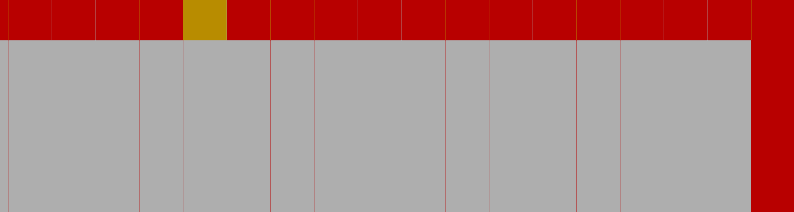
我记得几年前用桌面GL编写了雪碧贴图,具有讽刺意味的是使用了类似的代码(或多或少相当于我使用WebGL 2所能做的事情),而且它从来没有这些问题。
我正在考虑下一步尝试基于DOM的元素,但我担心它不会感觉或看起来很流畅。
回答 1
Stack Overflow用户
发布于 2018-11-25 06:08:07
一种解决方案是在碎片着色器中绘制瓷砖。
所以你有你的地图,比如说一个Uint32Array。将其分解为每个单位4个字节。前两个字节是平铺ID,最后一个字节是标志
当您在tilemap纹理中查找每一个像素时,使用它来计算UV坐标,从而从瓷砖的纹理中获取像素。如果您的瓷砖纹理有gl.NEAREST取样集,那么您将不会有任何出血
注意,与传统的tilemaps不同,每个瓷砖的in是瓷砖纹理中瓷砖的X,Y坐标。换句话说,如果您的瓷砖纹理跨16x8块,并且您希望您的地图将瓷砖7上下显示,那么该瓷砖的id是7,4 (第一个字节7,第二个字节4),其中,与传统的基于CPU的系统一样,瓷砖id可能是4*16+7或71 (第71块)。您可以向着色器添加代码以进行更传统的索引,但是由于着色器必须将id转换为2d纹理和弦,所以使用2d id似乎更容易。
const vs = `
  attribute vec4 position;
  //attribute vec4 texcoord; - since position is a unit square just use it for texcoords

  uniform mat4 u_matrix;
  uniform mat4 u_texMatrix;

  varying vec2 v_texcoord;

  void main() {
    gl_Position = u_matrix * position;
    // v_texcoord = (u_texMatrix * texccord).xy;
    v_texcoord = (u_texMatrix * position).xy;
  }
`;

const fs = `
  precision highp float;

  uniform sampler2D u_tilemap;
  uniform sampler2D u_tiles;
  uniform vec2 u_tilemapSize;
  uniform vec2 u_tilesetSize;

  varying vec2 v_texcoord;

  void main() {
    vec2 tilemapCoord = floor(v_texcoord);
    vec2 texcoord = fract(v_texcoord);
    vec2 tileFoo = fract((tilemapCoord + vec2(0.5, 0.5)) / u_tilemapSize);
    vec4 tile = floor(texture2D(u_tilemap, tileFoo) * 256.0);

    float flags = tile.w;
    float xflip = step(128.0, flags);
    flags = flags - xflip * 128.0;
    float yflip = step(64.0, flags);
    flags = flags - yflip * 64.0;
    float xySwap = step(32.0, flags);
    if (xflip > 0.0) {
      texcoord = vec2(1.0 - texcoord.x, texcoord.y);
    }
    if (yflip > 0.0) {
      texcoord = vec2(texcoord.x, 1.0 - texcoord.y);
    }
    if (xySwap > 0.0) {
      texcoord = texcoord.yx;
    }

    vec2 tileCoord = (tile.xy + texcoord) / u_tilesetSize;
    vec4 color = texture2D(u_tiles, tileCoord);
    if (color.a <= 0.1) {
      discard;
    }
    gl_FragColor = color;
  }
`;

const tileWidth = 32;
const tileHeight = 32;
const tilesAcross = 8;
const tilesDown = 4;

const m4 = twgl.m4;
const gl = document.querySelector('#c').getContext('webgl');

// compile shaders, link, look up locations
const programInfo = twgl.createProgramInfo(gl, [vs, fs]);
// gl.createBuffer, bindBuffer, bufferData
const bufferInfo = twgl.createBufferInfoFromArrays(gl, {
  position: {
    numComponents: 2,
    data: [
      0, 0,
      1, 0,
      0, 1,

      0, 1,
      1, 0,
      1, 1,
    ],
  },
});

function r(min, max) {
  if (max === undefined) {
    max = min;
    min = 0;
  }
  return min + (max - min) * Math.random();
}

// make some tiles
const ctx = document.createElement('canvas').getContext('2d');
ctx.canvas.width = tileWidth * tilesAcross;
ctx.canvas.height = tileHeight * tilesDown;
ctx.font = "bold 24px sans-serif";
ctx.textAlign = "center";
ctx.textBaseline = "middle";

const f = '0123456789abcdefghijklmnopqrstuvwxyzABCDEFGHIJKLMNOPQRSTUVWXYZ~';
for (let y = 0; y < tilesDown; ++y) {
  for (let x = 0; x < tilesAcross; ++x) {
    const color = `hsl(${r(360) | 0},${r(50,100)}%,50%)`;
    ctx.fillStyle = color;
    const tx = x * tileWidth;
    const ty = y * tileHeight;
    ctx.fillRect(tx, ty, tileWidth, tileHeight);
    ctx.fillStyle = "#FFF";
    ctx.fillText(f.substr(y * 8 + x, 1), tx + tileWidth * .5, ty + tileHeight * .5);
  }
}
document.body.appendChild(ctx.canvas);

const tileTexture = twgl.createTexture(gl, {
 src: ctx.canvas,
 minMag: gl.NEAREST,
});

// make a tilemap
const mapWidth = 400;
const mapHeight = 300;
const tilemap = new Uint32Array(mapWidth * mapHeight);
const tilemapU8 = new Uint8Array(tilemap.buffer);
const totalTiles = tilesAcross * tilesDown;
for (let i = 0; i < tilemap.length; ++i) {
  const off = i * 4;
  // mostly tile 9
  const tileId = r(10) < 1
      ? (r(totalTiles) | 0)
      : 9;
  tilemapU8[off + 0] = tileId % tilesAcross;
  tilemapU8[off + 1] = tileId / tilesAcross | 0;
  const xFlip = r(2) | 0;
  const yFlip = r(2) | 0;
  const xySwap = r(2) | 0;
  tilemapU8[off + 3] =
    (xFlip  ? 128 : 0) |
    (yFlip  ?  64 : 0) |
    (xySwap ?  32 : 0) ;
}

const mapTexture = twgl.createTexture(gl, {
  src: tilemapU8,
  width: mapWidth,
  minMag: gl.NEAREST,
});

function ease(t) {
  return Math.cos(t) * .5 + .5;
}

function lerp(a, b, t) {
  return a + (b - a) * t;
}

function easeLerp(a, b, t) {
  return lerp(a, b, ease(t));
}

function render(time) {
  time *= 0.001;  // convert to seconds;

  gl.viewport(0, 0, gl.canvas.width, gl.canvas.height);
  gl.clearColor(0, 1, 0, 1);
  gl.clear(gl.COLOR_BUFFER_BIT);

  gl.useProgram(programInfo.program);
  twgl.setBuffersAndAttributes(gl, programInfo, bufferInfo);

  const mat = m4.ortho(0, gl.canvas.width, gl.canvas.height, 0, -1, 1);
  m4.scale(mat, [gl.canvas.width, gl.canvas.height, 1], mat);

  const scaleX = easeLerp(.5, 2, time * 1.1);
  const scaleY = easeLerp(.5, 2, time * 1.1);

  const dispScaleX = 1;
  const dispScaleY = 1;
  // origin of scale/rotation
  const originX = gl.canvas.width  * .5;
  const originY = gl.canvas.height * .5;
  // scroll position in pixels
  const scrollX = time % (mapWidth  * tileWidth );
  const scrollY = time % (mapHeight * tileHeight);
  const rotation = time;

  const tmat = m4.identity();
  m4.translate(tmat, [scrollX, scrollY, 0], tmat);
  m4.rotateZ(tmat, rotation, tmat);
  m4.scale(tmat, [
    gl.canvas.width  / tileWidth  / scaleX * (dispScaleX),
    gl.canvas.height / tileHeight / scaleY * (dispScaleY),
    1,
  ], tmat);
  m4.translate(tmat, [
    -originX / gl.canvas.width,
    -originY / gl.canvas.height,
     0,
  ], tmat);

  twgl.setUniforms(programInfo, {
    u_matrix: mat,
    u_texMatrix: tmat,
    u_tilemap: mapTexture,
    u_tiles: tileTexture,
    u_tilemapSize: [mapWidth, mapHeight],
    u_tilesetSize: [tilesAcross, tilesDown],
  });

  gl.drawArrays(gl.TRIANGLES, 0, 6);

  requestAnimationFrame(render);
}
requestAnimationFrame(render);canvas { border: 1px solid black; }<canvas id="c"></canvas>
<script src="https://twgljs.org/dist/4.x/twgl-full.min.js"></script>
https://stackoverflow.com/questions/53462726
复制相似问题
腾讯云开发者

Copyright © 2013 - 2026 Tencent Cloud. All Rights Reserved. 腾讯云 版权所有
深圳市腾讯计算机系统有限公司 ICP备案/许可证号:粤B2-20090059  粤公网安备44030502008569号
腾讯云计算(北京)有限责任公司 京ICP证150476号 | 京ICP备11018762号