
构建角应用程序后,elementRef为空
在组件模板中,我选择一个带有ElementRef的svg元素。它可以正常工作,但是当我构建这个应用程序并打开它时,elementRef是空的。
    @Component({
      selector: 'app-svg',
      template: `<div id="root">
        <object [data]='trustedUrl' type="image/svg+xml" height="450" width="650" #dataSvg></object>
      </div>`,
      styleUrls: ['./svg.component.css']

    })
constructor(private sanitizer: DomSanitizer, private elRef: ElementRef) {
 }
elementRef靶向
@ViewChild('dataSvg') dataSvg: ElementRef;将它传递给elementRef变量
ngOnInit() {
    this.elementRef = this.elRef.nativeElement.querySelector('#dataSvg');
     }
加载内容之后,我将选择svg:
ngAfterContentInit() {
    const elementRef = this.elementRef;

    // when content is loaded...
    elementRef.addEventListener('load', function (event) {
// ...retrieve svg elementelementRef.querySelector('svg')为空
当我运行'npm运行构建‘并转到dist/index.html时,contentDocument >为空:
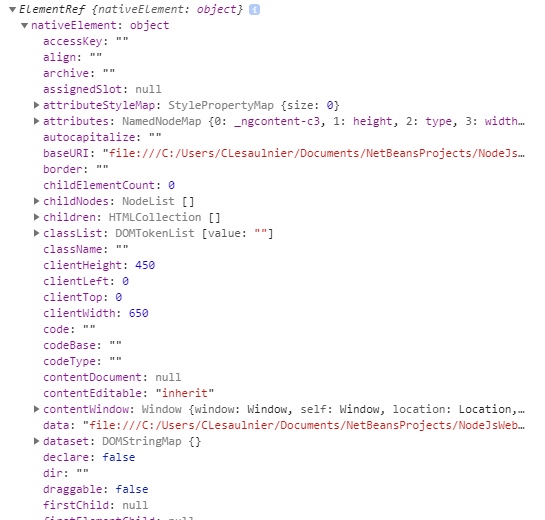
回答 6
Stack Overflow用户
发布于 2018-11-20 15:48:51
您使用@ViewChild('dataSvg') dataSvg: ElementRef;,但是在模板中没有为dataSvg提供任何锚点。
有两种方法可以做到这一点: 1)使用角舵上解释的@指令,2)使用模板引用#:在您的例子中:<object ... #dataSvg></object>
如果您已经使用了指令,则没有提到,但是在模板代码中,您只有一个id=dataSvg
Stack Overflow用户
发布于 2018-11-20 15:22:55
DOM尚未完全构建在ngOnInit中。您需要等待创建子级(此处的模板)。
不要使用ngOnInit,而是将代码放入ngAfterViewInit中。
关于组件生命周期中的钩子的更多信息可以找到在角文件中。
Stack Overflow用户
发布于 2018-11-20 15:26:36
根据官方医生,您不能访问@ViewChild元素,除非您在AfterView钩子(AfterViewInit或AfterViewChecked )中而不是在OnInit 1中这样做。
- https://medium.com/@tkssharma/understanding-viewchildren-viewchild-contentchildren-and-contentchild-b16c9e0358e是一篇关于
@ViewChild、@ViewChildren、@ContentChild和@ContentChildren之间差异的好文章。
https://stackoverflow.com/questions/53396176
复制相似问题
腾讯云开发者

Copyright © 2013 - 2026 Tencent Cloud. All Rights Reserved. 腾讯云 版权所有
深圳市腾讯计算机系统有限公司 ICP备案/许可证号:粤B2-20090059  粤公网安备44030502008569号
腾讯云计算(北京)有限责任公司 京ICP证150476号 | 京ICP备11018762号