
如何完全控制<div>旋转
如何完全控制<div>旋转
提问于 2018-11-19 15:01:13
如何使用CSS完全控制div的旋转?
我已经为这件事挣扎了一段时间了,但似乎一切都不正常。我用它作为一个文档,需要尽可能简洁,每次我需要在表格单元格内旋转一个div时,这个单元格的宽度就会变得无法控制,与写在里面的单词的长度挂钩。
现在我正在使用下面的代码,尽管我一直在尝试使用其他方法。
我的目标是减少左单元格的宽度,使其更适合字体,腾出空间。
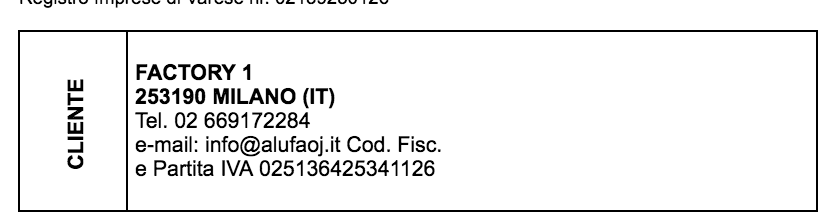
我的CSS:
.rotate {
    -webkit-transform: rotate(270deg);
    -moz-transform: rotate(270deg);
    writing-mode: lr-tb;
}
我的HTML:
<table class="TABELLA1" width="400px" align="left">
    <tr height="90px">
        <td width="1%">
            <p id="idcliente" class="A8BL rotate">C</p>
        </td>
        <td width="99%">
            <div>
                <div class="A8BL">
                    FACTORY 1<br>
                    253190 MILANO (IT)<br>
                </div>
                <div class="A8L">
                    Tel. 02 669172284<br>
                    e-mail: info@alufaoj.it
                    Cod. Fisc. <br>
                    e Partita IVA 2251364245341126
                </div>
            </div>
        </td>
    </tr>
</table>
回答 2
Stack Overflow用户
回答已采纳
发布于 2018-11-19 15:07:37
您看到的是布局引擎在应用转换之前计算元素的宽度。处理这一问题的一个简单方法是添加一个负的水平边距:
.rotate {
    -webkit-transform: rotate(270deg);
    -moz-transform: rotate(270deg);
    writing-mode: lr-tb;
    margin: 0 -1.5em;
}<table class="TABELLA1" width="400px" align="left">
<tr height="90px">
<td width="1%">
<p id="idcliente" class="A8BL rotate">CLIENTE</p>
</td>
<td width="99%">
<div>
<div class="A8BL">
FACTORY 1<br>
253190 MILANO (IT)<br>
</div>
<div class="A8L">
Tel. 02 669172284<br>
e-mail: info@alufaoj.it
Cod. Fisc. <br>
e Partita IVA 2251364245341126
</div>
</div>
</td>
</tr>
</table>
Stack Overflow用户
发布于 2018-11-19 15:36:23
宽度为1%的表数据有一个段落,我们可以简单地旋转,但是当有或多或少的字符时,您必须手动调整中间类的边距和填充。
.rotate {
    -webkit-transform: rotate(270deg);
    -moz-transform: rotate(270deg);
    transform: rotate(270deg);
    margin: 0 -1.6em;
}<table class="TABELLA1" width="400px" align="left">
<tr height="90px">
<td width="1%">
<p id="idcliente" class="A8BL rotate">CLIENTE</p>
</td>
<td width="99%">
<div>
<div class="A8BL">
FACTORY 1<br>
253190 MILANO (IT)<br>
</div>
<div class="A8L">
Tel. 02 669172284<br>
e-mail: info@alufaoj.it
Cod. Fisc. <br>
e Partita IVA 2251364245341126
</div>
</div>
</td>
</tr>
</table>
页面原文内容由Stack Overflow提供。腾讯云小微IT领域专用引擎提供翻译支持
原文链接:
https://stackoverflow.com/questions/53377340
复制相关文章
相似问题
腾讯云开发者

Copyright © 2013 - 2026 Tencent Cloud. All Rights Reserved. 腾讯云 版权所有
深圳市腾讯计算机系统有限公司 ICP备案/许可证号:粤B2-20090059  粤公网安备44030502008569号
腾讯云计算(北京)有限责任公司 京ICP证150476号 | 京ICP备11018762号