
填埋场填方不能正常工作
我正在用openCV在蟒蛇身上检测混凝土的裂缝。我能够用精明的边缘检测来检测裂缝。接下来,我需要填补边缘。我使用了openCV的填水操作,但有些缺口被填补了,而有些却没有被填补。左边的图像是输入的图像,而右边的是充满洪水的图像。我猜这是因为我的边在点上有断点。我该怎么解决这个问题?我的洪水处理代码:

im_th1 = imginput
im_floodfill = im_th1.copy()
# Mask used to flood filling.
# Notice the size needs to be 2 pixels than the image.
h, w = im_th1.shape[:2]
mask = np.zeros((h + 2, w + 2), np.uint8)

# Floodfill from point (0, 0)
cv2.floodFill(im_floodfill, mask, (5, 5), 255);

# Invert floodfilled image
im_floodfill_inv = cv2.bitwise_not(im_floodfill)

# Combine the two images to get the foreground.
im_out = im_th1 | im_floodfill_inv
cv2.imshow("Foreground", im_out)
cv2.waitKey(0)回答 2
Stack Overflow用户
发布于 2018-11-29 07:08:03
我找到了我想要的解决方案。把它贴在这里,因为它可能会对其他人有用。在互联网上进行了一些研究之后,只有两行代码,如下所示:如何在python中完成/关闭轮廓?。
对我有用的代码是:
kernel = cv2.getStructuringElement(cv2.MORPH_ELLIPSE, (9, 9))
dilated = cv2.dilate(image, kernel)
eroded=cv2.erode(dilated,kernel)结果显示在结果之前和之后的附加图像中。

Stack Overflow用户
发布于 2018-11-18 08:01:25
我经常在这里看到,所以,每个人都想使用边缘检测,然后填充边缘之间的区域。
除非您使用有目的地创建封闭轮廓的边缘检测方法,否则检测到的边缘很可能不会形成封闭的轮廓。除非你有一个封闭的等高线,否则你不能淹没一个区域。
在大多数情况下,一些过滤和一个简单的阈值就足够了。例如:
import PyDIP as dip
import matplotlib.pyplot as pp

img = dip.Image(pp.imread('oJAo7.jpg')).TensorElement(1) # From OP's other question
img = img[4:698,6:]

lines = dip.Tophat(img, 10, polarity='black')
dip.SetBorder(lines, [0], [2])
lines = dip.PathOpening(lines, length=100, polarity='opening', mode={'robust'})
lines = dip.Threshold(lines, method='otsu')[0]
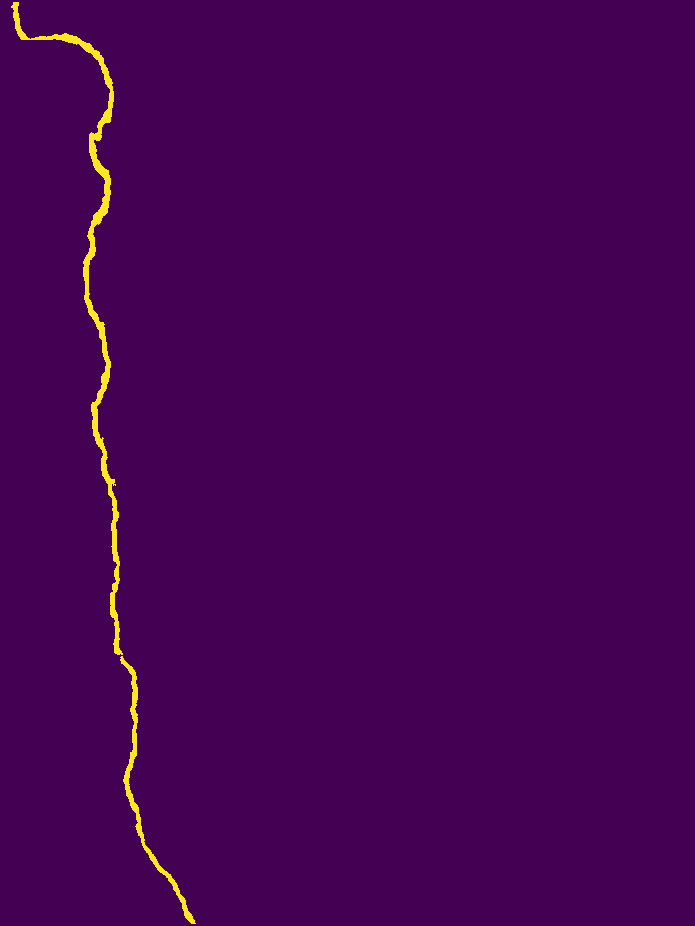
这一结果是经过一个简单的顶帽过滤器,它只保留薄的东西,然后是一个通道开放,它只保留很长的东西。这种组合消除了大规模的阴影,以及小的颠簸和东西。过滤后,一个简单的Otsu阈值产生一个二进制图像,标记裂缝中的所有像素。
备注:
https://stackoverflow.com/questions/53358598
复制相似问题
腾讯云开发者

Copyright © 2013 - 2026 Tencent Cloud. All Rights Reserved. 腾讯云 版权所有
深圳市腾讯计算机系统有限公司 ICP备案/许可证号:粤B2-20090059  粤公网安备44030502008569号
腾讯云计算(北京)有限责任公司 京ICP证150476号 | 京ICP备11018762号