
反应本地图像阴影颜色
反应本地图像阴影颜色
提问于 2018-11-17 12:34:46
我正在使用React开发一个移动应用程序--本机,我需要实现一个新组件。
例如:
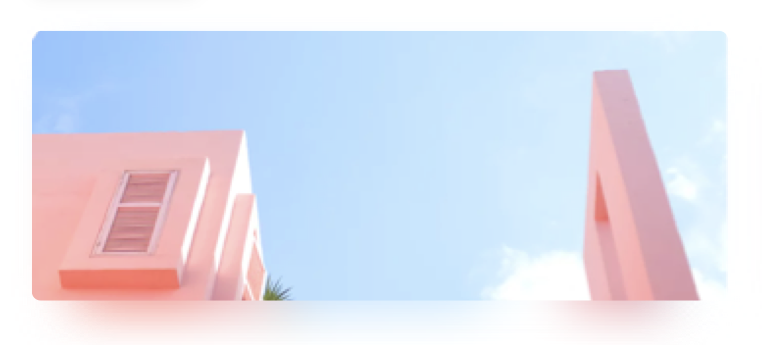
所以,我的问题是,如何在我的组件上添加这个阴影/模糊图像?
我知道如何在图像上制造模糊,但我如何才能做到这种效果呢?
谢谢
回答 1
Stack Overflow用户
回答已采纳
发布于 2018-11-17 16:00:18
所以,基本上你要处理两幅图像,不透明度,blurRadius和位置绝对。
试着:
<View style={{elevation:12, position:'absolute', left:100, top:100, elevation:12, borderRadius:50, borderWidth: 1, borderColor:'rgba(255, 255, 2555, 0.4)',  overflow: 'hidden',  opacity:0.3}}>
    <Image blurRadius={10} style={{width:300, height:150}} source={{uri:'https://image.shutterstock.com/image-photo/beautiful-garden-flowers-450w-257560639.jpg'}} />
</View>
<View style={{position:'absolute', left:95, top:90, borderRadius:50, borderWidth: 0, borderColor:'rgba(255, 255, 2555, 0.4)',   overflow: 'hidden'}}>
    <Image style={{width:300, height:150, }} source={{uri:'https://image.shutterstock.com/image-photo/beautiful-garden-flowers-450w-257560639.jpg'}} />
</View>页面原文内容由Stack Overflow提供。腾讯云小微IT领域专用引擎提供翻译支持
原文链接:
https://stackoverflow.com/questions/53351317
复制相关文章
相似问题
腾讯云开发者

Copyright © 2013 - 2026 Tencent Cloud. All Rights Reserved. 腾讯云 版权所有
深圳市腾讯计算机系统有限公司 ICP备案/许可证号:粤B2-20090059  粤公网安备44030502008569号
腾讯云计算(北京)有限责任公司 京ICP证150476号 | 京ICP备11018762号