
SWIFT4.2中滚动后的UICollectionView项数据失真
我正在尝试使用UICollectionView实现聊天屏幕,并按预期显示数据。然而,当我尝试滚动它几次,我的数据会被扭曲,在屏幕截图中解释。有人能告诉我出了什么问题以及如何解决吗?谢谢!
首先,它显示:

在滚动几次之后,它显示:
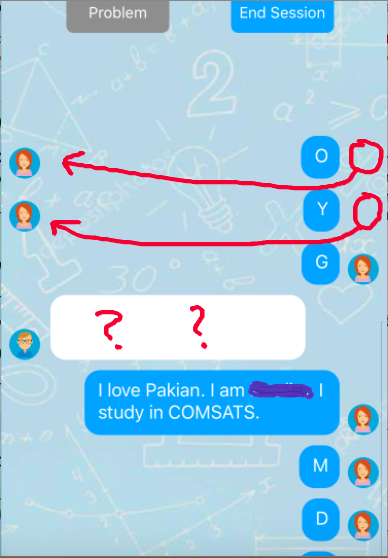
我使用的与UICollectionView相关的所有方法的代码:
func collectionView(_ collectionView: UICollectionView, numberOfItemsInSection section: Int) -> Int {
    let count = chatCategoriesArray.messages.count
    if count != 0 {
        return count
    }
    return 0
}

var allCellsHeight: CGFloat = 0.0
func collectionView(_ collectionView: UICollectionView, cellForItemAt indexPath: IndexPath) -> UICollectionViewCell {
    let cell = collectionView.dequeueReusableCell(withReuseIdentifier: cellId, for: indexPath) as! ChatLogMessageCell
    cell.messageTextView.text = chatCategoriesArray.messages[indexPath.item]
    let size = CGSize(width: 250, height: 1000)
    let options = NSStringDrawingOptions.usesFontLeading.union(.usesLineFragmentOrigin)
    let estimatedFrame = NSString(string: chatCategoriesArray.messages[indexPath.item]).boundingRect(with: size, options: options, attributes: [NSAttributedString.Key.font: UIFont.systemFont(ofSize: 18)], context: nil)

    if chatCategoriesArray.senderIds[indexPath.item] == "s_\(self.studentInstance.tutorIdFound)"{
        cell.profileImageView.image = UIImage(named: "three.png")
        cell.profileImageView.isHidden = false
        cell.messageTextView.frame = CGRect(x: 48 + 8, y:0, width: estimatedFrame.width + 16, height: estimatedFrame.height + 20)
        cell.textBubbleView.frame = CGRect(x: 48, y: 0, width: estimatedFrame.width + 16 + 8, height: estimatedFrame.height + 20)
        self.currentCellWidth = Double(estimatedFrame.width + 16 + 8)
        cell.textBubbleView.backgroundColor = .white
        cell.addSubview(cell.profileImageView)
        cell.addConstraintsWithFormat(format: "H:|-8-[v0(30)]", views: cell.profileImageView)
        cell.addConstraintsWithFormat(format: "V:[v0(30)]|", views: cell.profileImageView)
    }
    else{
        cell.profileImageView.image = UIImage(named: "two.png")
        cell.textBubbleView.backgroundColor = UIColor(r: 28, g:168, b:261)
        cell.messageTextView.frame = CGRect(x: view.frame.width - estimatedFrame.width - 16 - 46, y:0, width: estimatedFrame.width + 16, height: estimatedFrame.height + 20)
        cell.messageTextView.textColor = .white
        cell.textBubbleView.frame = CGRect(x: view.frame.width - estimatedFrame.width - 16 - 8 - 46, y: 0, width: estimatedFrame.width + 16 + 8, height: estimatedFrame.height + 20)
        self.currentCellWidth = Double(estimatedFrame.width + 16 + 8)
        cell.addSubview(cell.profileImageView)
        cell.addConstraintsWithFormat(format: "H:[v0(30)]-8-|", views: cell.profileImageView)
        cell.addConstraintsWithFormat(format: "V:[v0(30)]|", views: cell.profileImageView)
    }
    allCellsHeight += cell.frame.height
    return cell
}

func collectionView(_ collectionView: UICollectionView, layout collectionViewLayout: UICollectionViewLayout, insetForSectionAt section: Int) -> UIEdgeInsets {

    if allCellsHeight < (collectionView.frame.height){
        return UIEdgeInsets(top: view.frame.height - allCellsHeight, left: 0, bottom: 0, right: 0)
    }
    else {
        return UIEdgeInsets(top: 8, left: 0, bottom: 0, right: 0)
    }
}
func collectionView(_ collectionView: UICollectionView, layout collectionViewLayout: UICollectionViewLayout, sizeForItemAt indexPath: IndexPath) -> CGSize {

    let size = CGSize(width: 250, height: 1000)
    let options = NSStringDrawingOptions.usesFontLeading.union(.usesLineFragmentOrigin)
    let estimatedFrame = NSString(string: chatCategoriesArray.messages[indexPath.item]).boundingRect(with: size, options: options, attributes: [NSAttributedString.Key.font: UIFont.systemFont(ofSize: 18)], context: nil)
    return CGSize(width: view.frame.width, height: estimatedFrame.height + 20)
}回答 2
Stack Overflow用户
发布于 2018-11-14 09:51:30
集合单元被重用。这意味着当您向上/向下滚动时,变得不可见的单元将从层次结构中移除,并排队等待重用。然后,集合视图再次调用cellForItem:,以获取可见的项。dequeueReusableCell并不总是创建一个新实例。通常,它将只返回一个单元格,该单元格已变得不可见,您可以使用新的数据重新设置它。
如果在安装过程中添加视图/约束,则必须确保删除先前添加的视图/约束,否则单元格将具有重复的视图和相互冲突的约束。
还请注意,allCellsHeight不能像这样工作。在安装后(在实际布局之前),cell.frame.height不会立即正确,而且由于同一项可以多次调用该方法,所以不能只添加到全局变量中。您应该使用collectionView.contentSize.height代替。
Stack Overflow用户
发布于 2018-11-14 07:42:10
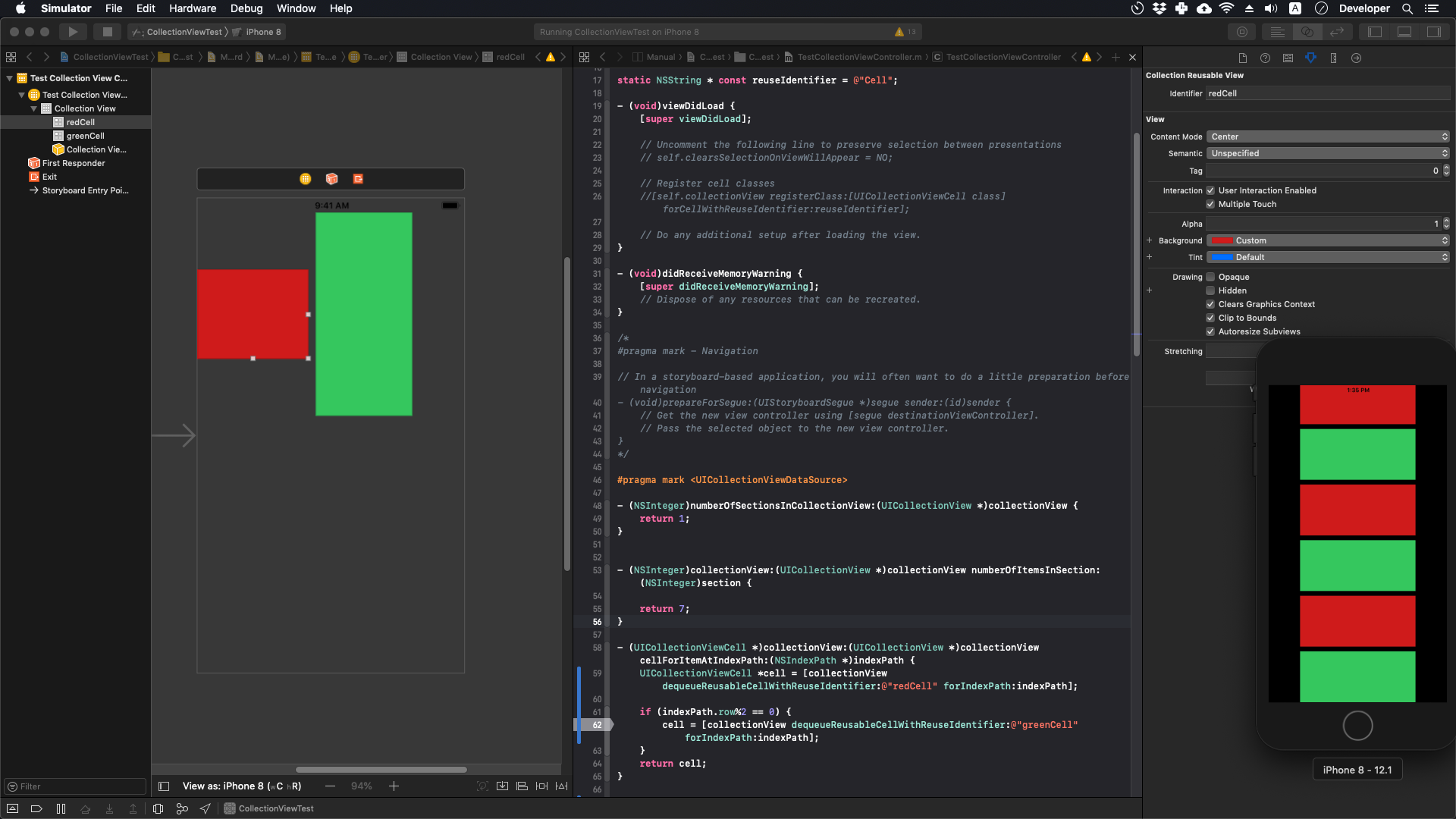
这是典型的可重复使用的细胞故障。这会导致集合视图重用接收方单元格设置来创建发件人消息框。
我建议你为发送者和接收者使用两个不同的单元格。在第一次加载时设置约束。这也将对业绩产生积极影响。
检查以下图像以了解如何使用2单元格。
https://stackoverflow.com/questions/53295128
复制相似问题
腾讯云开发者

Copyright © 2013 - 2026 Tencent Cloud. All Rights Reserved. 腾讯云 版权所有
深圳市腾讯计算机系统有限公司 ICP备案/许可证号:粤B2-20090059  粤公网安备44030502008569号
腾讯云计算(北京)有限责任公司 京ICP证150476号 | 京ICP备11018762号