
不运行在Raspberry Hyperiot OS + Gitlab CI + Spring Boot上
不运行在Raspberry Hyperiot OS + Gitlab CI + Spring Boot上
提问于 2018-11-13 16:49:01
我想为我的Spring项目设置一个使用Gitlab CI和Docker的自动部署。为此,我在我的覆盆子上安装了Hypriot操作系统来运行我的码头容器。Maven和Docker构建通过Gitlab CI运行,没有错误。但如果我用我的覆盆子跑码头,什么都不会发生。
gitlab-ci.yml
image: docker:latest

services:
    - docker:dind

variables:
    DOCKER_DRIVER: overlay
    SPRING_PROFILES_ACTIVE: gitlab-ci
    USER_GITLAB: ft
    APP_NAME: ft-backend
    REPO: backend

stages:
    - build
    - docker

maven-build:
    image: maven:3-jdk-8
    stage: build
    script: "mvn package -B"
    artifacts:
        paths:
            - target/*.jar

docker-build:
    stage: docker
    script:
        - docker login -u gitlab-ci-token -p $CI_BUILD_TOKEN registry.gitlab.com
        - docker build -t registry.gitlab.com/ft/$REPO .
        - docker push registry.gitlab.com/ft/$REPO
application.properties
spring.profiles.active=local
server.port=8080
spring.application.name=backend
Dockerfile
FROM jsurf/rpi-java:latest
VOLUME /tmp
ADD target/ft-backend-0.0.1-SNAPSHOT.jar app.jar
EXPOSE 8080
ENTRYPOINT ["java","-Djava.security.egd=file:/dev/./urandom","-jar","app.jar"]
CMD [""]我在Raspberry上使用以下命令来启动Docker。但是如果我想在192:8080上访问我的Raspberry,我的项目就不会出现。docker ps也不显示任何东西。
docker login registry.gitlab.com
docker pull registry.gitlab.com/ft/backend
docker run -d -p 8080:8080 registry.gitlab.com/ft/backend:latest
更新
项目结构
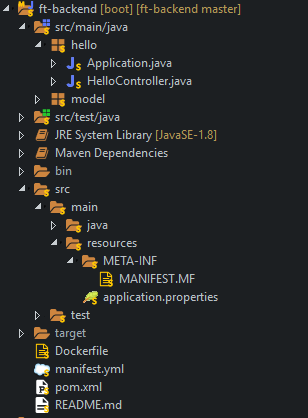
manifest.yml
applications:
- name: hello
  disk_quota: 512M
  instances: 1
  memory: 256M
  random-route: true
  timeout: 120
  path: ./target/ft-backend-0.0.1-SNAPSHOT.jar
  env:
    JBP_CONFIG_OPEN_JDK_JRE: '[memory_calculator: {stack_threads: 100, memory_sizes: {stack: 128k, native: 150m}}]'
MANIFEST.MF
Manifest-Version: 1.0
Start-Class: hello.Application
pom.xml
<project xmlns="http://maven.apache.org/POM/4.0.0"
    xmlns:xsi="http://www.w3.org/2001/XMLSchema-instance"
    xsi:schemaLocation="http://maven.apache.org/POM/4.0.0 http://maven.apache.org/xsd/maven-4.0.0.xsd">
    <modelVersion>4.0.0</modelVersion>
    <groupId>de.tf</groupId>
    <artifactId>ft-backend</artifactId>
    <version>0.0.1-SNAPSHOT</version>
    <packaging>jar</packaging>

    <parent>
        <groupId>org.springframework.boot</groupId>
        <artifactId>spring-boot-starter-parent</artifactId>
        <version>2.0.5.RELEASE</version>
    </parent>

    <properties>
        <project.build.sourceEncoding>UTF-8</project.build.sourceEncoding>
        <project.reporting.outputEncoding>UTF-8</project.reporting.outputEncoding>
        <java.version>1.8</java.version>
    </properties>

    <dependencies>
        <!-- Spring Boot -->
        <dependency>
            <groupId>org.springframework.boot</groupId>
            <artifactId>spring-boot-starter</artifactId>
        </dependency>
        <dependency>
            <groupId>org.springframework.boot</groupId>
            <artifactId>spring-boot-starter-web</artifactId>
        </dependency>
        <dependency>
            <groupId>org.springframework.boot</groupId>
            <artifactId>spring-boot-starter-test</artifactId>
            <scope>test</scope>
        </dependency>
    </dependencies>

    <build>
        <pluginManagement>
            <plugins>
            <plugin>
                <groupId>org.springframework.boot</groupId>
                <artifactId>spring-boot-maven-plugin</artifactId>
                <configuration>
                    <mainClass>hello.Application</mainClass>
                </configuration>
                <executions>
                    <execution>
                        <goals>
                            <goal>repackage</goal>
                        </goals>
                    </execution>
                </executions>
            </plugin>
                <plugin>
                    <groupId>org.apache.maven.plugins</groupId>
                    <artifactId>maven-surefire-plugin</artifactId>
                    <version>3.0.0-M1</version>
                </plugin>
            </plugins>
        </pluginManagement>
    </build>

</project>回答 1
Stack Overflow用户
发布于 2018-11-14 12:22:58
要构建Spring项目的坞映像,我建议使用dockerfile-maven-plugin。
1.将项目配置为可执行的jar
<build>
  <plugins>
    <plugin>
      <groupId>org.springframework.boot</groupId>
      <artifactId>spring-boot-maven-plugin</artifactId>
    </plugin>
...2.配置构建码头映像
  ...
    <plugin>
      <groupId>com.spotify</groupId>
      <artifactId>dockerfile-maven-plugin</artifactId>
      <version>${dockerfile-maven-plugin.version}</version>
      <executions>
        <execution>
          <id>default</id>
          <goals>
            <goal>build</goal>
            <goal>push</goal>
          </goals>
        </execution>
      </executions>
      <configuration>
        <repository>${docker.repository}/${project.artifactId}</repository>
        <tag>${project.version}</tag>
        <buildArgs>
          <JAR_FILE>target/${project.build.finalName}.jar</JAR_FILE>
        </buildArgs>
      </configuration>
</plugin>3.创建一个Dockerfile
4.构建码头映像
$ mvn clean package有关更多信息,请参见带船坞导轨的弹簧靴。
页面原文内容由Stack Overflow提供。腾讯云小微IT领域专用引擎提供翻译支持
原文链接:
https://stackoverflow.com/questions/53285828
复制相关文章
相似问题
腾讯云开发者

Copyright © 2013 - 2026 Tencent Cloud. All Rights Reserved. 腾讯云 版权所有
深圳市腾讯计算机系统有限公司 ICP备案/许可证号:粤B2-20090059  粤公网安备44030502008569号
腾讯云计算(北京)有限责任公司 京ICP证150476号 | 京ICP备11018762号