
如何横向扩展CSS家族树?
如何横向扩展CSS家族树?
提问于 2018-11-13 05:14:38
我使用CSS创建了一个家族树。
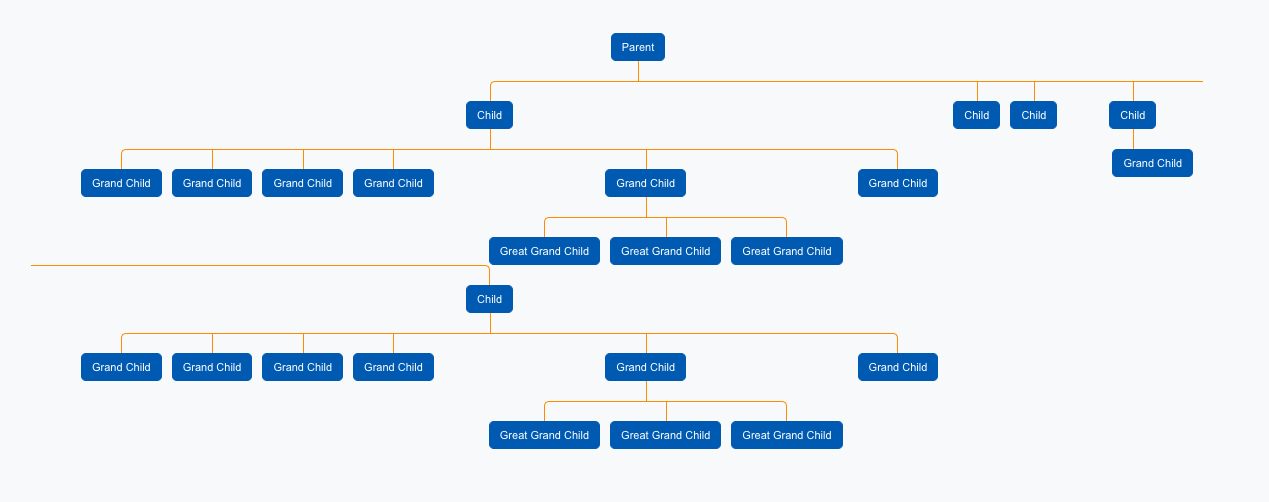
家族树正常工作,但问题是,如果一行中有太多的列表,它就会在行的右端断开行,并将其显示在新行上。
如何使此家族树水平扩展而不破坏子元素?即使在页面底部没有水平滚动,我也只想按原样显示这棵树,而不将元素移动到新的行中。
这是代码:
.tree ul {
  overflow-x: auto;
  padding-top: 20px; position: relative;

  transition: all 0.5s;
  -webkit-transition: all 0.5s;
  -moz-transition: all 0.5s;
}

.tree li {
  overflow-x: auto;
  float: left; text-align: center;
  list-style-type: none;
  position: relative;
  padding: 20px 5px 0 5px;

  transition: all 0.5s;
  -webkit-transition: all 0.5s;
  -moz-transition: all 0.5s;
}

/*We will use ::before and ::after to draw the connectors*/

.tree li::before, .tree li::after{
  content: '';
  position: absolute; top: 0; right: 50%;
  border-top: 1px solid #F39331;
  width: 50%; height: 20px;
}
.tree li::after{
  right: auto; left: 50%;
  border-left: 1px solid #F39331;
}

/*We need to remove left-right connectors from elements without
any siblings*/
.tree li:only-child::after, .tree li:only-child::before {
  display: none;
}

/*Remove space from the top of single children*/
.tree li:only-child{ padding-top: 0;}

/*Remove left connector from first child and
right connector from last child*/
.tree li:first-child::before, .tree li:last-child::after{
  border: 0 none;
}
/*Adding back the vertical connector to the last nodes*/
.tree li:last-child::before{
  border-right: 1px solid #F39331;
  border-radius: 0 5px 0 0;
  -webkit-border-radius: 0 5px 0 0;
  -moz-border-radius: 0 5px 0 0;
}
.tree li:first-child::after{
  border-radius: 5px 0 0 0;
  -webkit-border-radius: 5px 0 0 0;
  -moz-border-radius: 5px 0 0 0;
}

/*Time to add downward connectors from parents*/
.tree ul ul::before{
  content: '';
  position: absolute; top: 0; left: 50%;
  border-left: 1px solid #F39331;
  width: 0; height: 20px;
}

.tree li a{
  border: 1px solid #0F60AF;
  background-color: #0F60AF;
  padding: 5px 10px;
  text-decoration: none;
  color: #fff;
  font-family: arial, verdana, tahoma;
  font-size: 11px;
  display: inline-block;

  border-radius: 5px;
  -webkit-border-radius: 5px;
  -moz-border-radius: 5px;

  transition: all 0.5s;
  -webkit-transition: all 0.5s;
  -moz-transition: all 0.5s;
}

bg_orange {
  border: 1px solid #F39331;
  background-color: #F39331;
}

/*Time for some hover effects*/
/*We will apply the hover effect the the lineage of the element also*/
.tree li a:hover, .tree li a:hover+ul li a {
  background: #F39331; color: #fff; border: 1px solid #F39331;
}<div class="tree">
<ul>
<li>
<a href="#">Parent</a>
<ul>
<li>
<a href="#">Child</a>
<ul>
<li>
<a href="#">Grand Child</a>
</li>
<li>
<a href="#">Grand Child</a>
</li>
<li>
<a href="#">Grand Child</a>
</li>
<li>
<a href="#">Grand Child</a>
</li>
<li>
<a href="#">Grand Child</a>
<ul>
<li>
<a href="#">Great Grand Child</a>
</li>
<li>
<a href="#">Great Grand Child</a>
</li>
<li>
<a href="#">Great Grand Child</a>
</li>
</ul>
</li>
<li>
<a href="#">Grand Child</a>
</li>
</ul>
</li>
<li>
<a href="#">Child</a>
</li>
<li>
<a href="#">Child</a>
</li>
<li>
<a href="#">Child</a>
<ul>
<li>
<a href="#">Grand Child</a>
</li>
</ul>
</li>
<li>
<a href="#">Child</a>
<ul>
<li>
<a href="#">Grand Child</a>
</li>
<li>
<a href="#">Grand Child</a>
</li>
<li>
<a href="#">Grand Child</a>
</li>
<li>
<a href="#">Grand Child</a>
</li>
<li>
<a href="#">Grand Child</a>
<ul>
<li>
<a href="#">Great Grand Child</a>
</li>
<li>
<a href="#">Great Grand Child</a>
</li>
<li>
<a href="#">Great Grand Child</a>
</li>
</ul>
</li>
<li>
<a href="#">Grand Child</a>
</li>
</ul>
</li>
</ul>
</li>
</ul>
</div>
寻找帮助,我如何能够扩大这个水平?
谢谢。
阿尔琼
回答 2
Stack Overflow用户
回答已采纳
发布于 2018-11-13 05:38:10
在这种情况下,您可以通过向display:flex添加css- .tree ul来使用css-柔箱,这应该可以工作。
display: flex;
padding-top: 20px;
position: relative;
transition: all 0.5s;
-webkit-transition: all 0.5s;
-moz-transition: all 0.5s;此外,您似乎没有将width定义为父ul,而是将width:100%添加到.tree ul。
Stack Overflow用户
发布于 2022-04-01 19:42:54
对@Dark_thunder用户的完全响应
<style type="text/css">
.tree ul {
    overflow-x: auto;
    padding-top: 20px; position: relative;

    transition: all 0.5s;
    -webkit-transition: all 0.5s;
    -moz-transition: all 0.5s;

    display: flex;
}

.tree li {
    /*overflow-x: auto;*/
    overflow: hidden; /* Hide scrollbars */

    float: left; text-align: center;
    list-style-type: none;
    position: relative;
    padding: 20px 5px 0 5px;

    transition: all 0.5s;
    -webkit-transition: all 0.5s;
    -moz-transition: all 0.5s;
}页面原文内容由Stack Overflow提供。腾讯云小微IT领域专用引擎提供翻译支持
原文链接:
https://stackoverflow.com/questions/53274237
复制相关文章
相似问题
腾讯云开发者

Copyright © 2013 - 2026 Tencent Cloud. All Rights Reserved. 腾讯云 版权所有
深圳市腾讯计算机系统有限公司 ICP备案/许可证号:粤B2-20090059  粤公网安备44030502008569号
腾讯云计算(北京)有限责任公司 京ICP证150476号 | 京ICP备11018762号