
基于航运类和最小运量的有条件自由运输
基于航运类和最小运量的有条件自由运输
提问于 2018-11-12 09:07:23
在woocommerce的航运方法方面,我试图做到以下几点:
- 产品A只在购物车内:与“免费送货”配套
- 产品B仅在购物车中:设置:
- 如果产品B购买量少于200,则统一费率金额为15。
- 如果B类产品的采购量达到200或更多,则可免费装运。
- 产品A+产品B同时在车内:“免费装运”,不受任何数量的限制。
我试过使用统一费率和装运等级,如果A产品和B产品在那里,那么如果购物车达不到200,就收取15运费。
任何帮助都是非常感谢的。
回答 2
Stack Overflow用户
回答已采纳
发布于 2018-11-12 10:01:02
更新:使它首先工作,您将需要:
- 若要添加“免费”船运级别(第一),
- 为了实现两种运输方式:“免费送货”和“统一运价”,
- 在您使用免费送货的产品中,需要将设置为“免费”,
- 在您的其他产品中,将没有任何定义的传递类。
- 对于“免费送货”方法,您将不会向它添加任何限制金额,。
- 对于“统一费率”运输方法,您将将其设置为以下屏幕快照:
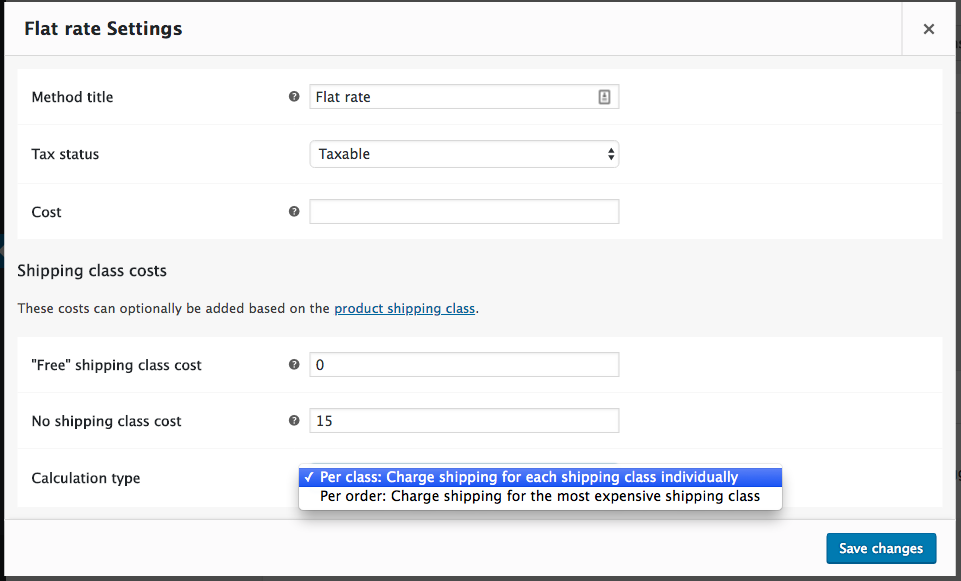
- 魔术将通过以下代码完成,这些代码将使剩下的代码实现: add_filter('woocommerce_package_rates',‘条件自由_航运’,10,2);函数conditional_free_shipping( $rates,$package ){ if ( is_admin() &!)定义( 'DOING_AJAX‘)返回$费率;--您在下面的设置-- ## $shipping_class = ' Free ';// "Free“级产品$min_free_amount = 200;//正常产品##的最低免费发货量- ## $has_free = false;//初始化$products_total = 0;//通过购物车项目初始化//循环($package‘’contents‘as $cart_item ){ if( $ cart _item’‘data’-> Get _ == _class()== $shipping_class ){ $has_free = true;}{ //获取普通产品$products_total += $cart_item‘’line_ total‘+$cart_item’‘line_tax’的总采购金额;} foreach ( $rates as $rate_key => $rate ){ // 1.只有购物车中的免费运输产品或购物车中的两类产品if( $has_free ){ if( 'flat_rate‘=== $rate->method_id ) unset( $rates$rate_key );//删除平坦率} // 2。只有普通产品在购物车{ // A,如果它是在最小数量以下,如果( 'free_shipping‘=== $ rate ->method_id & $products_total < $min_free_amount )未设置( $rates$rate_key );//删除免费运输// B.当达到最小数量时,如果( 'flat_rate‘=== $ rate ->method_id && $products_total >= $min_free_amount ) unset( $rates$rate_key );// Remove }Report$rates;}
代码在您的活动子主题(活动主题)的function.php文件中。测试和工作。
您可能需要刷新传送缓存的数据:在Woocommerce传送设置中,禁用、保存和启用、保存当前配送区域的相关传送方法。
Stack Overflow用户
发布于 2018-11-12 14:00:24
我对代码做了一些改进,现在它运行良好..
add_filter('woocommerce_package_rates', 'conditional_free_shipping', 10, 2);
function conditional_free_shipping( $rates, $package ){
    if ( is_admin() && ! defined( 'DOING_AJAX' ) )
        return $rates;

    ## -- Your settings bellow -- ##

    $shipping_class  = 'free'; // "Free" shipping class products
    $min_free_amount = 200;    // Minimal Free shipping amount for normal products

    ## -- -- -- -- -- -- -- -- -- ##

    $has_normal = $has_free = false; // Initializing
    $products_total = 0; // Initializing

    // Loop through cart items
    foreach( $package['contents'] as $cart_item ) {
        if( $cart_item['data']->get_shipping_class() == $shipping_class ) {
            $has_free = true;
        } else {
            $has_normal = true;
            // Get the total purchased amount for normal product
            $products_total += $cart_item['line_total'] + $cart_item['line_tax'];
        }
    }

    foreach ( $rates as $rate_key => $rate ){
        // 1. Only Free shipping products in cart
        if( $has_free && ! $has_normal ) {
            if( 'flat_rate' === $rate->method_id )
                unset( $rates[$rate_key] ); // Remove flat rate


        }

        elseif(( $has_free && $has_normal )){
             if( 'flat_rate' === $rate->method_id && $products_total <= $min_free_amount )
                unset( $rates[$rate_key] );
                }


        // 2. Only normal products in cart OR Both products kind in cart
        elseif( ( ! $has_free && $has_normal )  ) {
            // A. If it's under the min amount
            if( 'free_shipping' === $rate->method_id && $products_total < $min_free_amount )
                unset( $rates[$rate_key] ); // Remove Free shipping
            // B. When min amount is reached
            elseif( 'flat_rate' === $rate->method_id && $products_total >= $min_free_amount )
                unset( $rates[$rate_key] ); // Remove flat rate
        }
    }
    return $rates;
}页面原文内容由Stack Overflow提供。腾讯云小微IT领域专用引擎提供翻译支持
原文链接:
https://stackoverflow.com/questions/53258868
复制相关文章
相似问题
腾讯云开发者

Copyright © 2013 - 2026 Tencent Cloud. All Rights Reserved. 腾讯云 版权所有
深圳市腾讯计算机系统有限公司 ICP备案/许可证号:粤B2-20090059  粤公网安备44030502008569号
腾讯云计算(北京)有限责任公司 京ICP证150476号 | 京ICP备11018762号