
JavaFX GridPane对象对齐
我正在尝试使用JavaFX来创建一个场景,程序的标题位于顶部的中心位置,并且在场景左侧的垂直线上有按钮。然而,这两个元素都集中在场景的右上角,而不是我想要的位置。
如何将这些元素显示在我希望它们的位置?
下面是我如何尝试设置程序标题的位置:
  grid.add(gameTitle, 0, 0);
  GridPane.setHalignment(gameTitle, HPos.CENTER);
  GridPane.setValignment(gameTitle, VPos.TOP);
我试图以类似的方式设置VBox对象:
  grid.getChildren().add(buttonBox);
  GridPane.setHalignment(buttonBox, HPos.LEFT);
  GridPane.setValignment(buttonBox, VPos.CENTER);
以下是显示的内容:
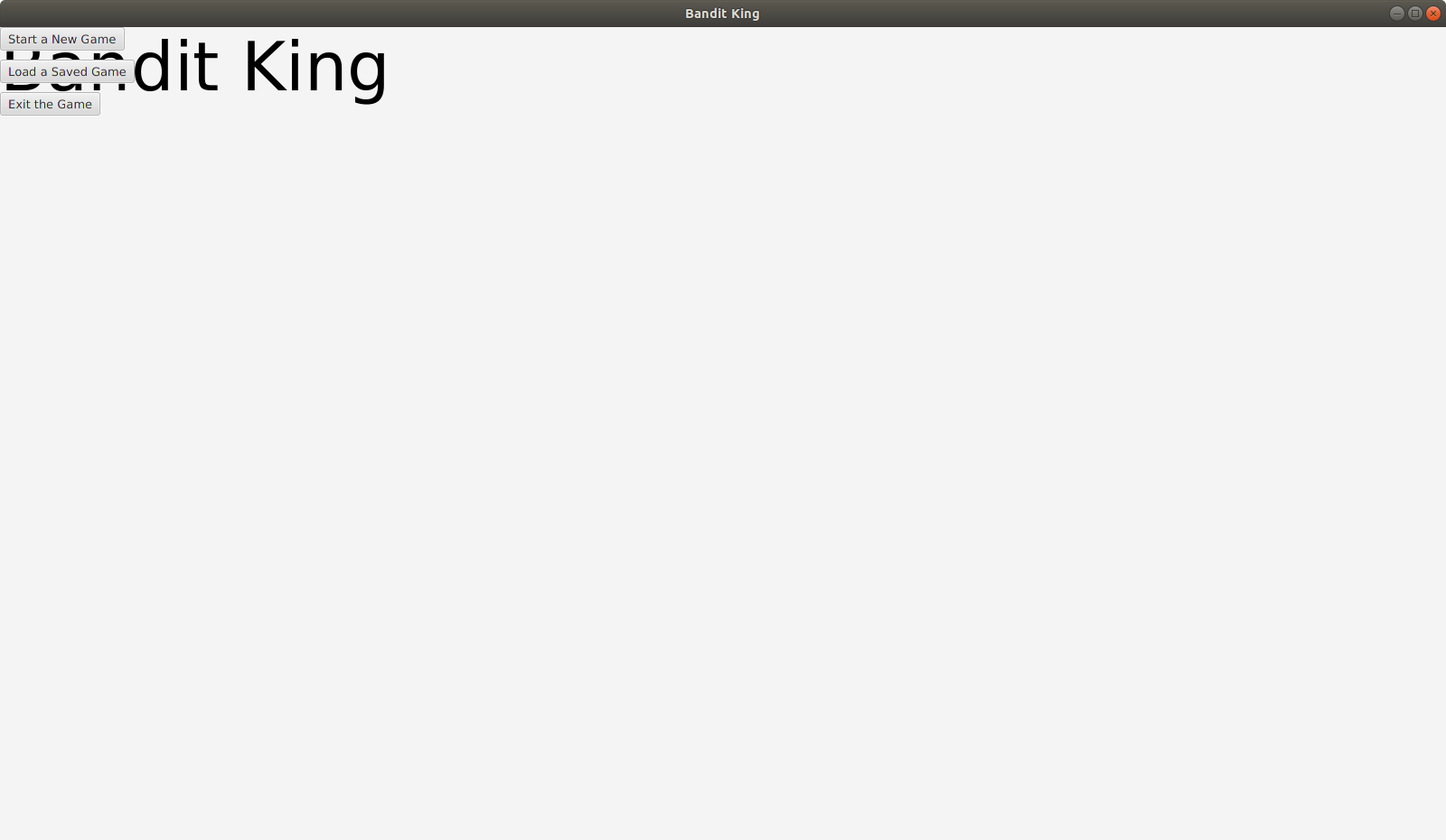
我的整个MainMenu课。(这个类在我的主课堂中被调用来构造场景):
package scenes;

import javafx.scene.layout.GridPane;
import javafx.scene.layout.VBox;
import javafx.application.Platform;
import javafx.geometry.HPos;
import javafx.geometry.VPos;
import javafx.scene.control.Button;
import javafx.scene.layout.Pane;
import javafx.scene.text.Font;
import javafx.scene.text.Text;

public class MainMenu {
   public Pane getMainMenuPane() {
      // Create the scene grid
      GridPane grid = new GridPane();
      grid.setHgap(10);
      grid.setVgap(10);

      // Set the game title to the top center
      Text gameTitle = new Text("Bandit King");
      Font titleFont = new Font(75);
      gameTitle.setFont(titleFont);
      //
      grid.add(gameTitle, 0, 0);
      GridPane.setHalignment(gameTitle, HPos.CENTER);
      GridPane.setValignment(gameTitle, VPos.TOP);

      // Create Button objects and put in VBox
      Button[] buttArr = makeButtons();
      VBox buttonBox = new VBox();
      buttonBox.getChildren().addAll(buttArr);
      buttonBox.setSpacing(10);

      // add Button VBox to GridPane
      grid.getChildren().add(buttonBox);
      GridPane.setHalignment(buttonBox, HPos.LEFT);
      GridPane.setValignment(buttonBox, VPos.CENTER);

      return (Pane) grid;
   }

   private Button[] makeButtons() {
      // Create buttons
      Button start = new Button("Start a New Game");
      Button load = new Button("Load a Saved Game");
      Button exit = new Button("Exit the Game");

      // set Button actions
      start.setOnAction( a -> {
         System.out.println("WIP- start game.");
      });
      load.setOnAction( a -> {
         System.out.println("WIP- load game");
      });
      exit.setOnAction( a -> {
         Platform.exit();
         System.exit(0);
      });

      // return Button[] array
      Button[] buttArr = {start, load, exit};
      return buttArr;
   }


}
我的主要课程(显示场景):
package central;

import javafx.stage.Stage;
import scenes.*;
import controllers.*;
import javafx.application.Application;
import javafx.scene.Scene;
import javafx.scene.layout.Pane;

public class Main  extends Application {

   // Get scene panes
   private static Pane mainMenu = new MainMenu().getMainMenuPane();

   // Create SceneController object.
   private static Scene scene = new Scene(mainMenu, 1600, 900);
   public static SceneController SceneControl = new SceneController(scene);

   @Override
   public void start(Stage stage) {
      stage.setTitle("Bandit King");
      stage.setScene(scene);
      stage.show();
   }

   public static void main(String[] args) {
      launch(args);
   }


}回答 2
Stack Overflow用户
发布于 2018-11-11 23:19:08
将GridPane的子单元格添加到的默认单元格是(0, 0),这是您在这一行中所做的:
grid.getChildren().add(buttonBox);你需要把这个改成
grid.add(buttonBox, 0, 1);若要将行索引设置为1,可以选择以这种方式分配行索引,但在本例中,这是最方便的选项。
但是,这不会导致第一列获取GridPane的全部宽度。如果还希望第一列获取所有可用宽度,则需要通过添加ColumnConstraints来指定
ColumnConstraints constraints = new ColumnConstraints();
constraints.setHgrow(Priority.ALWAYS);

grid.getColumnConstraints().add(constraints);Stack Overflow用户
发布于 2018-11-11 22:58:44
正如我所注意到的,您在列中添加了所有节点并设置了位置,但没有指定需要扩展列的长度。除非指定,否则GridPane列不会自动展开。
通过将gridLinesVisible of GridPane属性启用为true,您可以调试程序。
grid.setGridLinesVisible(true);您需要指定columnConstraints,让GridPane列扩展到可用的宽度。
ColumnConstraints constraint = new ColumnConstraints();
constraint.setHgrow(Priority.ALWAYS);
grid.getColumnConstraints().add(constraint);https://stackoverflow.com/questions/53253552
复制相似问题
腾讯云开发者

Copyright © 2013 - 2026 Tencent Cloud. All Rights Reserved. 腾讯云 版权所有
深圳市腾讯计算机系统有限公司 ICP备案/许可证号:粤B2-20090059  粤公网安备44030502008569号
腾讯云计算(北京)有限责任公司 京ICP证150476号 | 京ICP备11018762号