
Azure ssh到web应用程序失败:AppService隧道/Tunnel.ashx?GetStatus‘,状态代码'404’,原因是“找不到”
Azure ssh到web应用程序失败:AppService隧道/Tunnel.ashx?GetStatus‘,状态代码'404’,原因是“找不到”
提问于 2018-11-07 17:58:16
我需要ssh到Web App on Azure。在使用说明之后,我安装了azure cli,登录并调用以打开隧道:
az webapp remote-connection create -g myresourcegroup -n myapp -p 9000它生成这个错误堆栈:
Traceback (most recent call last):
  File "/usr/local/Cellar/python/3.7.1/Frameworks/Python.framework/Versions/3.7/lib/python3.7/threading.py", line 917, in _bootstrap_inner
self.run()
  File "/usr/local/Cellar/python/3.7.1/Frameworks/Python.framework/Versions/3.7/lib/python3.7/threading.py", line 865, in run
self._target(*self._args, **self._kwargs)
  File "/Users/myusername/.azure/cliextensions/webapp/azext_webapp/custom.py", line 235, in _start_tunnel
if not _check_for_ready_tunnel(remote_debugging_enabled, tunnel_server):
  File "/Users/myusername/.azure/cliextensions/webapp/azext_webapp/custom.py", line 200, in _check_for_ready_tunnel
default_port = tunnel_server.is_port_set_to_default()
  File "/Users/myusername/.azure/cliextensions/webapp/azext_webapp/tunnel.py", line 96, in is_port_set_to_default
url, r.status, r.reason))
knack.util.CLIError: Failed to connect to 'https://myapp.scm.azurewebsites.net/AppServiceTunnel/Tunnel.ashx?GetStatus' with status code '404' and reason 'Not Found'我从这里怎么走?我上MacOs了。
编辑:
错误前的几行debug跟踪:
msrest.http_logger : <publishData><publishProfile profileName="hxserver1 - Web Deploy" publishMethod="MSDeploy" publishUrl="hxserver1.scm.azurewebsites.net:443" msdeploySite="hxserver1" userName="$hxserver1" userPWD="bRqeRL3xwe1K2Wuqi3MX6oFZMlASg3jSt3bE9lN4YygiNafTvJSrgbTNMLz1" destinationAppUrl="http://hxserver1.azurewebsites.net" SQLServerDBConnectionString="" mySQLDBConnectionString="" hostingProviderForumLink="" controlPanelLink="http://windows.azure.com" webSystem="WebSites"><databases /></publishProfile><publishProfile profileName="hxserver1 - FTP" publishMethod="FTP" publishUrl="ftp://waws-prod-blu-083.ftp.azurewebsites.windows.net/site/wwwroot" ftpPassiveMode="True" userName="hxserver1\$hxserver1" userPWD="bRqeRL3xwe1K2Wuqi3MX6oFZMlASg3jSt3bE9lN4YygiNafTvJSrgbTNMLz1" destinationAppUrl="http://hxserver1.azurewebsites.net" SQLServerDBConnectionString="" mySQLDBConnectionString="" hostingProviderForumLink="" controlPanelLink="http://windows.azure.com" webSystem="WebSites"><databases /></publishProfile></publishData>
urllib3.connectionpool : Starting new HTTPS connection (1): hxserver1.scm.azurewebsites.net
urllib3.connectionpool : https://hxserver1.scm.azurewebsites.net:443 "GET /api/settings HTTP/1.1" 200 574
urllib3.connectionpool : Starting new HTTPS connection (1): hxserver1.scm.azurewebsites.net
urllib3.connectionpool : https://hxserver1.scm.azurewebsites.net:443 "GET /AppServiceTunnel/Tunnel.ashx?GetStatus HTTP/1.1" 404 67回答 1
Stack Overflow用户
回答已采纳
发布于 2018-11-08 07:42:57
还有别的方法可以到达机器吗?我需要它在我的mac上工作。
对于您的评论,您真的想知道如何SSH到您的网站,您可以点击"SSH“在您的网页应用服务页面上的Azure门户。
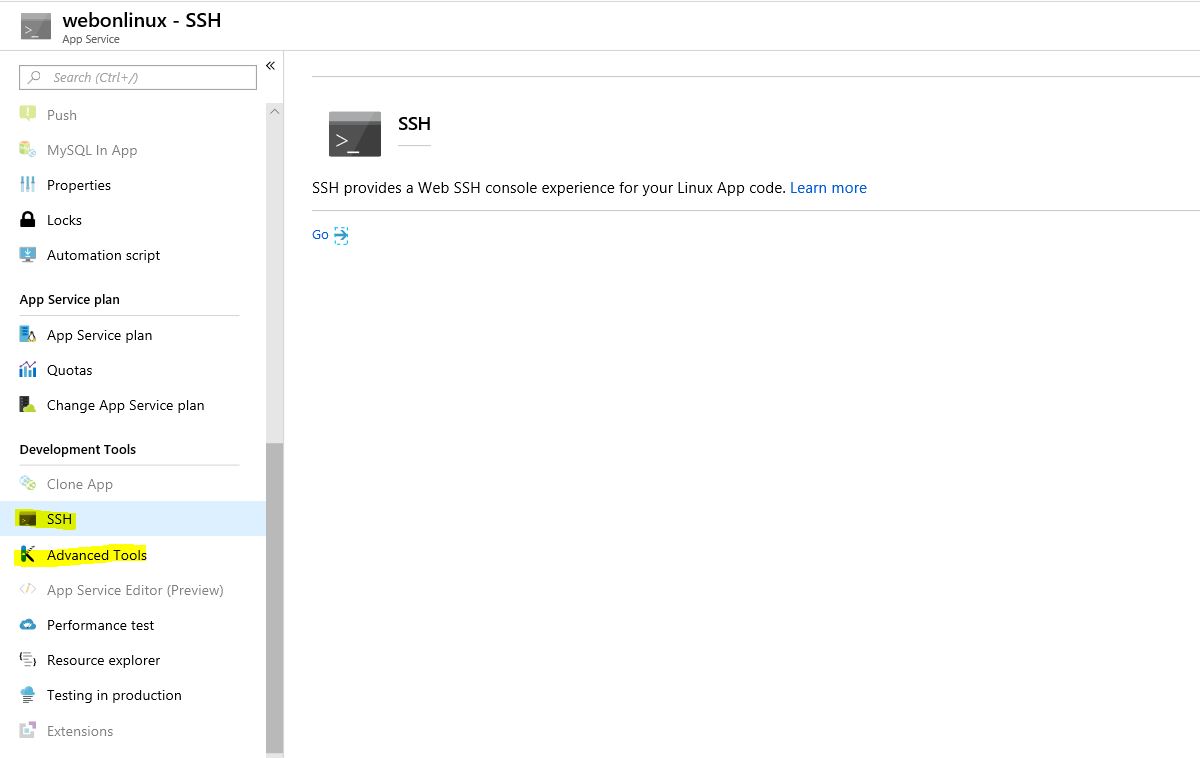
关于您的问题,当您使用CLIError创建一个TCP隧道时,似乎存在一些CLI错误"CLIError:未能连接到状态代码'404‘和原因’未找到‘的KUDU站点,而不是您自己的实际错误。您还可以在门户上使用SSH访问web应用程序Linux容器。
在公共预览中,对于给定的应用程序,我们在任何给定的时间只支持一个TCP隧道。我们计划在公共预览之后的未来版本中取消这一限制。请参阅此博客。
在预览版中,可能会有一些SSH的不舒服体验。您可以在github上查看类似的开放场景。
页面原文内容由Stack Overflow提供。腾讯云小微IT领域专用引擎提供翻译支持
原文链接:
https://stackoverflow.com/questions/53195121
复制相关文章
相似问题
腾讯云开发者

Copyright © 2013 - 2026 Tencent Cloud. All Rights Reserved. 腾讯云 版权所有
深圳市腾讯计算机系统有限公司 ICP备案/许可证号:粤B2-20090059  粤公网安备44030502008569号
腾讯云计算(北京)有限责任公司 京ICP证150476号 | 京ICP备11018762号