
推荐使用Azure App从Excel文件中读取数据?
背景
我有一个遗留站点,允许授权用户上传产品数据的Excel电子表格等。然后,该站点读取Excel工作表并将数据解压缩到SQL server中。这是一个旧的网站,它使用OLE。很老了,但很管用。
问题
我最近已经将这个站点发布到Azure应用程序服务中,但是我的代码中从Excel读取的现有部分不起作用(因为Azure没有正确的驱动程序)。
问题
我很乐意重写这部分代码,但是使用Azure应用服务从Excel读取正确的或推荐的方法是什么呢?我并不是在问一些可行的方法,我只对正确的方法感兴趣。
我所说的“推荐”是指:
- 没有不必要的复杂。保持简单。
- 很可能在未来保留微软的支持。
我已经研究过这个问题,但一直未能找到一个明确的声明,说明最好的办法。如果你对不同的方法有经验或知识,我将非常感谢你能分享你对最好的方法的结论。
回答 2
Stack Overflow用户
发布于 2018-11-08 07:44:11
应该有很多方法可以做到这一点,下面我列举了2种方法:
1.使用MS发布的DocumentFormat.OpenXml,但它有点复杂。演示代码是这里。
2.使用ExcelDataReader,它非常简单,支持两种.xls and .xlsx。您可以参考这个文章来完成它(请注意,IsFirstRowAsColumnNames属性已被放弃,您可以看到下面的代码)。
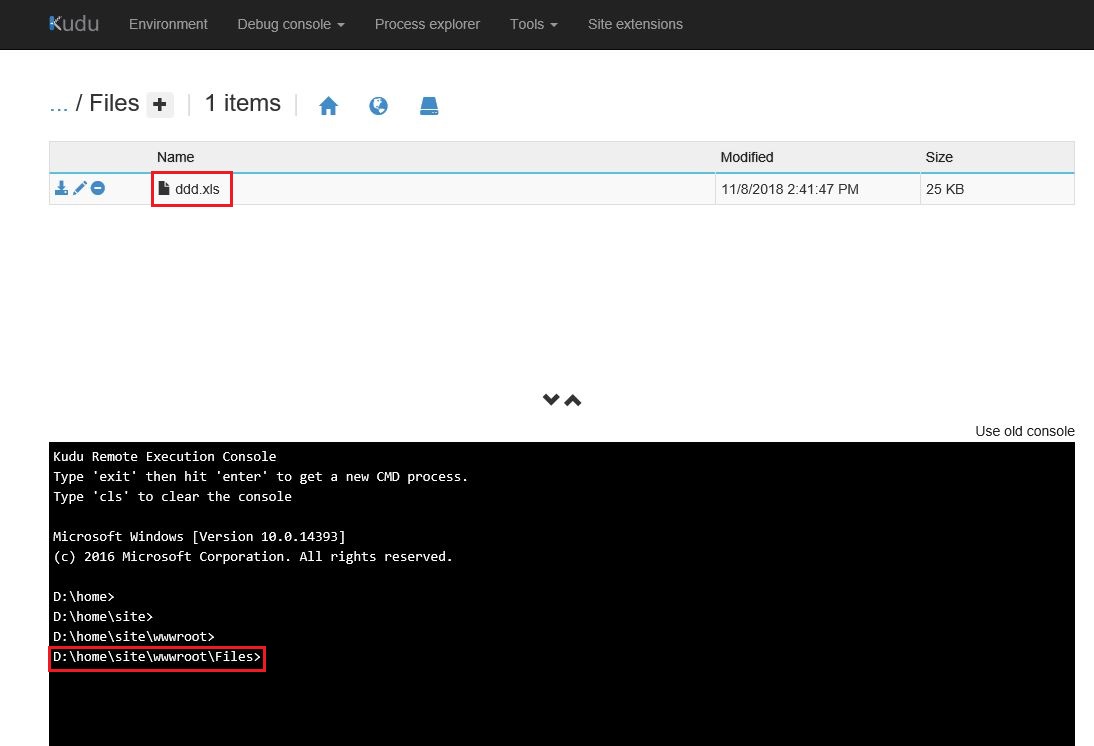
为了测试目的,我用第二种方法ExcelDataReader.Just编写了一个演示,我将excel上传到了蔚蓝的web应用程序目录中,如下所示:
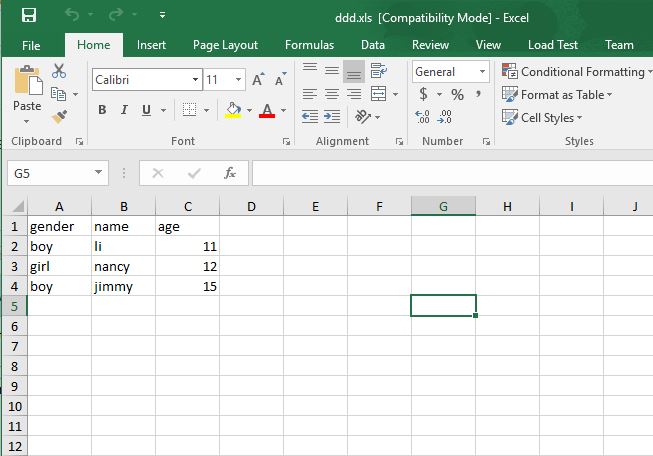
以下是excel的内容:
步骤1:创建一个asp.net MVC项目,然后通过nuget安装最新版本的ExcelDataReader和ExcelDataReader.DataSet。
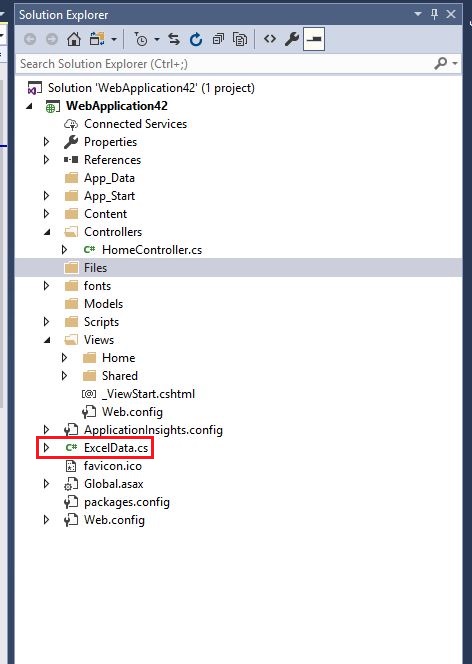
步骤2:在项目中创建用于读取excel文件的ExcelData.cs文件:
步骤3:用ExcelData.cs编写以下代码:
using ExcelDataReader;
using System;
using System.Collections.Generic;
using System.Data;
using System.IO;
using System.Linq;

namespace WebApplication42
{
    public class ExcelData
    {
        string _path;
        public ExcelData(string path)
        {
            _path = path;
        }

        public IExcelDataReader GetExcelReader()
        {
            FileStream stream = File.Open(_path, FileMode.Open, FileAccess.Read);
            IExcelDataReader reader = null;
            try
            {
                if (_path.EndsWith(".xls"))
                {
                    reader = ExcelReaderFactory.CreateBinaryReader(stream);
                }
                if (_path.EndsWith(".xlsx"))
                {
                    reader = ExcelReaderFactory.CreateOpenXmlReader(stream);
                }

                return reader;
            }
            catch (Exception)
            {
                throw;
            }
        }

        //read the sheets name if you need
        public IEnumerable<string> GetWorksheetNames()
        {
            var reader = this.GetExcelReader();
            var workbook = reader.AsDataSet();
            var sheets = from DataTable sheet in workbook.Tables select sheet.TableName;
            return sheets;
        }

        //read data in a specified sheet
        public IEnumerable<DataRow> GetData(string sheet)
        {

            var reader = this.GetExcelReader();
            var workSheet = reader.AsDataSet(new ExcelDataSetConfiguration()
            {
                ConfigureDataTable = (_) => new ExcelDataTableConfiguration()
                {
                    //indicates if use the header values
                    UseHeaderRow = true
                }

            }).Tables[sheet];

            var rows = from DataRow a in workSheet.Rows select a;
            return rows;
        }

    }
}
步骤4:在控制器中,调用read方法:
        public ActionResult Excels()
        {
            ViewBag.Message = "the data from excel:";
            string data = "";

            //your excel path after uploaded, here I hardcoded it for test only
            string path = @"D:\home\site\wwwroot\Files\ddd.xls";
            var excelData = new ExcelData(path);
            var people = excelData.GetData("sheet1");

            foreach (var p in people)
            {
                for (int i=0;i<=p.ItemArray.GetUpperBound(0);i++)
                {
                    data += p[i].ToString()+",";
                }

                data += ";";
            }

            ViewBag.Message += data;

            return View();
        }
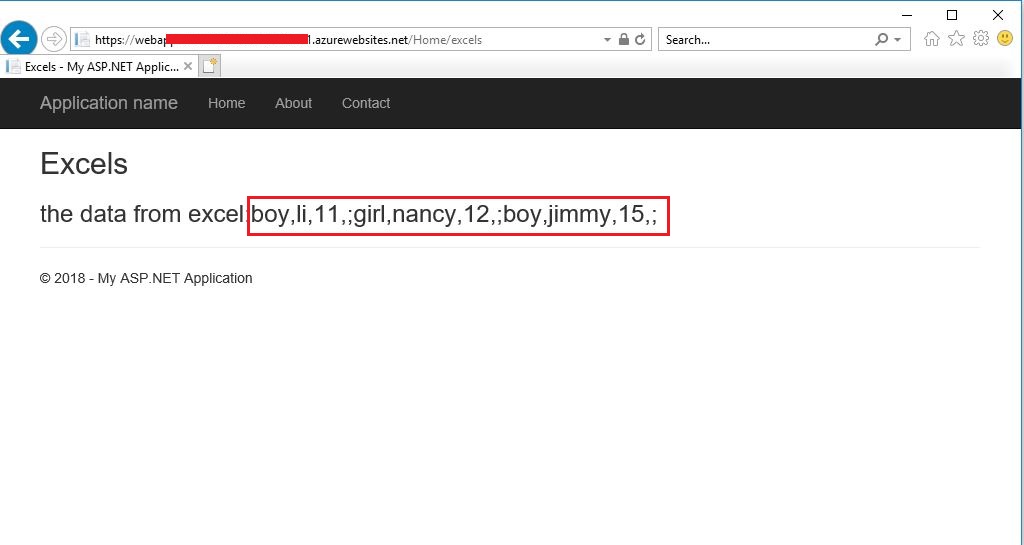
步骤5:在发布到azure之后,启动站点并查看结果-> excel中的所有数据都被读取:
Stack Overflow用户
发布于 2018-11-13 15:37:32
因此,我使用https://github.com/dotnetcore/NPOI进行Excel,并在Azure上进行了测试,它非常好。我成功地进口了50,000份记录。但是请注意,如果您想要导入大约10万条记录,您可能会收到请求超时错误,对于长期运行的任务,您应该更愿意创建web作业/函数。请记住,Azure的requestTimeout限制为230。在选择您的实现之前,考虑以下链接将是很好的。
https://stackoverflow.com/questions/53189639
复制相似问题
腾讯云开发者

Copyright © 2013 - 2026 Tencent Cloud. All Rights Reserved. 腾讯云 版权所有
深圳市腾讯计算机系统有限公司 ICP备案/许可证号:粤B2-20090059  粤公网安备44030502008569号
腾讯云计算(北京)有限责任公司 京ICP证150476号 | 京ICP备11018762号