
C#代码中的语法问题。在代码中创建逻辑错误
C#代码中的语法问题。在代码中创建逻辑错误
提问于 2018-11-06 00:47:21
pi的值可以按照以下顺序创建:4-4/3+4/5-4/7+ 4/9。
编写Windows窗体应用程序,该应用程序提示用户输入多个术语,并计算指定项数的序列值。我无法舍弃由此产生的价值。
想象一下,如果这是设计页面(我正在使用Visual 2017)
输入术语#:
计算//这是一个按钮
(*label 2)在插入文本框输入值项后近似于pi的值。
(*标签3) pi印刷值
那么,如何获得文本框的正确输入呢?把这两条信息都打印出来?
public partial class Form1 : Form
{
    public Form1()
    {
        InitializeComponent();
    }

    private void calculateButton_Click(object sender, EventArgs e)
    {
       // Need Variable names for input of textbox. Textbox must be a double value

        if termsTextBox?
        //termsTextBox is the name of the textbox I named.

    }

    private void termsTextBox_TextChanged(object sender, EventArgs e)
    {

    }

    private void Form1_Load(object sender, EventArgs e)
    {
        Console.WriteLine("Approximate value of pi after" + "" + "terms");
        Console.WriteLine(Math.PI);
    }
}回答 2
Stack Overflow用户
发布于 2018-11-06 03:12:49
double double;
string textValue = termsTextBox.Text.Trim();
if (textValue != "")
{
    double = Convert.ToDouble(textValue);
}
尽管您还应该使用try/catch来确保输入实际上可以在没有错误的情况下被转换。
Stack Overflow用户
发布于 2018-11-06 18:07:38
解决办法如下:
public partial class Form1 : Form
{
    public Form1()
    {
        InitializeComponent();
    }

    private void termTextBox_TextChanged(object sender, EventArgs e)
    {
        int numberOfTerms;
        if (Int32.TryParse(termTextBox.Text, out numberOfTerms) && numberOfTerms > 0)
        {
          this.approxLbl.Text = "Approximate the value of pi after " + numberOfTerms + " terms";
          this.calculateBtn.Enabled = true;
        }
        else
        {
            this.approxLbl.Text = "Number of terms must be a positive integer.";
        }
    }

    private void calculateBtn_Click(object sender, EventArgs e)
    {
        //the approximation of pi is given by 4/1 – 4/3 + 4/5 – 4/7 + 4/9 ... number of terms
        double numerator = 4;
        double denominator = 1;

        int numberOfTerms;
        Int32.TryParse(termTextBox.Text, out numberOfTerms);

        double approximation = 0;

        for (int i = 1; i <= numberOfTerms; i++)
        {
            //change the operation each cycle
            if(i % 2 != 0)
            {
                approximation += numerator / denominator;
            }
            else
            {
                approximation -= numerator / denominator;
            }
            denominator += 2;
        }

        this.resultLbl.Text = "The approximation is " + approximation;
    }
}
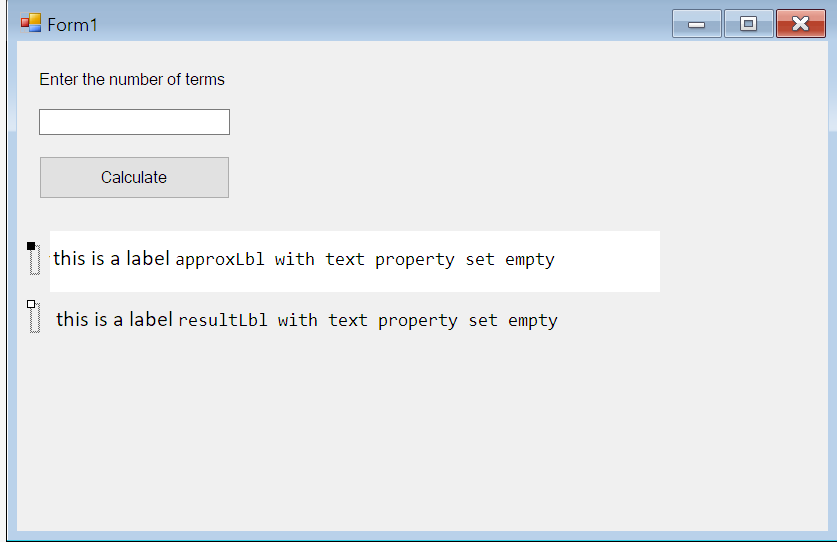
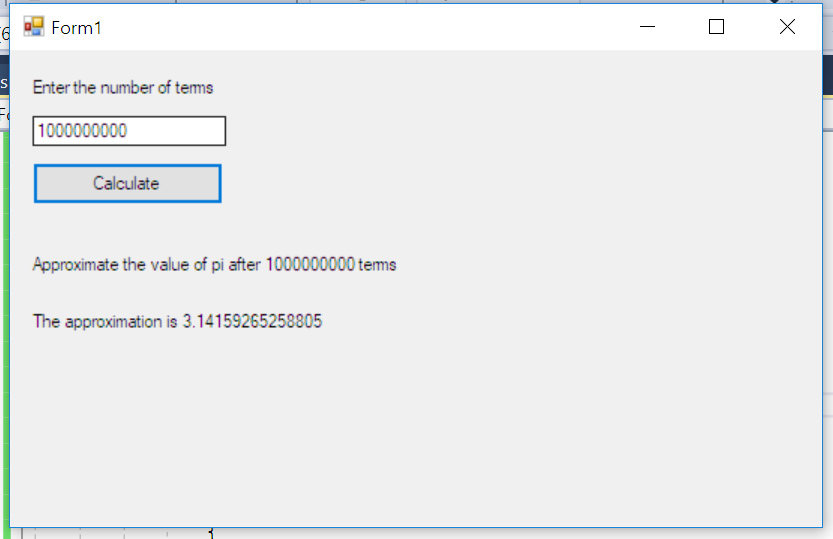
您的表单应该如下所示:
结果:
希望它能帮上忙
页面原文内容由Stack Overflow提供。腾讯云小微IT领域专用引擎提供翻译支持
原文链接:
https://stackoverflow.com/questions/53164330
复制相关文章
相似问题
腾讯云开发者

Copyright © 2013 - 2026 Tencent Cloud. All Rights Reserved. 腾讯云 版权所有
深圳市腾讯计算机系统有限公司 ICP备案/许可证号:粤B2-20090059  粤公网安备44030502008569号
腾讯云计算(北京)有限责任公司 京ICP证150476号 | 京ICP备11018762号