
Matplotlib plt.plot_date()如何根据第三列为点设置颜色
Matplotlib plt.plot_date()如何根据第三列为点设置颜色
提问于 2018-11-02 14:57:16
我的数据如下:
      time             distance color
1   2017-10-10 14:04:14 0.006   yellow
2   2017-10-10 14:04:15 0.011   green
3   2017-10-10 14:04:46 0.051   green
4   2017-10-10 14:04:56 0.063   red
5   2017-10-10 14:05:06 0.073   red
6   2017-10-10 14:05:16 0.081   green
7   2017-10-10 14:05:26 0.095   green
8   2017-10-10 14:05:36 0.103   green
9   2017-10-10 14:05:46 0.113   green
10  2017-10-10 14:05:56 0.124   green
11  2017-10-10 14:06:06 0.134   green
12  2017-10-10 14:06:16 0.149   yellow
13  2017-10-10 14:06:26 0.158   yellow
我的代码是这样的:
fig, ax1 = plt.subplots(figsize=(30,10))
color = 'tab:red'
ax1.plot_date(df['time'], df['distance'], marker='o',color='red')
ax1.set_xlabel('Time', fontsize=20)
ax1.set_ylabel('distance', color=color, fontsize=20)
ax1.set_ylim(bottom=0,top=80)
ax1.set_xlim(left=xmin, right=xmax) # I set the boundary for x-axis
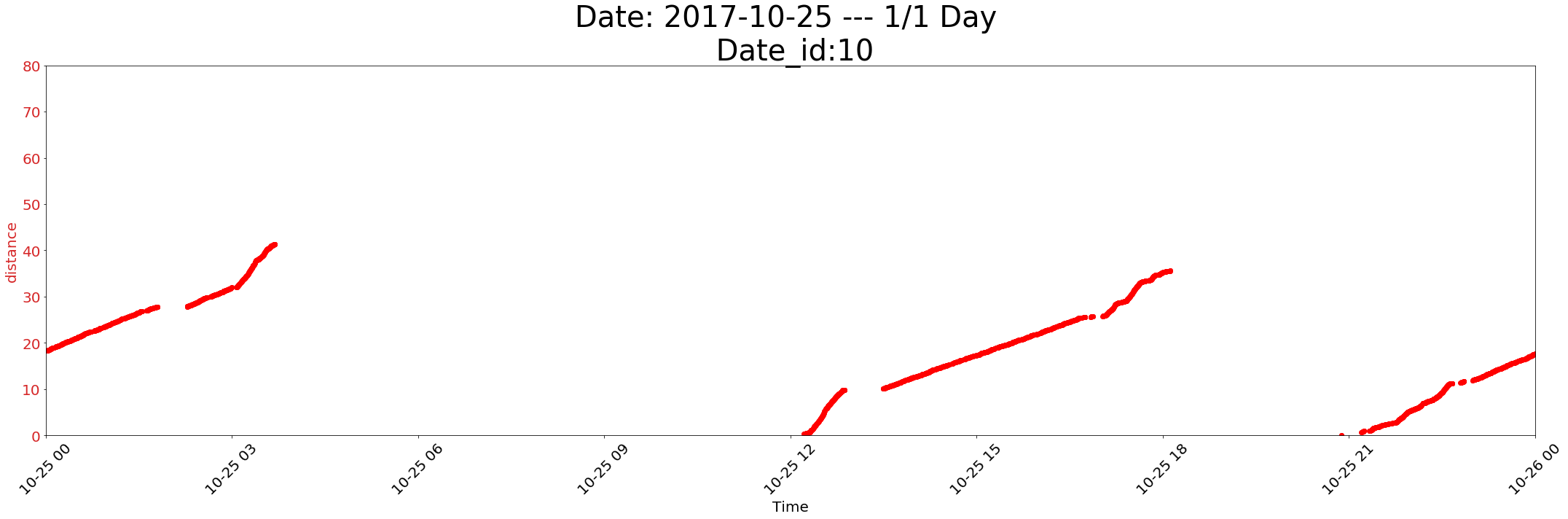
我想根据列df['color']为每个点指定不同的颜色。如果我将代码更改为,它就会产生错误。
ax1.plot_date(df['time'], df['distance'], marker='o',color=df['color']) 错误:
ValueError: Invalid RGBA argument: 0      yellow
1       yellow
2       green
3       green
4       red
5       red
6 green如果任何人知道如何使用plt.plot_date()的第三列为不同类别的标签设置颜色,我将非常感激。
注意:我使用plt.plot_date()而不是plt.scatter(),因为它允许我选择在特定图形上显示的时间框架,并更容易地设置timeTickers。
回答 1
Stack Overflow用户
回答已采纳
发布于 2018-11-02 15:07:56
您可以为每种颜色分别绘制groupby和绘图:
import matplotlib.pyplot as plt

fig, ax1 = plt.subplots(figsize=(30,10))
color = 'tab:red'
for pcolor, gp in df.groupby('color'):
    ax1.plot_date(gp['time'], gp['distance'], marker='o', color=pcolor)
...页面原文内容由Stack Overflow提供。腾讯云小微IT领域专用引擎提供翻译支持
原文链接:
https://stackoverflow.com/questions/53120943
复制相关文章
相似问题
腾讯云开发者

Copyright © 2013 - 2026 Tencent Cloud. All Rights Reserved. 腾讯云 版权所有
深圳市腾讯计算机系统有限公司 ICP备案/许可证号:粤B2-20090059  粤公网安备44030502008569号
腾讯云计算(北京)有限责任公司 京ICP证150476号 | 京ICP备11018762号