
安卓电视Leanback
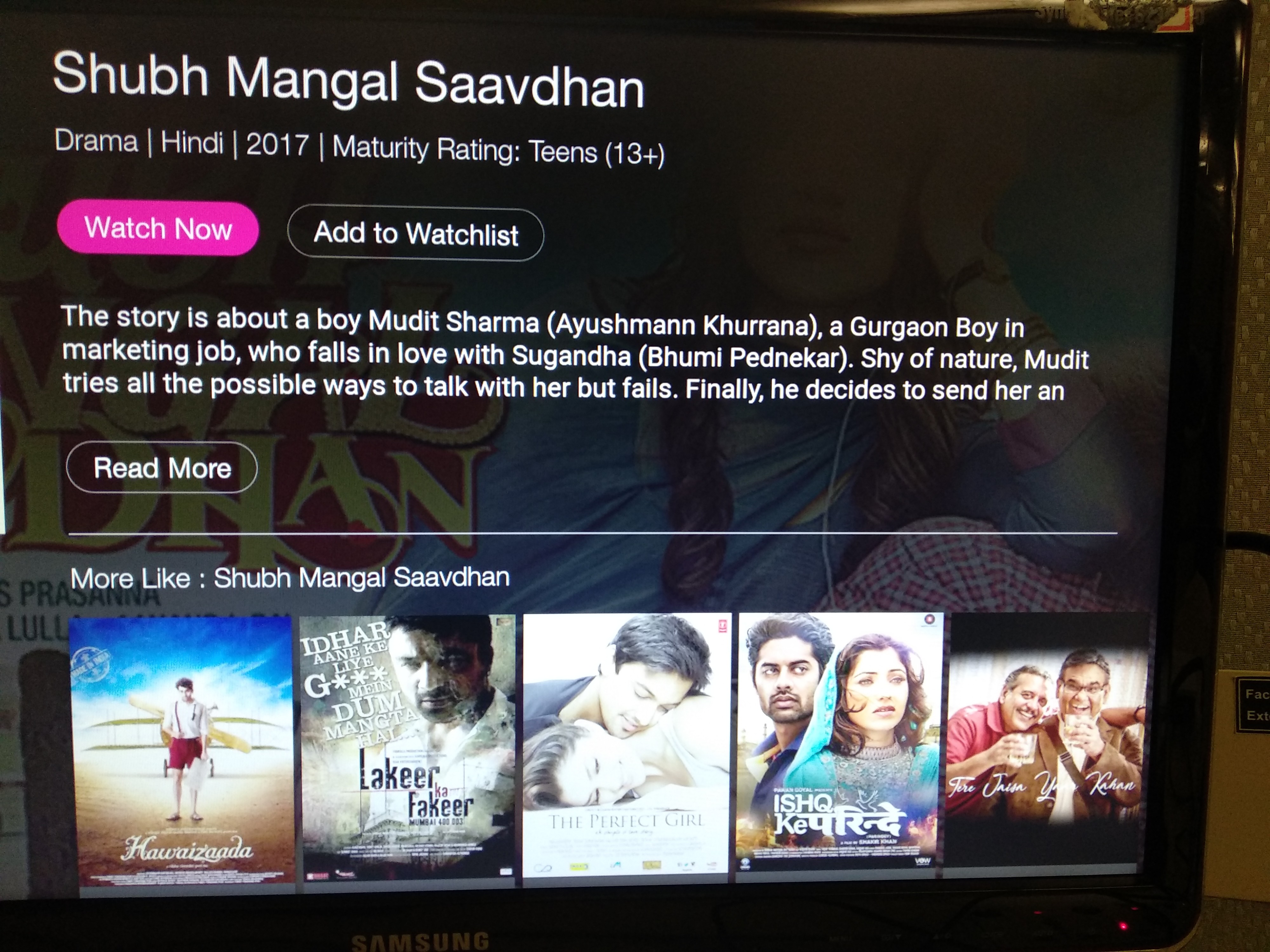
我是Android电视开发的新手。我不知道该用哪种碎片。我想要两个实现类似上述截图的布局,如jiocinema。不知何故,我在活动布局中使用了两个xml片段实现了它。第二个片段在点击API之后加载屏幕截图,所以它会在一段时间后加载。从上面的截图中可以看到,我想要两个parts..top的布局,一个有细节和一些按钮,下面一个是那部电影的截图列表。
在我的例子中,问题是,底部列表部分将重点放在加载这个特定的屏幕上,然后再按下按钮或任何一个按钮,它不会失去焦点,也不会出现在顶部。注意:下面的片段异步加载,因为它访问了截图urls的api。
可能我还没有为这个特殊的布局使用适当的片段。有人能指点我的代码或帮助我决定使用什么样的这种布局。因为它是可以实现的,但导航是主要的事情。
代码
活动布局
<?xml version="1.0" encoding="utf-8"?>
<RelativeLayout xmlns:android="http://schemas.android.com/apk/res/android"
    android:layout_width="match_parent"
    android:layout_height="wrap_content"
    android:background="@color/photo_label_box">
    <fragment
        android:id="@+id/detail_layout"
        android:layout_width="match_parent"
        android:name="com.DetailsActivityGame$Detalfragment"
        android:layout_height="200dp"></fragment>
    <fragment
        android:id="@+id/row_layout"
        android:layout_width="match_parent"
        android:layout_below="@+id/detail_layout"
        android:name="com.DetailsActivityGame$SampleFragmentC"
        android:layout_height="wrap_content"></fragment>
</RelativeLayout>
谢谢
回答 2
Stack Overflow用户
发布于 2018-12-12 10:47:04
尝试在RowSupportFragment支持片段中使用V4以获得所需的输出。
将布局划分为两部分布局,包括按钮、描述和下面的滚动布局(由RowSupportFragment表示)
//
<?xml version="1.0" encoding="utf-8"?>
 <LinearLayout xmlns:android="http://schemas.android.com/apk/res/android"
android:orientation="vertical" android:layout_width="match_parent"
android:layout_height="match_parent"
android:background="@color/leader_background">
<RelativeLayout
    android:layout_width="match_parent"
    android:layout_height="wrap_content"
    android:id="@+id/main_layout"
  //your own layout design for buttons and description
</RelativeLayout>
<fragment
    android:name="FragmentScreenshots"
    android:id="@+id/screenshot_fragment"
    android:layout_width="match_parent"
    android:layout_height="wrap_content"
    />
    </LinearLayout>
//----------------Detailfragment
public static class Detailfragment extends Fragment {
    public  Detailfragment(){ }

 @Override
    public View onCreateView(LayoutInflater inflater, ViewGroup container, Bundle savedInstanceState) {
        final View view = inflater.inflate(R.layout.detail_layout, container, false);
        //————————your own implementation—————————————————————————
        return view;
     }
     public static class FragmentScreenshots extends RowsSupportFragment {
         private ArrayObjectAdapter mRowsAdapter = null;
          public FragmentScreenshots() {
            mRowsAdapter = new ArrayObjectAdapter(new ShadowRowPresenterSelector());
            setAdapter(mRowsAdapter);
           }

        @Override
        public void onCreate(Bundle savedInstanceState) {
            super.onCreate(savedInstanceState);
          //———————Provide data accordinally———————————
             List<ScreenshotItem> list;

             // Add a Related items row
            ArrayObjectAdapter listRowAdapter = new ArrayObjectAdapter(
                    new ScreenshotCardPresenter(getActivity()));
            for (ScreenshotItem s:list)
            {
                listRowAdapter.add(s);
            }
            HeaderItem header = new HeaderItem("Screenshots");
            mRowsAdapter.add(new ListRow(header, listRowAdapter));
            setAdapter(mRowsAdapter);

            setOnItemViewClickedListener(new OnItemViewClickedListener() {
                @Override
                public void onItemClicked(Presenter.ViewHolder itemViewHolder, Object item, RowPresenter.ViewHolder rowViewHolder, Row row) {
                    if (item instanceof ScreenshotItem) {
                                                  }
                    else{
                                                }
                }
            });

            setOnItemViewSelectedListener(new OnItemViewSelectedListener() {
                @Override
                public void onItemSelected(Presenter.ViewHolder itemViewHolder, Object item, RowPresenter.ViewHolder rowViewHolder, Row row) {

                }
            });
        }

        @Override
        public void setExpand(boolean expand) {
            super.setExpand(true);
        }

        @Override
        public void setOnItemViewClickedListener(BaseOnItemViewClickedListener listener) {
            super.setOnItemViewClickedListener(listener);
        }

        @Override
        public void setOnItemViewSelectedListener(BaseOnItemViewSelectedListener listener) {
            super.setOnItemViewSelectedListener(listener);
        }
}}Stack Overflow用户
发布于 2018-11-02 10:26:14
你必须用BrowseFragment来达到你的目的。它由一个RowsFragment和一个HeadersFragment组成。
BrowseFragment将其ObjectAdapter的元素呈现为垂直列表中的一组行。此适配器中的元素必须是Row的子类。
本教程可以帮助您开始工作。
https://stackoverflow.com/questions/53116488
复制相似问题
腾讯云开发者

Copyright © 2013 - 2026 Tencent Cloud. All Rights Reserved. 腾讯云 版权所有
深圳市腾讯计算机系统有限公司 ICP备案/许可证号:粤B2-20090059  粤公网安备44030502008569号
腾讯云计算(北京)有限责任公司 京ICP证150476号 | 京ICP备11018762号