
如何配置使用RichTextBox编辑器在SmartEdit中编辑的属性?
如何配置使用RichTextBox编辑器在SmartEdit中编辑的属性?
提问于 2018-10-25 11:04:29
我注意到,CMSParagraphComponent's content属性可以使用如下图所示的RichTextBox编辑:
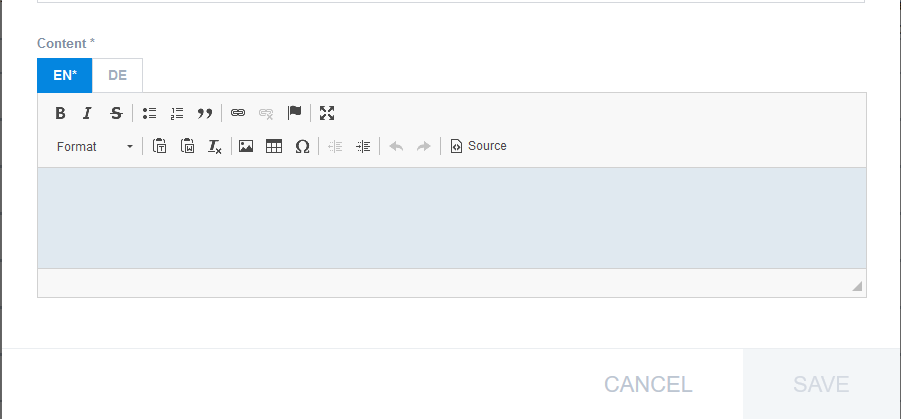
我想以同样的方式编辑我的自定义属性(使用描述的RichTextBox)。我怎么能这么做?
我尝试配置backoffice-config.xml以使用wysiwyg:
<context merge-by="type" type="MyType" component="editor-area" module="moduleBackoffice">
    <editorArea:editorArea xmlns:editorArea="http://www.hybris.com/cockpitng/component/editorArea">
        <editorArea:tab merge-mode="replace" name="hmc.properties">
            <editorArea:section  name="hmc.properties">
                <editorArea:attribute
                        editor="com.hybris.cockpitng.editor.localized(com.hybris.cockpitng.editor.wysiwyg)"
                        qualifier="customStringAttribute"/>
            </editorArea:section>
        </editorArea:tab>
    </editorArea:editorArea>
</context>
但这只反映在后台,对SmartEdit没有影响。
如何在RichTextBox中使用smartEdit?
狂妄自大版本:6.7.0.3
回答 1
Stack Overflow用户
回答已采纳
发布于 2018-10-26 18:19:16
这可以通过在Spring下面创建来解决:
<bean class="de.hybris.platform.cmsfacades.types.service.impl.DefaultComponentTypeAttributeStructure" p:typecode="MyType" p:qualifier="customStringAttribute">
    <property name="populators">
        <set>
            <ref bean="richTextComponentTypeAttributePopulator" />
            <ref bean="requiredComponentTypeAttributePopulator" />
        </set>
    </property>
</bean>我在我的${extensionname}-spring.xml,中添加了上面定义的bean,重新启动了服务器,一切都按预期进行了工作。MyType的MyType现在可以通过智能编辑配置,其方式与CMSParagraphComponent's content完全相同。
页面原文内容由Stack Overflow提供。腾讯云小微IT领域专用引擎提供翻译支持
原文链接:
https://stackoverflow.com/questions/52987757
复制相关文章
相似问题
腾讯云开发者

Copyright © 2013 - 2026 Tencent Cloud. All Rights Reserved. 腾讯云 版权所有
深圳市腾讯计算机系统有限公司 ICP备案/许可证号:粤B2-20090059  粤公网安备44030502008569号
腾讯云计算(北京)有限责任公司 京ICP证150476号 | 京ICP备11018762号