
反应-选择异步loadOptions没有正确加载选项
React异步选择loadoption有时无法加载该选项。这是一个非常奇怪的现象,在两组查询反应后,loadoptions不加载任何值,但我从日志中可以看到,从后端查询得到的结果是正确的。我的代码库完全更新了react选择新的版本并使用
“反应-选择”:"^2.1.1“
下面是我的react异步选择组件的前端代码。我确实在我的getOptions函数中使用debounce来减少后端搜索查询的数量。我想这不会引起任何问题。我想补充我在这个例子中观察到的另一点,loadoptions指示器(.)也没有出现在这个现象中。
import React from 'react';
import AsyncSelect from 'react-select/lib/Async';
import Typography from '@material-ui/core/Typography';
import i18n from 'react-intl-universal';

const _ = require('lodash');

class SearchableSelect extends React.Component {
  constructor(props) {
    super(props);
    this.state = {
      inputValue: '',
      searchApiUrl: props.searchApiUrl,
      limit: props.limit,
      selectedOption: this.props.defaultValue
    };
    this.getOptions = _.debounce(this.getOptions.bind(this), 500);
    //this.getOptions = this.getOptions.bind(this);
    this.handleChange = this.handleChange.bind(this);
    this.noOptionsMessage = this.noOptionsMessage.bind(this);
    this.handleInputChange = this.handleInputChange.bind(this);
  }

  handleChange(selectedOption) {
    this.setState({
      selectedOption: selectedOption
    });
    if (this.props.actionOnSelectedOption) {
      // this is for update action on selectedOption
      this.props.actionOnSelectedOption(selectedOption.value);
    }
  }

  handleInputChange(inputValue) {
    this.setState({ inputValue });
    return inputValue;
  }

  async getOptions(inputValue, callback) {
    console.log('in getOptions'); // never print
    if (!inputValue) {
      return callback([]);
    }
    const response = await fetch(
      `${this.state.searchApiUrl}?search=${inputValue}&limit=${
        this.state.limit
      }`
    );
    const json = await response.json();
    console.log('results', json.results); // never print
    return callback(json.results);
  }

  noOptionsMessage(props) {
    if (this.state.inputValue === '') {
      return (
        <Typography {...props.innerProps} align="center" variant="title">
          {i18n.get('app.commons.label.search')}
        </Typography>
      );
    }
    return (
      <Typography {...props.innerProps} align="center" variant="title">
        {i18n.get('app.commons.errors.emptySearchResult')}
      </Typography>
    );
  }
  getOptionValue = option => {
    return option.value || option.id;
  };

  getOptionLabel = option => {
    return option.label || option.name;
  };

  render() {
    const { defaultOptions, placeholder } = this.props;
    return (
      <AsyncSelect
        cacheOptions
        value={this.state.selectedOption}
        noOptionsMessage={this.noOptionsMessage}
        getOptionValue={this.getOptionValue}
        getOptionLabel={this.getOptionLabel}
        defaultOptions={defaultOptions}
        loadOptions={this.getOptions}
        placeholder={placeholder}
        onChange={this.handleChange}
      />
    );
  }
}

export default SearchableSelect;
编辑回应史蒂夫的答案
谢谢你的回答史蒂夫。还是没有运气。我试着根据你的反应点作出回应。
- 如果我不使用optionsValue,而是使用getOptionValue和getOptionLevel,那么查询结果没有正确加载。我的意思是有空白选项加载,没有文本值。
- 是的,您是对的,是一个返回字符串的同步方法,我不需要重写它。这个工作的好和noOptionsMessage显示得很好。感谢你指出这一点。
- actionOnSelectedOption不是一个noop方法,它可能有一些责任来执行。我尝试使用SearchableSelect作为一个独立的组件,如果我需要一些后端操作来完成这个功能,就会相应地触发它。例如,我在我的项目的用户配置文件中使用这一点,用户可以从现有的条目中更新他的学校/大学信息。当用户选择一个选项时,将执行配置文件更新责任。
- 是的你是对的。我不需要在状态下维护inputValue,谢谢。
- 我确实确保defaultOptions是一个数组。
- 我做测试没有使用退出,仍然没有运气。我正在使用取消限制后端呼叫,否则可能会有一个后端呼叫的每一个键-冲程,我肯定不想。
异步选择工作非常适合2/3查询,然后它突然停止工作。我观察到,对于这些情况,搜索指标(.)也没露出来。
非常感谢你抽出时间。
编辑2以回应Steve的回答
再次感谢你的回应。我对getOptionValue和getOptionLabel的看法错了。如果loadOptions得到响应,那么这两个函数都被调用。因此,我从我以前的代码片段中删除了我的助手optionsValue函数,并根据以下内容更新了我的代码片段。但还是没有运气。在某些情况下,异步选择无效。我试着拍一张截图一个这样的案子。我在本地数据库名"tamim“中使用了名字,但当我搜索他时,我没有得到任何响应,而是从后端得到了正确的响应。这是这个案子的截图
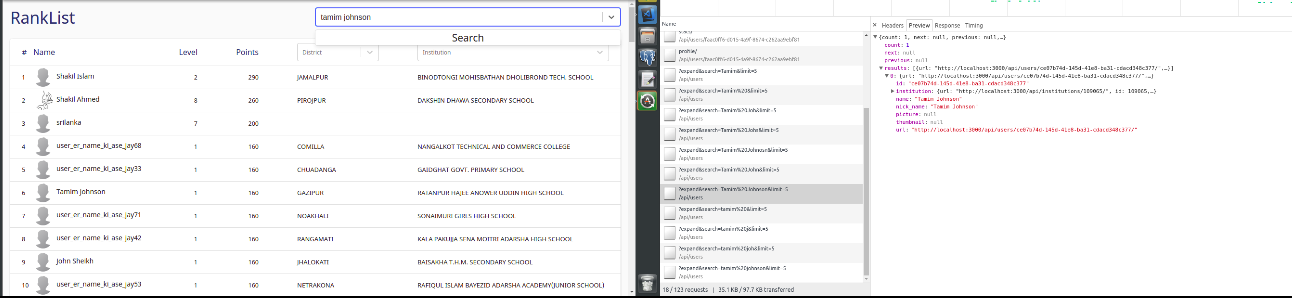
我不知道这个截图有多清晰。塔米姆·约翰逊在我的排名中也排在第六位。
先生,谢谢您的时间。我不知道我做错了什么或错过了什么。
编辑3以回应Steve的回答
这是名为"tamim“的用户搜索的预览选项卡响应。
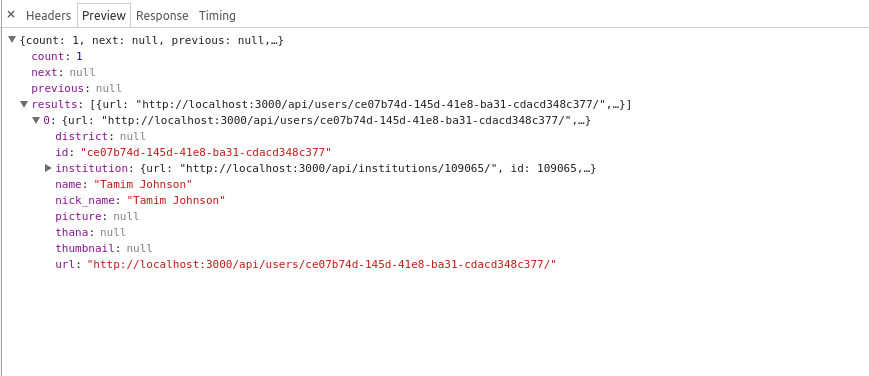
回答 3
Stack Overflow用户
发布于 2019-02-12 16:54:30
我发现人们想要寻找这个问题。因此,我张贴我的更新部分的代码,以解决这个问题。转换从异步等待到正常回调函数修复我的问题。特别感谢史蒂夫和其他人。
import React from 'react';
import AsyncSelect from 'react-select/lib/Async';
import { loadingMessage, noOptionsMessage } from './utils';
import _ from 'lodash';

class SearchableSelect extends React.Component {
  constructor(props) {
    super(props);
    this.state = {
      selectedOption: this.props.defaultValue
    };
    this.getOptions = _.debounce(this.getOptions.bind(this), 500);
  }

  handleChange = selectedOption => {
    this.setState({
      selectedOption: selectedOption
    });
    if (this.props.actionOnSelectedOption) {
      this.props.actionOnSelectedOption(selectedOption.value);
    }
  };

  mapOptionsToValues = options => {
    return options.map(option => ({
      value: option.id,
      label: option.name
    }));
  };

  getOptions = (inputValue, callback) => {
    if (!inputValue) {
      return callback([]);
    }

    const { searchApiUrl } = this.props;
    const limit =
      this.props.limit || process.env['REACT_APP_DROPDOWN_ITEMS_LIMIT'] || 5;
    const queryAdder = searchApiUrl.indexOf('?') === -1 ? '?' : '&';
    const fetchURL = `${searchApiUrl}${queryAdder}search=${inputValue}&limit=${limit}`;

    fetch(fetchURL).then(response => {
      response.json().then(data => {
        const results = data.results;
        if (this.props.mapOptionsToValues)
          callback(this.props.mapOptionsToValues(results));
        else callback(this.mapOptionsToValues(results));
      });
    });
  };

  render() {
    const { defaultOptions, placeholder, inputId } = this.props;
    return (
      <AsyncSelect
        inputId={inputId}
        cacheOptions
        value={this.state.selectedOption}
        defaultOptions={defaultOptions}
        loadOptions={this.getOptions}
        placeholder={placeholder}
        onChange={this.handleChange}
        noOptionsMessage={noOptionsMessage}
        loadingMessage={loadingMessage}
      />
    );
  }
}

export default SearchableSelect;Stack Overflow用户
发布于 2018-12-28 14:50:58
问题是,Lodash的退欧函数不适合这样做。Lodash指定
对已取消的函数的后续调用返回上次func调用的结果。
不是这样的:
随后的调用返回承诺,这将解决下一个func调用的结果。
这意味着,在对已取消的loadOptions支持函数等待期间内的每个调用实际上都返回了最后一个func调用,因此我们关心的“真实”承诺从未被订阅过。
相反,使用的是返回的函数。
例如:
import debounce from "debounce-promise";

//...
this.getOptions = debounce(this.getOptions.bind(this), 500);见完整解释https://github.com/JedWatson/react-select/issues/3075#issuecomment-450194917
Stack Overflow用户
发布于 2018-10-25 11:57:12
在代码下面可以找到一些注释。你在找这样的东西:
import React, {Component} from 'react';
import PropTypes from 'prop-types';
import AsyncSelect from 'react-select/lib/Async';
import debounce from 'lodash.debounce';
import noop from 'lodash.noop';
import i18n from 'myinternationalization';

const propTypes = {
  searchApiUrl: PropTypes.string.isRequired,
  limit: PropTypes.number,
  defaultValue: PropTypes.object,
  actionOnSelectedOption: PropTypes.func
};

const defaultProps = {
  limit: 25,
  defaultValue: null,
  actionOnSelectedOption: noop
};

export default class SearchableSelect extends Component {
  static propTypes = propTypes;
  static defaultProps = defaultProps;
  constructor(props) {
    super(props);
    this.state = {
      inputValue: '',
      searchApiUrl: props.searchApiUrl,
      limit: props.limit,
      selectedOption: this.props.defaultValue,
      actionOnSelectedOption: props.actionOnSelectedOption
    };
    this.getOptions = debounce(this.getOptions.bind(this), 500);
    this.handleChange = this.handleChange.bind(this);
    this.noOptionsMessage = this.noOptionsMessage.bind(this);
    this.handleInputChange = this.handleInputChange.bind(this);
  }

  getOptionValue = (option) => option.id;

  getOptionLabel = (option) => option.name;

  handleChange(selectedOption) {
    this.setState({
      selectedOption: selectedOption
    });
    // this is for update action on selectedOption
    this.state.actionOnSelectedOption(selectedOption.value);
  }

  async getOptions(inputValue) {
    if (!inputValue) {
      return [];
    }
    const response = await fetch(
      `${this.state.searchApiUrl}?search=${inputValue}&limit=${
      this.state.limit
      }`
    );
    const json = await response.json();
    return json.results;
  }

  handleInputChange(inputValue) {
    this.setState({ inputValue });
    return inputValue;
  }

  noOptionsMessage(inputValue) {
    if (this.props.options.length) return null;
    if (!inputValue) {
      return i18n.get('app.commons.label.search');
    }

    return i18n.get('app.commons.errors.emptySearchResult');
  }

  render() {
    const { defaultOptions, placeholder } = this.props;
    const { selectedOption } = this.state;
    return (
      <AsyncSelect
        cacheOptions
        value={selectedOption}
        noOptionsMessage={this.noOptionsMessage}
        getOptionValue={this.getOptionValue}
        getOptionLabel={this.getOptionLabel}
        defaultOptions={defaultOptions}
        loadOptions={this.getOptions}
        placeholder={placeholder}
        onChange={this.handleChange}
      />
    );
  }
}- 您不需要使用该方法来映射结果集。有些道具可以帮你处理。
- 如果您的
i18n.get()是返回字符串的同步方法,则不必覆盖整个组件(即使是样式更改)。 - 如果将
actionOnSelectedOption默认为noop方法,则不再需要条件来调用它。 - 反应-选择轨道
inputValue内部。除非您有一些外部需求(包装器),否则不需要尝试管理它的状态。 defaultOptions要么是- 默认选项数组(在筛选之前不会调用
loadOptions) true(将自动从您的loadOptions方法)
- 默认选项数组(在筛选之前不会调用
- 异步/等待函数使用允诺响应而不是
callback类型返回允诺。
我想知道,通过将getOptions()方法包装在debounce中,您是否正在破坏组件的this作用域。不能肯定,因为我以前从未使用过debounce。您可以拔出包装器,并尝试您的代码进行测试。
https://stackoverflow.com/questions/52984105
复制相似问题
腾讯云开发者

Copyright © 2013 - 2026 Tencent Cloud. All Rights Reserved. 腾讯云 版权所有
深圳市腾讯计算机系统有限公司 ICP备案/许可证号:粤B2-20090059  粤公网安备44030502008569号
腾讯云计算(北京)有限责任公司 京ICP证150476号 | 京ICP备11018762号