
如何在MATLAB中删除特定的图标菜单选项(例如,在图例菜单中)
如何在MATLAB中删除特定的图标菜单选项(例如,在图例菜单中)
提问于 2018-10-22 13:36:04
因此,在我正在处理的应用程序中,我有一个传奇(关于一个情节)。如果您右键单击它,就会出现一堆可选的操作。其中包括“翻译”、“位置”、“定位”等。我知道你可以通过设置你自己的set(axes,'uicontextmenu',newmenu)来覆盖这个菜单,但是你怎么编辑它呢?如果我想阻止用户调整图例的位置,但没有其他的,那该怎么办?
这种定制是可能的吗?这是我一直在测试/处理这个问题的代码。
x = 1:20;
y = cos(x);
z = sin(x);
plot(x,y);
hold on
plot(x,z);
lg = legend('stuff1','stuff2');
% remove the menu altogether
%set(lg,'uicontextmenu','')
我正在运行R2014b
编辑:要完全清楚,我想要能够删除一些选项,从现有的u谋文本菜单(我没有显式创建),但不是全部。
回答 1
Stack Overflow用户
回答已采纳
发布于 2018-10-22 16:09:56
您需要做的第一件事是将根对象的根对象设置为'on',这将使隐藏句柄可以被发现。然后,您只需执行以下操作:
>> hMenu = get(lg, 'UIContextMenu')  % Get the context menu handle

hMenu =

  ContextMenu with properties:

    Callback: ''
    Children: [12×1 Menu]  % This would be empty if handles were still hidden

  Show all properties

>> hItems = get(hMenu, 'Children')  % Get the menu item handles

hItems =

  12×1 Menu array:

  Menu    (scribe:legend:mcode)
  Menu    (scribe:legend:propedit)
  Menu    (scribe:legend:orientation)
  Menu    (scribe:legend:location)
  Menu    (scribe:legend:interpreter)
  Menu    (scribe:legend:font)
  Menu    (scribe:legend:linewidth)
  Menu    (scribe:legend:edgecolor)
  Menu    (scribe:legend:color)
  Menu    (scribe:legend:edittitle)
  Menu    (scribe:legend:delete)
  Menu    (scribe:legend:refresh)

>> delete(hItems(4));  % Delete the fourth item
对于属性访问,还可以使用点表示法来实现,如下所示:
delete(lg.UIContextMenu.Children(4));此外,您可以隐藏句柄并使用findall,这要求您了解要查找的对象的一些属性。例如,要查找和删除当前图中将'Label'属性设置为'Location'的菜单对象,请执行以下操作:
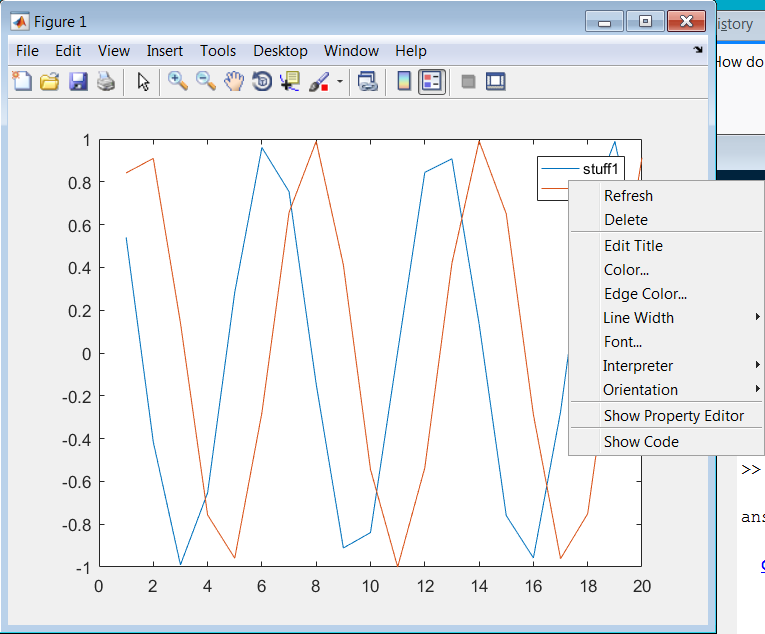
delete(findall(gcf, 'Label', 'Location'));对于以上所有内容,您可以确认"Location“选项现在已从上下文菜单中删除:
页面原文内容由Stack Overflow提供。腾讯云小微IT领域专用引擎提供翻译支持
原文链接:
https://stackoverflow.com/questions/52930755
复制相关文章
相似问题
腾讯云开发者

Copyright © 2013 - 2026 Tencent Cloud. All Rights Reserved. 腾讯云 版权所有
深圳市腾讯计算机系统有限公司 ICP备案/许可证号:粤B2-20090059  粤公网安备44030502008569号
腾讯云计算(北京)有限责任公司 京ICP证150476号 | 京ICP备11018762号