
图片编辑扩展-将图像恢复为原始图像
我正在为iOS开发一个照片编辑扩展,它捆绑在一个容器应用程序中,提供相同的照片编辑功能。
为了重用代码,我有一个视图控制器类,该类采用了所需的PHContentEditingController协议,并将其子类作为应用程序扩展的主接口和容器应用程序的“工作屏幕”。
关于编辑扩展,控制器的方法被Photos应用程序的编辑会话调用,如苹果的文档和你可以在网络上找到的各种教程中所描述的那样。
另一方面,容器应用程序上的,,首先通过UIImagePickerController类获得PHAsset实例,然后直接在"work“视图控制器上手动启动编辑会话,如下所示:
// 'work' is my view controller which adopts
// `PHContentEditingController`. 'workNavigation'
// embeds it.

let options = PHContentEditingInputRequestOptions()
options.canHandleAdjustmentData = { (adjustmentData) in
    return work.canHandle(adjustmentData)
}

asset.requestContentEditingInput(with: options, completionHandler: { [weak self] (input, options) in
    // (Called on the Main thread on iOS 10.0 and above)
    guard let this = self else {
        return
    }
    guard let editingInput = input else {
        return
    }
    work.asset = asset
    work.startContentEditing(with: editingInput, placeholderImage: editingInput.displaySizeImage!)
    this.present(workNavigation, animated: true, completion: nil)
})当用户完成编辑时,工作视图控制器调用自身的finishContentEditing(completionHandler:来完成会话:
self.finishContentEditing(completionHandler: {(output) in
    // nil output results in "Revert" prompt.
    // non-nil output results in "Modify" prompt.

    let library = PHPhotoLibrary.shared()
    library.performChanges({
        let request = PHAssetChangeRequest(for: self.asset)
        request.contentEditingOutput = output

    }, completionHandler: {(didSave, error) in
        if let error = error {
            // handle error...

        } else if didSave {
            // proceed after saving...

        } else {
            // proceed after cancellation...
        }
    })
})在编辑会话中,用户可以“清除”以前以调整数据形式传递的编辑,从而有效地将图像恢复到原来的状态。我注意到,如果我通过调用传递给finishContentEditing(completionHandler:)的以nil作为参数的完成处理程序(而不是一个有效的PHContentEditingOutput对象)来完成编辑,Photos框架将提示用户“恢复”图像,而不是“修改”它:
func finishContentEditing(completionHandler: @escaping (PHContentEditingOutput?) -> Void) {

    guard let editingInput = self.editingInput, let inputURL = editingInput.fullSizeImageURL else {
        return completionHandler(nil)
    }

    if editingInput.adjustmentData != nil && hasUnsavedEdits == false {
        // We began with non-nil adjustment data but now have
        // no outstanding edits - means REVERT:

        return completionHandler(nil)
    }

// (...proceed with writing output to url...)但是,这只在从容器应用程序运行时才能起作用。如果我尝试从扩展中尝试相同的技巧(即加载包含先前编辑的图像,重置它们,然后点击‘完成’),我会得到可怕的“无法保存更改”消息.
在照片编辑扩展内将以前的编辑恢复为图像的正确方法是什么?
回答 1
Stack Overflow用户
发布于 2019-02-01 09:13:25
几个月后,仍然没有答案,所以我勉强采用了这个解决方案(这仍然比错误警报更好):
当用户从Photos点击“完成”,并且图像没有应用到它的编辑时(或者因为用户重置了以前的编辑,或者没有对一个全新的图像应用任何更改),那么在finishContentEditing(completionHandler:)中执行以下操作
- 创建根本没有可见更改("null效果“)的调整数据,并将其存档为
Data。 - 从上面创建一个具有"null效果“数据的
PHAdjustmentData实例,并正确设置formatVersion和formatIdentifier。 - 从会话开始时传递的编辑输入创建一个
PHContentEditingOutput实例(与往常一样),并设置上面创建的调整数据。 - 从编辑输入的
inputURL属性读取未修改的图像,并将其写入未修改的到PHContentEditingOutput实例的renderedContentURL属性指定的url。 - 调用
completionHandler块,传递编辑输出实例(正常情况)。
的结果是:将图像保存在其原始状态(没有应用效果),并且不会发生警报或错误。
的缺点:库资产保持在“已编辑”状态(因为我们传递了非零编辑输出和调整数据,因此没有其他选择),所以下次用户尝试从Photos.app编辑它时,就会出现红色的“还原”按钮:

但是,在中选择“revert”结果不会对图像数据(duh!)进行可见的更改,这可能会使用户感到困惑。
--
更新
我检查了内置的“标记”扩展的功能:
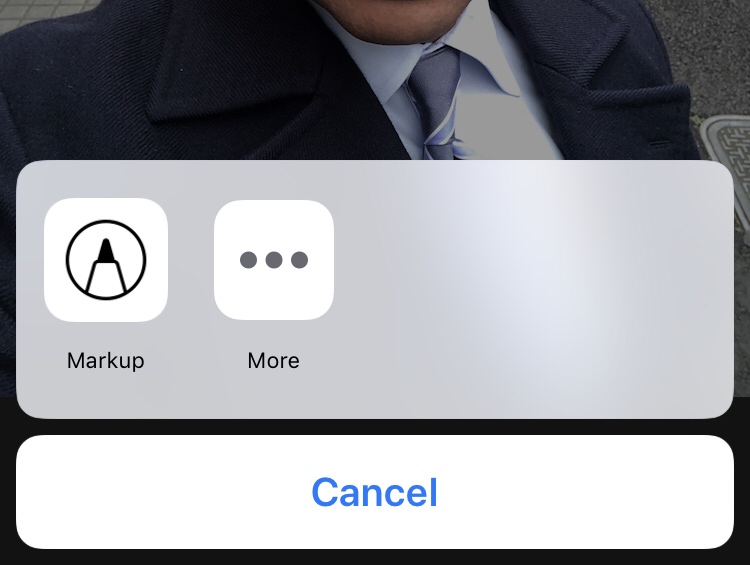
...and
https://stackoverflow.com/questions/52929378
复制相似问题
腾讯云开发者

Copyright © 2013 - 2026 Tencent Cloud. All Rights Reserved. 腾讯云 版权所有
深圳市腾讯计算机系统有限公司 ICP备案/许可证号:粤B2-20090059  粤公网安备44030502008569号
腾讯云计算(北京)有限责任公司 京ICP证150476号 | 京ICP备11018762号