
使用源映射调试openlayers 5应用程序
使用源映射调试openlayers 5应用程序
提问于 2018-10-19 14:49:31
我正在从第二层迁移到第五层,我已经下载了带有精简的js和源代码地图的分布。然后,我在index.html中包含了js文件:
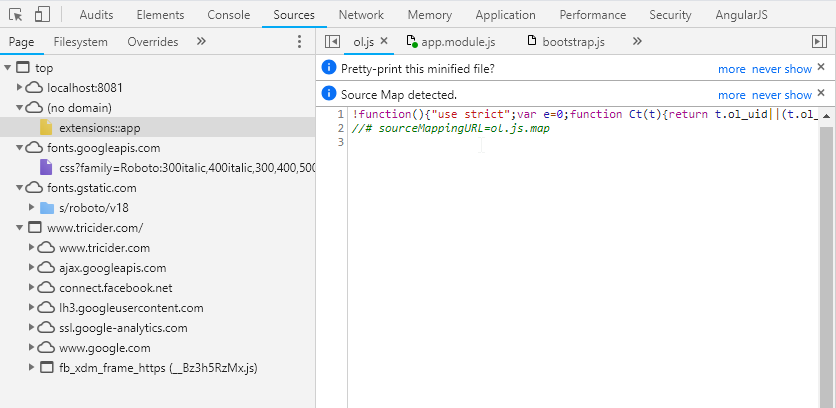
<script src="bower_components/openlayers/ol.js"></script>现在我想调试源代码。当我进入ol.js时,会有“源地图检测到”消息。问题是,我在chrome dev控制台中看不到源图文件中的源代码:
回答 1
Stack Overflow用户
回答已采纳
发布于 2018-10-20 14:56:28
目前,我正在使用ol-调试器进行调试。也许源映射是更好的调试方法,但仍然无法使其工作。我跟踪了https://github.com/openlayers/openlayers/issues/8330。它只在linux/mac上工作。因此,要编译ol-调试器So (应该安装npm):
git clone https://github.com/openlayers/openlayers.git
cd openlayers
npm install
npm install --global rollup
然后按照github问题中的步骤执行。
页面原文内容由Stack Overflow提供。腾讯云小微IT领域专用引擎提供翻译支持
原文链接:
https://stackoverflow.com/questions/52894835
复制相关文章
相似问题
腾讯云开发者

Copyright © 2013 - 2026 Tencent Cloud. All Rights Reserved. 腾讯云 版权所有
深圳市腾讯计算机系统有限公司 ICP备案/许可证号:粤B2-20090059  粤公网安备44030502008569号
腾讯云计算(北京)有限责任公司 京ICP证150476号 | 京ICP备11018762号