
gganimate累积地块0.9.9.9
我没能找到一个先前发布的问题,足以回答这个问题。在以前的文章中,接受的答案使用shadow_mark来保持先前呈现的层的持久性。
How to keep previous layers of data while doing animation in R gganimate?
在散点图中显示输出时,这是一个不错的解决方案,但它不是累积度量,而且在尝试执行时失败,例如,堆叠条形图。
请考虑以下数据。我希望使用df中的一个过渡状态来构建一个累积的叠加条形图。
df <- data.frame(t = c(2000, 2000, 2001, 2001, 2002, 2002),
                 f = c("y", "n", "y", "n", "y", "n"),
                 x = c("a", "a", "b", "c", "a", "c"),
                 y = c(2,3,5,1,4,8))
> df
     t f x y
1 2000 y a 2
2 2000 n a 3
3 2001 y b 5
4 2001 n c 1
5 2002 y a 4
6 2002 n c 8
我想显示2000年的数据,在下一层中,我想将2001年的数据作为上一层的累加。再一次,对于下一层,我想将2002年的数据作为2000年和2001年的累积数据进行添加。
这说明了为什么shadow_mark不是累积数据的解决方案:
ggplot(df, aes(x=x, y=y, fill=f)) +
geom_col() + labs(x=NULL, y=NULL, fill=NULL, title="{closest_state}") +
transition_states(t, transition_length = 2, state_length = 1) +
shadow_mark() + enter_fade() + exit_shrink() + ease_aes('sine-in-out') + theme_bw()
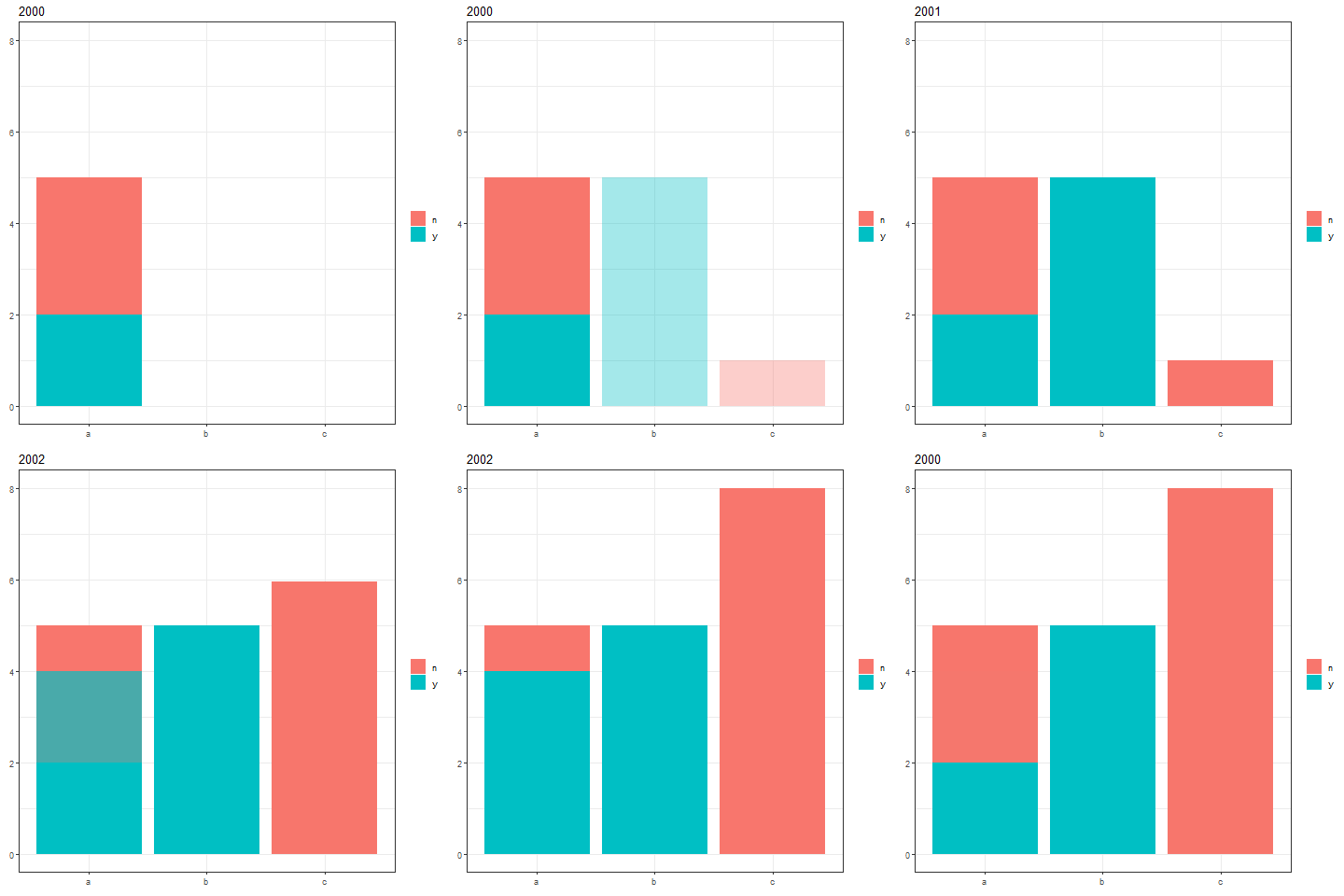
添加对shadow_mark的调用将无法实现累积图的预期结果。"a“的累计总数应为9。
对于c(2000)、c(2000,2001)和c(2000,2001,2002),可以将数据子集为3种不同的df,然后在创建新的状态列之后重新绑定,但这似乎是一种非常麻烦的方法。
是否有一种更干净的方法来使用内置在gganimate中的工具来显示累积数据?
回答 2
Stack Overflow用户
发布于 2018-10-17 23:04:52
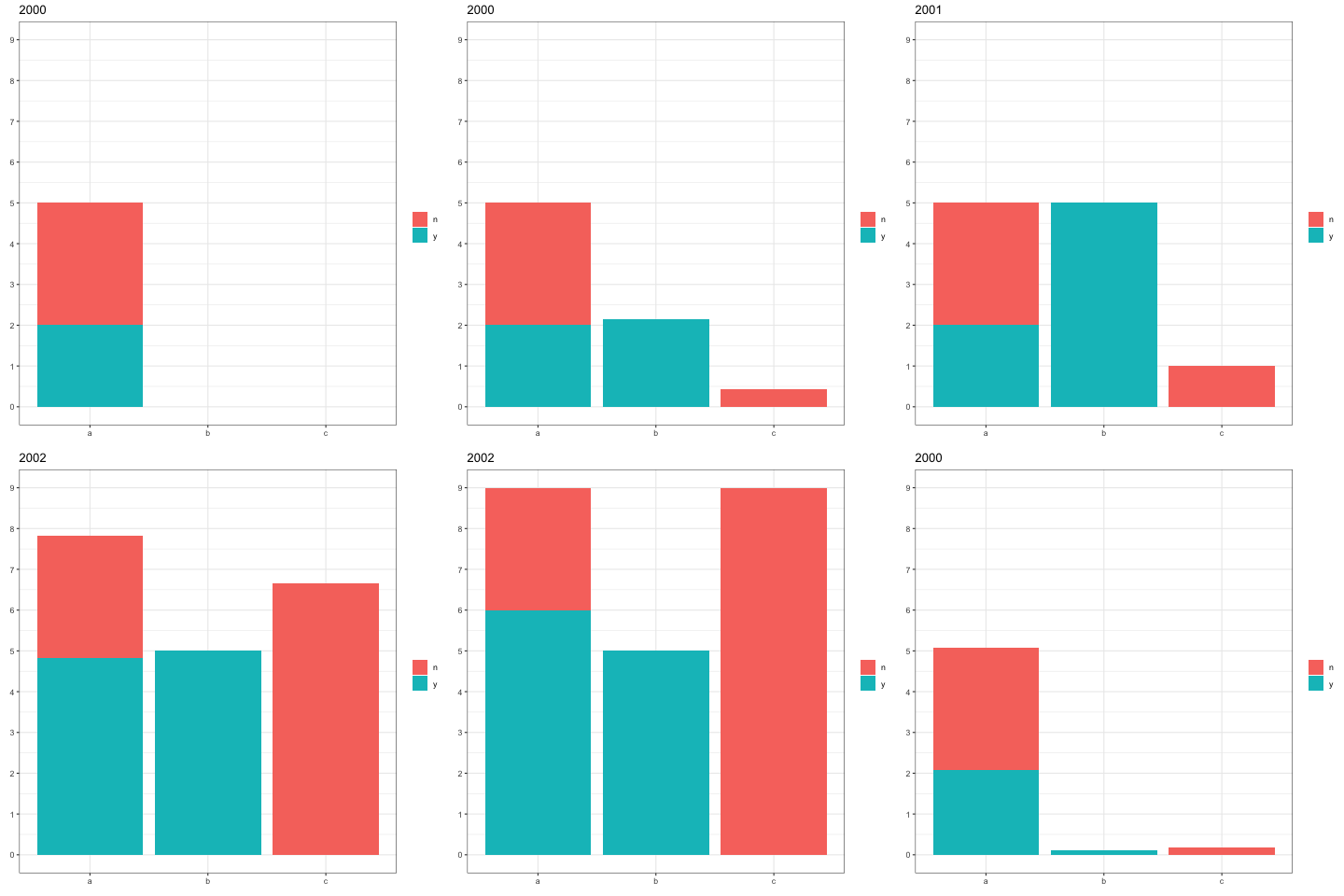
您可以在数据中创建一个新列,其中包含每年的累加结果,并直接绘制该列。在下面的代码中,我们使用cumsum函数来完成这个任务。我们还使用complete来确保f和x的每个组合都有一个t行(在添加的行中设置y=0 )。如果我们不这样做,当某些年份(t值)缺少f和x的某些组合时,累积和将是不正确的。所有的数据转换都是通过一个dplyr管道实时完成的:
library(tidyverse)
library(gganimate)

ggplot(df %>%
         complete(t, nesting(f, x), fill=list(y=0)) %>%
         arrange(t) %>%
         group_by(x,f) %>%
         mutate(y_cum = cumsum(y)),
       aes(x=x, y=y_cum, fill=f)) +
  geom_col() +
  labs(x=NULL, y=NULL, fill=NULL, title="{closest_state}") +
  transition_states(t, transition_length = 2, state_length = 1) +
  enter_fade() + ease_aes('sine-in-out') +
  theme_bw() +
  scale_y_continuous(breaks=0:10)
Stack Overflow用户
发布于 2021-05-28 20:40:44
我发现,对于直方图,诀窍是复制早期的转换值,以确保累积构建。
# packages my mac needs for gganimate to work
if (!require("pacman")) install.packages("pacman")
pacman::p_load(dplyr, gganimate, gifski, png)

# vector of values to plot in histogram
sampling_dist_v1 <- rnorm(1e3)

# create a transition sequence variable
init_seq <- c(1, rep(2,10), rep(3,10))

observed_rates <-
  tibble(
    observed_rate = sampling_dist_v1,
    transition_sequence = c(init_seq, rep(4, length(sampling_dist_v1) - length(init_seq)))
  )

# duplicate earlier entries to ensure animation is cumulative
t_sub_4 <-
  observed_rates %>%
  filter(transition_sequence < 4) %>%
  mutate(transition_sequence = 4)

t_sub_3 <-
  observed_rates %>%
  filter(transition_sequence < 3) %>%
  mutate(transition_sequence = 3)

t_sub_2 <-
  observed_rates %>%
  filter(transition_sequence < 2) %>%
  mutate(transition_sequence = 2)

observed_rates <-
  bind_rows(
    observed_rates,
    t_sub_4,
    t_sub_3,
    t_sub_2
  )

# animate
anim <- observed_rates %>%
  ggplot(aes(x = observed_rate)) +
  geom_histogram(binwidth = .25, fill = 'blue') +
  transition_states(
    transition_sequence,
    state_length = 4,
    wrap = FALSE
    )

[![enter image description here][1]][1]


[1]: https://i.stack.imgur.com/vyJ8m.gifhttps://stackoverflow.com/questions/52864445
复制相似问题
腾讯云开发者

Copyright © 2013 - 2026 Tencent Cloud. All Rights Reserved. 腾讯云 版权所有
深圳市腾讯计算机系统有限公司 ICP备案/许可证号:粤B2-20090059  粤公网安备44030502008569号
腾讯云计算(北京)有限责任公司 京ICP证150476号 | 京ICP备11018762号