
detailTextLabel of UITableViewHeaderFooterView
detailTextLabel of UITableViewHeaderFooterView
提问于 2018-10-15 12:34:57
我得到了一个UITableView,并希望定制它的sectionHeader。我的目标是使用Autolayout实现detailTextLabel右对齐。(见照片)。许多小时我试图设置它的锚,修改了tableview.sectionHeaderHeight,与contentView头一起工作,但是我没有得到它。
有人能告诉我如何妥善处理这件事吗?我应该创建一个自定义UIView,然后将它添加到UITableViewHeaderFooterView中吗?那我怎么才能得到标签的字体属性呢?
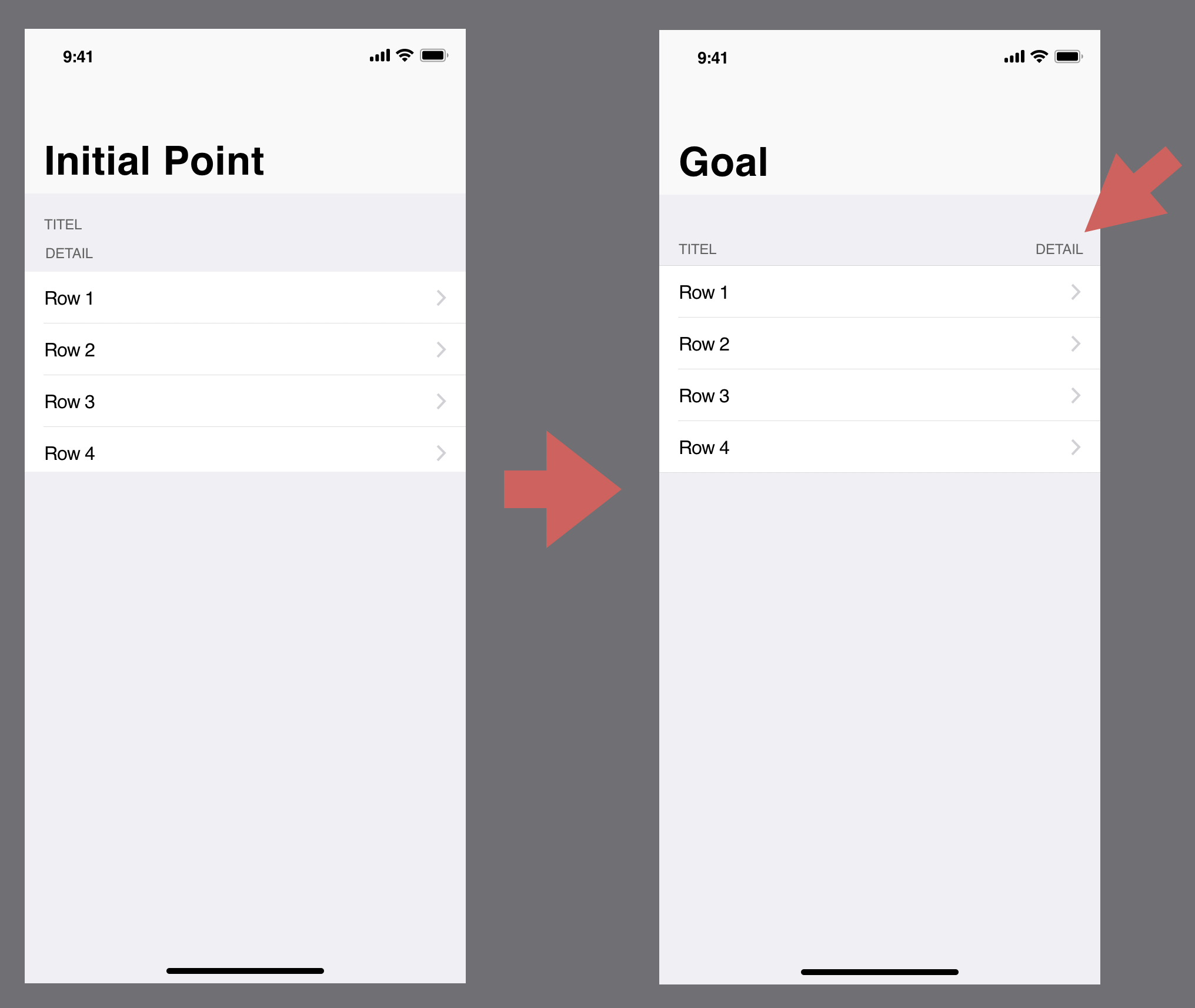
用基调创建
我的代码看起来是这样的,但我不会用它作为起点。:)
class GSTableHeaderView: UITableViewHeaderFooterView, ReusableView {

  override init(reuseIdentifier: String?) {
    super.init(reuseIdentifier: reuseIdentifier)
  }

  func configure() {
    setupSubviews()
    setupConstraints()
  }

  func setupSubviews() {
    guard let detailTextLabel = detailTextLabel, let textLabel = textLabel else { return }
    contentView.addSubview(detailTextLabel)
  }

  func setupConstraints() {
    guard let detailTextLabel = detailTextLabel, let textLabel = textLabel else { return }
    detailTextLabel.anchor(top: nil, leading: nil, bottom: contentView.bottomAnchor, trailing: contentView.trailingAnchor, paddingTop: 0, paddingLeading: 0, paddingBottom: 0, paddingTrailing: 16, width: 0, height: 0)
    detailTextLabel.centerYAnchor.constraint(equalTo: textLabel.centerYAnchor).isActive = true
  }

  required init?(coder aDecoder: NSCoder) {
    fatalError("init(coder:) has not been implemented")
  }
}lazy var tableView: UITableView = {
let tableview = UITableView(frame: .zero, style: .grouped)
tableview.dataSource = self
tableview.delegate = self
tableview.showsHorizontalScrollIndicator = false
tableview.rowHeight = 44
tableview.sectionHeaderHeight = 70
tableview.estimatedSectionHeaderHeight = 70
tableview.isScrollEnabled = false
tableview.isUserInteractionEnabled = true
tableview.register(GSAltDetailTableViewCell.self, forCellReuseIdentifier: GSAltDetailTableViewCell.reuseIdentifier)
tableview.register(GSTableHeaderView.self, forHeaderFooterViewReuseIdentifier: GSTableHeaderView.reuseIdentifier)
return tableview
}()
func tableView(_ tableView: UITableView, viewForHeaderInSection section: Int) -> UIView? {
let header = tableView.dequeueReusableHeaderFooterView(withIdentifier: GSTableHeaderView.reuseIdentifier) as! GSTableHeaderView
header.textLabel?.text = "Details"
header.detailTextLabel?.text = "Expand all"
header.tag = section
header.configure()
return header
}回答 1
Stack Overflow用户
发布于 2018-10-15 12:45:00
使用xib文件创建CustomSectionHeaderView:
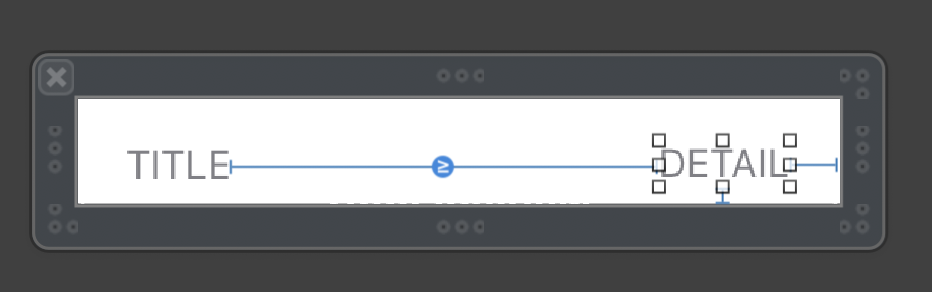
你们班:
class CustomSectionHeaderView: UIView {

    @IBOutlet weak var titleLabel: UILabel!
    @IBOutlet weak var detailLabel: UILabel!

    class func fromNib() -> CustomSectionHeaderView {
        return UINib(nibName: String(describing: self), bundle: nil).instantiate(withOwner: nil, options: nil)[0] as! CustomSectionHeaderView
    }

    override func awakeFromNib() {
        super.awakeFromNib()

    }
}
在ViewContoller中:
var headerSectionView = CustomSectionHeaderView.fromNib()

func tableView(_ tableView: UITableView, viewForHeaderInSection section: Int) -> UIView? {

    headerSectionView.titleLabel.text = "TITLE"
    headerSectionView.detailLabel.text = "DETAILS"

    //or if you need
    //headerSectionView.detailLabel.isHidden = true

    return headerSectionView
}页面原文内容由Stack Overflow提供。腾讯云小微IT领域专用引擎提供翻译支持
原文链接:
https://stackoverflow.com/questions/52816918
复制相关文章
相似问题
腾讯云开发者

Copyright © 2013 - 2026 Tencent Cloud. All Rights Reserved. 腾讯云 版权所有
深圳市腾讯计算机系统有限公司 ICP备案/许可证号:粤B2-20090059  粤公网安备44030502008569号
腾讯云计算(北京)有限责任公司 京ICP证150476号 | 京ICP备11018762号