
如何使最左边的列与垂直表中的内容相匹配?
如何使最左边的列与垂直表中的内容相匹配?
提问于 2018-10-15 11:10:44
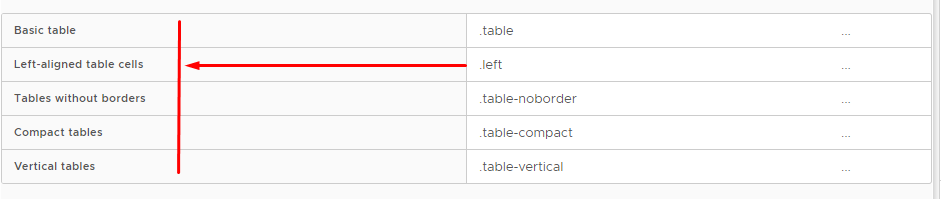
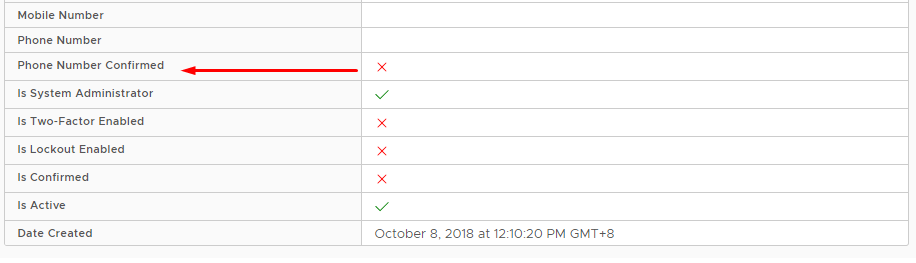
是否有办法使最左边的列与垂直表中的内容相匹配?
预期:
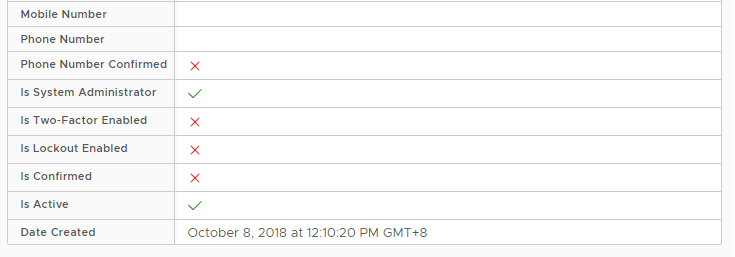
实际:
回答 2
Stack Overflow用户
回答已采纳
发布于 2018-10-16 18:29:37
下面是一种使用css自动将列宽度与其内容相匹配的方法。在您想要适应内容的th元素上,添加以下类:
.auto-fit {
  width: 1px;
  white-space: nowrap;
}运行代码的StackBlitz在这里:https://stackblitz.com/edit/so-52815432-auto-fit-width-to-content
Stack Overflow用户
发布于 2018-10-18 06:40:07
.auto-fit-vertical th {
  width: 1px;
  white-space: nowrap;
}

.auto-fit-vertical td {
    width:100%;
}<table class="table table-compact table-vertical auto-fit-vertical">
<tbody>
<tr>
<th>Username</th>
<td style="font-weight: bold">{{user?.userName}}</td>
</tr>
<tr>
<th>Email</th>
<td>{{user?.email}}</td>
</tr>
<tr>
<th>Email Confirmed</th>
<td [ngStyle]="{ color: user?.emailConfirmed ? 'green' : 'red' }">
<clr-icon [attr.shape]="user?.emailConfirmed ? 'check' : 'times'"></clr-icon>
</td>
</tr>
<tr>
<th>Recovery Email</th>
<td>{{user?.recoveryEmail}}</td>
</tr>
<tr>
<th>Mobile Number</th>
<td>{{user?.mobileNo}}</td>
</tr>
<tr>
<th>Phone Number</th>
<td>{{user?.phoneNumber}}</td>
</tr>
<tr>
<th>Phone Number Confirmed</th>
<td [ngStyle]="{ color: user?.phoneNumberConfirmed ? 'green' : 'red' }">
<clr-icon [attr.shape]="user?.phoneNumberConfirmed ? 'check' : 'times'"></clr-icon>
</td>
</tr>
<tr>
<th>Is System Administrator</th>
<td [ngStyle]="{ color: user?.isSystemAdministrator ? 'green' : 'red' }">
<clr-icon [attr.shape]="user?.isSystemAdministrator ? 'check' : 'times'"></clr-icon>
</td>
</tr>
<tr>
<th>Is Two-Factor Enabled</th>
<td [ngStyle]="{ color: user?.twoFactorEanbled ? 'green' : 'red' }">
<clr-icon [attr.shape]="user?.twoFactorEanbled ? 'check' : 'times'"></clr-icon>
</td>
</tr>
<tr>
<th>Is Lockout Enabled</th>
<td [ngStyle]="{ color: user?.lockout ? 'green' : 'red' }">
<clr-icon [attr.shape]="user?.lockout ? 'check' : 'times'"></clr-icon>
</td>
</tr>
<tr>
<th>Is Confirmed</th>
<td [ngStyle]="{ color: user?.confirmed ? 'green' : 'red' }">
<clr-icon [attr.shape]="user?.confirmed ? 'check' : 'times'"></clr-icon>
</td>
</tr>
<tr>
<th>Is Active</th>
<td [ngStyle]="{ color: user?.active ? 'green' : 'red' }">
<clr-icon [attr.shape]="user?.active ? 'check' : 'times'"></clr-icon>
</td>
</tr>
<tr>
<th>Date Created</th>
<td>{{user?.dateCreated|date:'long'}}</td>
</tr>
</tbody>
</table>
页面原文内容由Stack Overflow提供。腾讯云小微IT领域专用引擎提供翻译支持
原文链接:
https://stackoverflow.com/questions/52815432
复制相关文章
相似问题
腾讯云开发者

Copyright © 2013 - 2026 Tencent Cloud. All Rights Reserved. 腾讯云 版权所有
深圳市腾讯计算机系统有限公司 ICP备案/许可证号:粤B2-20090059  粤公网安备44030502008569号
腾讯云计算(北京)有限责任公司 京ICP证150476号 | 京ICP备11018762号