
numpy中对3D数组广播操作的时间缩放
我试图在两个3D数组上播放一个简单的">“操作。一个具有维数(m,1,n),另一个维(1,m,n)。如果我改变第三维空间( n )的值,我会天真地期望计算的速度达到n。
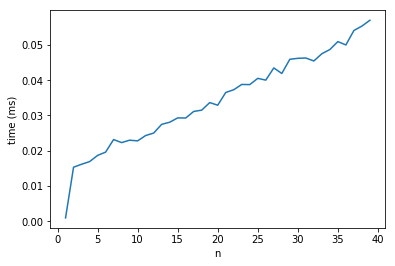
然而,当我试图明确地测量这一点时,我发现当n从1增加到2时,大约因子10的计算时间会增加,之后,标度是线性的。
为什么从n=1到n=2的计算时间会急剧增加?我假设它是numpy中内存管理的一个工件,但我正在寻找更多的细节。
代码附在下面,并附有生成的图。
import numpy as np
import time
import matplotlib.pyplot as plt

def compute_time(n):

    x, y = (np.random.uniform(size=(1, 1000, n)),
            np.random.uniform(size=(1000, 1, n)))

    t = time.time()
    x > y
    return time.time() - t

a = [
        [
            n, np.asarray([compute_time(n)
            for _ in range(100)]).mean()
        ]
        for n in range(1, 30, 1)
    ]

a = np.asarray(a)
plt.plot(a[:, 0], a[:, 1])
plt.xlabel('n')
plt.ylabel('time(ms)')
plt.show()播放操作的时间图
回答 2
Stack Overflow用户
发布于 2018-10-12 10:02:44
我无法证明这一点,但我非常肯定,这是由于一个只在n==1可用的简单优化。
目前,numpy ufunc实现基于计算机生成的内部循环代码,该代码映射到一个简单的C循环。封闭循环需要使用完全成熟的迭代器对象,这取决于有效负载,即最内部循环的大小和原子操作的成本可能是一个很大的开销。
现在,在n==1中,问题本质上是2D的(numpy足够聪明地检测到这一点),内部循环大小为1000,因此迭代器对象有1000个步骤。从n==2向上看,最内部循环的大小为n,迭代器对象有1,000,000个步骤,这说明了您所观察到的跳转。
正如我说的,我不能证明它,但我可以让它看起来可信:如果我们把变量维数移到前面,那么最里面的循环的大小是恒定的1000,外循环在1000个迭代步骤中线性增长。事实上,这使得跳跃消失了。
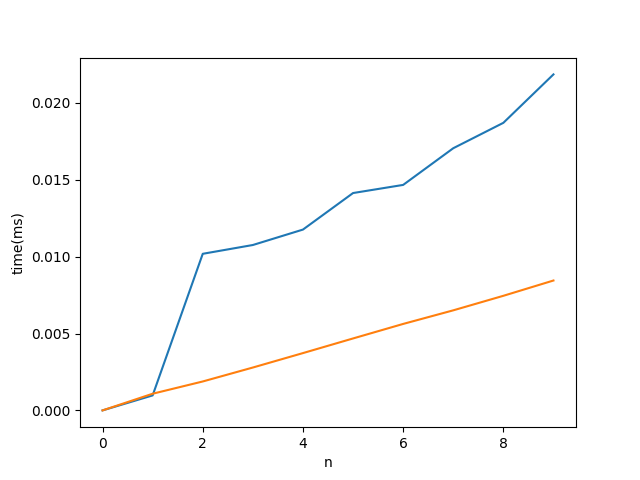
代码:
import numpy as np
import time
import matplotlib.pyplot as plt

def compute_time(n, axis=2):
    xs, ys = [1, 10], [10, 1]
    xs.insert(axis, n)
    ys.insert(axis, n)
    x, y = (np.random.uniform(size=xs),
            np.random.uniform(size=ys))

    t = time.perf_counter()
    x > y
    return time.perf_counter() - t

a = [
        [
            n,
            np.asarray([compute_time(n) for _ in range(100)]).mean(),
            np.asarray([compute_time(n, 0) for _ in range(100)]).mean()
        ]
        for n in range(0, 10, 1)
     ]

a = np.asarray(a)
plt.plot(a[:, 0], a[:, 1:])
plt.xlabel('n')
plt.ylabel('time(ms)')
plt.show()Stack Overflow用户
发布于 2018-11-03 00:31:29
@保罗的理论是完全正确的。在这个答案中,我使用perf和调试器来支持这一理论。
首先,让我们看一看运行时间是在哪里度过的(关于确切的代码,请参阅run.py下面的清单)。
对于n=1,我们看到以下内容:
Event count (approx.): 3388750000
Overhead  Command  Shared Object                               Symbol
  34,04%  python   umath.cpython-36m-x86_64-linux-gnu.so       [.] DOUBLE_less
  32,71%  python   multiarray.cpython-36m-x86_64-linux-gnu.so  [.] _aligned_strided_to_contig_size8_srcstride0
  28,16%  python   libc-2.23.so                                [.] __memmove_ssse3_back
1,46% python multiarray.cpython-36m-x86_64-linux-gnu.so [.] PyArray_TransferNDimToStrided与n=2相比
Event count (approx.): 28954250000
Overhead  Command  Shared Object                               Symbol
  40,85%  python   libc-2.23.so                                [.] __memmove_ssse3_back
  40,16%  python   multiarray.cpython-36m-x86_64-linux-gnu.so  [.] PyArray_TransferNDimToStrided
   8,61%  python   umath.cpython-36m-x86_64-linux-gnu.so       [.] DOUBLE_less
   8,41%  python   multiarray.cpython-36m-x86_64-linux-gnu.so  [.] _contig_to_contig
对于n=2来说,计算的事件要多8.5倍,但只有数据的两倍,所以我们需要解释一下4的减速因素。
另一个重要的观察是:运行时间主要是内存操作--对于n=2和n=1 (不太明显)的操作(_aligned_strided_to_contig_size8_srcstride0都是关于复制数据的),它们增加了比较的成本-- DOUBLE_less。
显然,两种大小都需要PyArray_TransferNDimtoStrided,那么为什么它的运行时间有这么大的差异呢?
PyArray_TransferNDimtoStrided显示的自时间不是复制所需的时间,而是开销:指针被调整,以便在最后一个维度中可以通过stransfer一次复制。
 PyArray_TransferNDimToStrided(npy_intp ndim,
 ....
 /* A loop for dimensions 0 and 1 */
 for (i = 0; i < shape1; ++i) {
    if (shape0 >= count) {
        stransfer(dst, dst_stride, src, src_stride0,
                    count, src_itemsize, data);
        return 0;
    }
    else {
        stransfer(dst, dst_stride, src, src_stride0,
                    shape0, src_itemsize, data);
    }
    count -= shape0;
    src += src_stride1;
    dst += shape0*dst_stride;
}
...这些stransfer-函数是_aligned_strided_to_contig_size8_srcstride0 (请参阅下面清单中生成的代码)和_contig_to_contig
_contig_to_contig用于n=2和tranfers 2-双(最后一个维度有2个值),调整指针的开销非常高!_aligned_strided_to_contig_size8_srcstride0用于n=1,每次调用传输1000个双倍(正如@Paul所指出的,我们很快就会看到,numpy足够聪明,可以丢弃1元素长的维度),调整指针的开销可以忽略。
顺便说一句,为了使用现代CPU的矢量化,使用这些函数代替简单的for -循环:编译器能够在编译时将代码向量化(编译器通常只能在运行时才能这样做),因此numpy分析访问模式,并向不同的预编译函数发送。
还有一个问题:如果numpy的尺寸是1,那么numpy真的会像我们观察到的那样丢弃最后一个维度吗?
用拆解器可以很容易地验证:
- ufunc通过迭代器访问数据,该迭代器在
iterator_loop中通过NpyIter_AdvancedNew创建。 NpyIter_AdvancedNew,当npyiter_coalesce_axes时,对尺寸进行分析(并重新解释)。
至于速度因子4,当将n=2与n=1进行比较时,它是“丢失”的:它没有特殊的意义,只是我的maschine上的一个随机值:将矩阵的维数从10^3更改为10^4将进一步转移优势(减少开销)到n=1-case,这在我的机器上导致丢失-速度因子12。
run.py
import sys
import numpy as np

n=int(sys.argv[1])

x, y = (np.random.uniform(size=(1, 1000, n)),
        np.random.uniform(size=(1000, 1, n)))

for _ in range(10000):
    y<x
然后:
perf record python run.py 1
perf report
....
perf record python run.py 2
perf report_aligned_strided_to_contig_size8_srcstride0生成源
/*
 * specialized copy and swap for source stride 0,
 * interestingly unrolling here is like above is only marginally profitable for
 * small types and detrimental for >= 8byte moves on x86
 * but it profits from vectorization enabled with -O3
 */
#if (0 == 0) && 1
static NPY_GCC_OPT_3 void
_aligned_strided_to_contig_size8_srcstride0(char *dst,
                        npy_intp dst_stride,
                        char *src, npy_intp NPY_UNUSED(src_stride),
                        npy_intp N, npy_intp NPY_UNUSED(src_itemsize),
                        NpyAuxData *NPY_UNUSED(data))
{
#if 8 != 16
#  if !(8 == 1 && 1)
    npy_uint64 temp;
#  endif
#else
    npy_uint64 temp0, temp1;
#endif
    if (N == 0) {
        return;
    }
#if 1 && 8 != 16
    /* sanity check */
    assert(npy_is_aligned(dst, _ALIGN(npy_uint64)));
    assert(npy_is_aligned(src, _ALIGN(npy_uint64)));
#endif
#if 8 == 1 && 1
    memset(dst, *src, N);
#else

#  if 8 != 16
    temp = _NPY_NOP8(*((npy_uint64 *)src));
#  else
#    if 0 == 0
        temp0 = (*((npy_uint64 *)src));
        temp1 = (*((npy_uint64 *)src + 1));
#    elif 0 == 1
        temp0 = _NPY_SWAP8(*((npy_uint64 *)src + 1));
        temp1 = _NPY_SWAP8(*((npy_uint64 *)src));
#    elif 0 == 2
        temp0 = _NPY_SWAP8(*((npy_uint64 *)src));
        temp1 = _NPY_SWAP8(*((npy_uint64 *)src + 1));
#    endif
#  endif

    while (N > 0) {
#  if 8 != 16
        *((npy_uint64 *)dst) = temp;
#  else
        *((npy_uint64 *)dst) = temp0;
        *((npy_uint64 *)dst + 1) = temp1;
#  endif
#  if 1
        dst += 8;
#  else
        dst += dst_stride;
#  endif
        --N;
    }
#endif/* @elsize == 1 && 1 -- else */
}
#endif/* (0 == 0) && 1 */https://stackoverflow.com/questions/52774318
复制相似问题
腾讯云开发者

Copyright © 2013 - 2026 Tencent Cloud. All Rights Reserved. 腾讯云 版权所有
深圳市腾讯计算机系统有限公司 ICP备案/许可证号:粤B2-20090059  粤公网安备44030502008569号
腾讯云计算(北京)有限责任公司 京ICP证150476号 | 京ICP备11018762号