
在VisualStudio2017中无法引用IoT
在VisualStudio2017中无法引用IoT
提问于 2018-10-11 00:33:57
当我将Visual 2017升级到15.8.2时,它崩溃了,我不得不清除所有东西并重新加载。从那时起,我就无法获得IoT扩展的UWP。当我点击我的项目中的引用时,IoT扩展会显示一个黄色的三角形。我右键单击reference添加引用,转到通用窗口(它显示了核心和扩展),我单击不存在。我已经卸载和安装了VS2017很多次了,我想我是按照IoT的指示来安装的,但是很明显,我太厚了,遗漏了一些东西。任何帮助都将不胜感激。
<?xml version="1.0" encoding="utf-8"?>
<Package xmlns="http://schemas.microsoft.com/appx/manifest/foundation/windows10" xmlns:mp="http://schemas.microsoft.com/appx/2014/phone/manifest" xmlns:uap="http://schemas.microsoft.com/appx/manifest/uap/windows10" xmlns:iot="http://schemas.microsoft.com/appx/manifest/iot/windows10" IgnorableNamespaces="uap mp iot">
  <Identity Name="3ac96fd1-69de-454f-a811-1b1ac668e762" Publisher="CN=kbown" Version="1.0.0.0" />
  <mp:PhoneIdentity PhoneProductId="3ac96fd1-69de-454f-a811-1b1ac668e762" PhonePublisherId="00000000-0000-0000-0000-000000000000" />
  <Properties>
    <DisplayName>Water_Dewater</DisplayName>
    <PublisherDisplayName>kbown</PublisherDisplayName>
    <Logo>Assets\StoreLogo.png</Logo>
  </Properties>
  <Dependencies>
    <TargetDeviceFamily Name="Windows.Universal" MinVersion="10.0.0.0" MaxVersionTested="10.0.0.0" />
  </Dependencies>
  <Resources>
    <Resource Language="x-generate" />
  </Resources>
  <Applications>
    <Application Id="App" Executable="$targetnametoken$.exe"          EntryPoint="Water_Dewater.App">
      <uap:VisualElements DisplayName="Water_Dewater" Square150x150Logo="Assets\Square150x150Logo.png" Square44x44Logo="Assets\Square44x44Logo.png" Description="Water_Dewater" BackgroundColor="transparent">
        <uap:DefaultTile Wide310x150Logo="Assets\Wide310x150Logo.png">
        </uap:DefaultTile>
        <uap:SplashScreen Image="Assets\SplashScreen.png" />
      </uap:VisualElements>
    </Application>
  </Applications>
  <Capabilities>
    <Capability Name="internetClient" />
    <iot:Capability Name="lowLevelDevices" />
    <iot:Capability Name="systemManagement" />
    <DeviceCapability Name="109b86ad-f53d-4b76-aa5f-821e2ddf2141" />
  </Capabilities>
</Package>
回答 1
Stack Overflow用户
回答已采纳
发布于 2018-10-12 08:06:52
UWP的Windows扩展将通过IoT安装在以下路径上。

安装完成后,您可以签入控制面板。
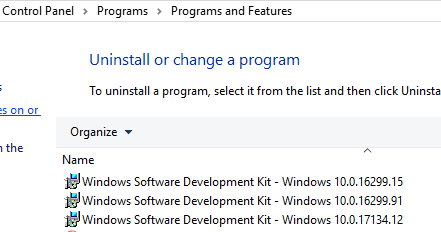
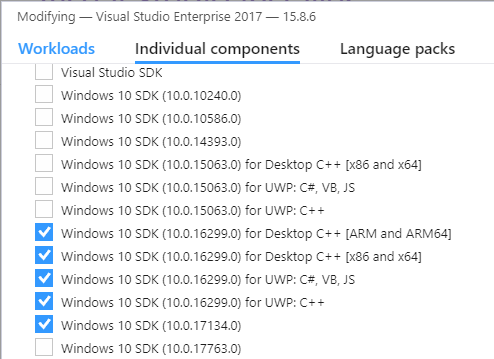
您可以尝试安装SDK来查看它是否有用。
更新:
页面原文内容由Stack Overflow提供。腾讯云小微IT领域专用引擎提供翻译支持
原文链接:
https://stackoverflow.com/questions/52750515
复制相关文章
相似问题
腾讯云开发者

Copyright © 2013 - 2026 Tencent Cloud. All Rights Reserved. 腾讯云 版权所有
深圳市腾讯计算机系统有限公司 ICP备案/许可证号:粤B2-20090059  粤公网安备44030502008569号
腾讯云计算(北京)有限责任公司 京ICP证150476号 | 京ICP备11018762号