
无法操纵Bootstrap 3模态
无法操纵Bootstrap 3模态
提问于 2018-10-08 13:26:54
我使用MVC,有标准的支架index.cshtml页面。我的目标是在一个模态框上显示细节。我可以显示模态框,但是无论我做什么,模态总是显示在屏幕的左上角。我试着用css来操纵它,但是它失败了,不管我做什么,它都不起作用
所以我所做的是:
Index.cshtml
 <div id="myModal" class="modal TestModal">
    <div class="modal-dialog TestModal">
        <div class="modal-content TestModal">
            <div id="myModalContent" class="TestModal"></div>
        </div>
    </div>
</div>
1-创建一个partialView
  <div class="modal-header">
    <h4 class="modal-title">Validation Error</h4>
</div>
<div class="modal-body">
    <p class="text-warning">
        <small>Please make an entry before save</small>
    </p>
</div>
<div class="modal-footer">
    <button type="button" class="btn btn-default" data-dismiss="modal">Ok</button>
</div>
2-在我的控制器中创建了以下方法
public PartialViewResult DisplayModalFor(int id)
    {
        //var parent = _context.TOURNAMENTS_M.Include(x => x.TOURNAMENTS_D).First(x => x.TM_ROWID.Equals(Id));
        return PartialView("_DetailsModal");
    }
最后,我在javascript文件中有以下函数:
function PopUpModalFor(tmRowid) {

const id = tmRowid;
$.ajax({
    url: "/TOURNAMENTS_M/DisplayModalFor",
        type: "GET",
        data: {
            id: id
        }
    })
    .done(function (result) {

        $("#myModalContent").html(result);
        $("#myModal").modal("show");

    })
    .fail(function () {
        alert("I failed :'( ");
    });
}
有什么想法?
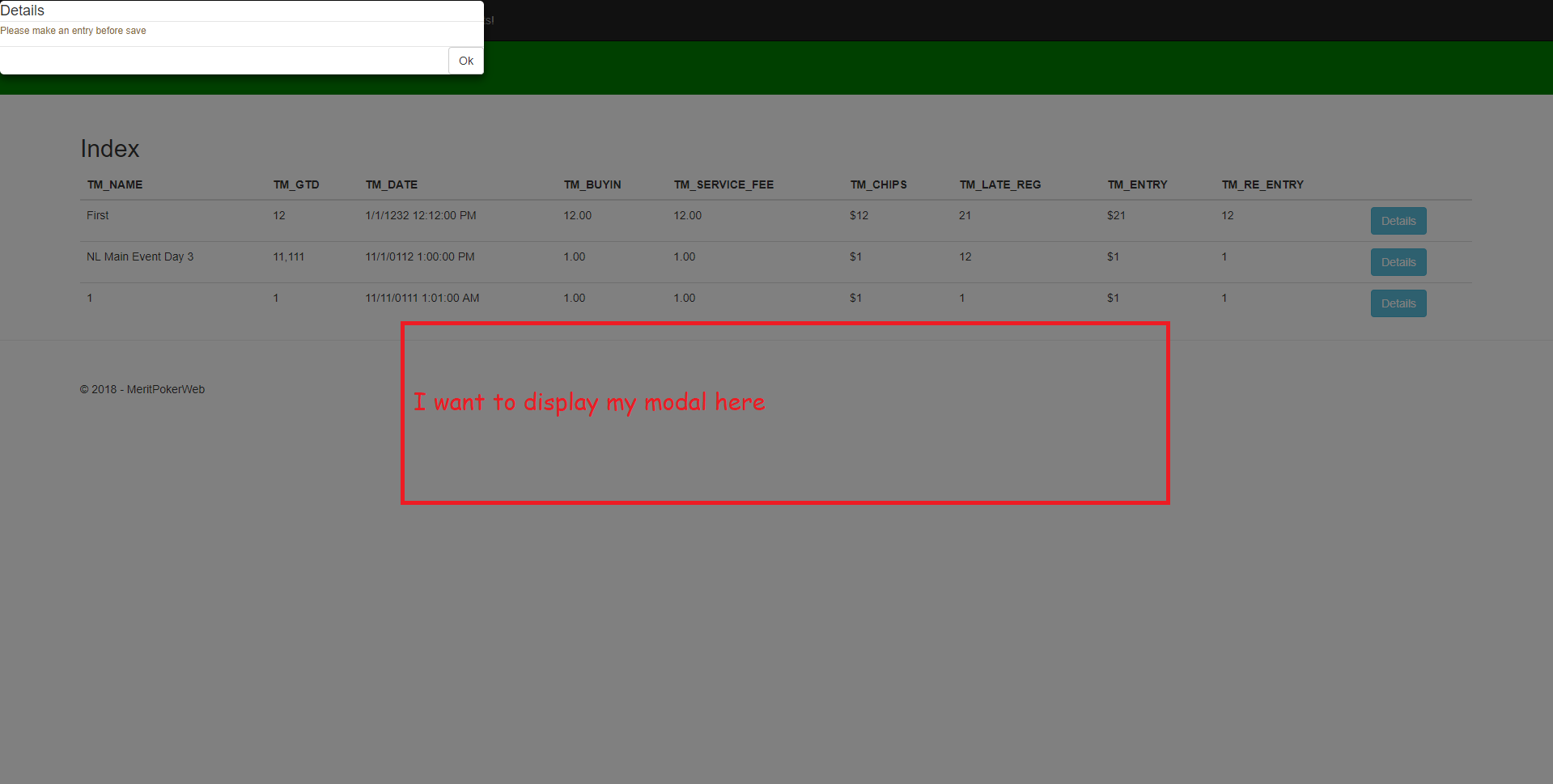
我有个奇怪的问题!虽然我已经包括了
<link rel="stylesheet" href="~/css/MyStyle.css" />在我的_Layout.cshtml中,我的CSS并没有完全工作。
例如,我有
.YOLO {
background-color: green;
}

.Padded {

    margin: 50px 100px 0 100px !important;
}
然后,我修改了我的index.cshtml,使其看起来像这样
<div class="Padded">
   <p class="YOLO">THIS SHOULD BE GREEN</p>
   <h2>Index</h2>
//More code..
但是p标签不是绿色的,我该怎么办?
回答 1
Stack Overflow用户
发布于 2018-10-08 14:11:17
我在这里上发现了这个。但不知道这对你是否有效。你能在下面试试吗?无论如何,默认情况下,它应该与中间对齐。
#myModal{
  text-align: center;
  padding: 0!important;
}

.modal:before {
  content: '';
  display: inline-block;
  height: 100%;
  vertical-align: middle;
  margin-right: -4px;
}

.modal-dialog {
  display: inline-block;
  text-align: left;
  vertical-align: middle;
}页面原文内容由Stack Overflow提供。腾讯云小微IT领域专用引擎提供翻译支持
原文链接:
https://stackoverflow.com/questions/52703392
复制相关文章
相似问题
腾讯云开发者

Copyright © 2013 - 2026 Tencent Cloud. All Rights Reserved. 腾讯云 版权所有
深圳市腾讯计算机系统有限公司 ICP备案/许可证号:粤B2-20090059  粤公网安备44030502008569号
腾讯云计算(北京)有限责任公司 京ICP证150476号 | 京ICP备11018762号