
如何在Xamarin.Forms中更改标签的字体系列?
如何在Xamarin.Forms中更改标签的字体系列?
提问于 2018-10-07 14:48:17
我试图用CSS和XAML更改标签的字体系列,但是字体没有反映出来。我正在尝试在我的应用程序中使用蒙特塞拉特字体。我怎么才能解决这个问题?
XAML代码:
<Label StyleClass="label" Text="Sample"/>CSS代码:
.label{
    font-family: Montserrat;
}回答 2
Stack Overflow用户
回答已采纳
发布于 2018-10-07 15:36:53
为了在项目中使用自定义字体,必须执行以下操作:
在AndroidAsset中,将字体文件放在资产文件夹中,并确保构建类型为AndroidAsset。
然后,可以在XAML中声明资源字典中的字体(例如,在App.xaml中)。
<ResourceDictionary>
    <OnPlatform x:TypeArguments="x:String" x:Key="BoldFont">
        <On Platform="Android" Value="OpenSans-Bold.ttf#Open Sans" />
        <On Platform="UWP" Value="/Assets/OpenSans-Bold.ttf#Open Sans" />
        <On Platform="iOS" Value="OpenSans-Bold" />
    </OnPlatform>
    <OnPlatform x:TypeArguments="x:String" x:Key="NormalFont">
        <On Platform="Android" Value="OpenSans-Regular.ttf#Open Sans" />
        <On Platform="UWP" Value="/Assets/OpenSans-Regular.ttf#Open Sans" />
        <On Platform="iOS" Value="OpenSans-Regular" />
    </OnPlatform>
</ResourceDictionary>
要使用自定义字体,只需:
<StackLayout>
    <Label Text="Welcome to Xamarin Forms! (OpenSans-Bold)" FontFamily="{StaticResource BoldFont}" />
    <Label Text="Welcome to Xamarin Forms! (OpenSans-Regular)" FontFamily="{StaticResource NormalFont}" />
    <Label Text="Welcome to Xamarin Forms! (Default)" />
</StackLayout>Stack Overflow用户
发布于 2021-07-04 12:56:46
在xamarin.forms v4.5.530+中,您可以轻松地添加自定义嵌入式字体,而不必担心跨平台问题:
- 在共享项目中添加自定义字体文件(
*.tff、*.otf)。
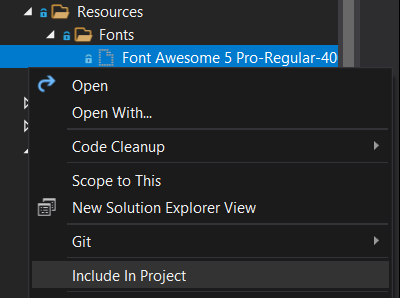
- 右键单击Build Action中的字体文件> Properties >选择Embedded Resource。
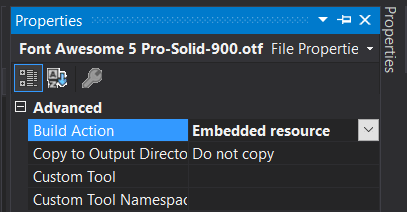
- 在共享项目中的某个位置添加
ExportFont属性(通常在App.xaml.cs或AssemblyInfo.cs中)。
// "Font Awesome 5 Pro-Regular-400.otf" is the font file name witout the subfolders path
// Alias is the name to reference in code
[assembly: ExportFont("Font Awesome 5 Pro-Regular-400.otf", Alias = "FARegular")]

namespace YourProject.Shared
{
    public partial class App : Application
    {

        public App()
        {
            InitializeComponent();
            // ...
        }
    }
}- 更新控件中的自定义字体系列:
<Label FontFamily="FARegular" Text="" />参考文献
页面原文内容由Stack Overflow提供。腾讯云小微IT领域专用引擎提供翻译支持
原文链接:
https://stackoverflow.com/questions/52689641
复制相关文章
相似问题
腾讯云开发者

Copyright © 2013 - 2026 Tencent Cloud. All Rights Reserved. 腾讯云 版权所有
深圳市腾讯计算机系统有限公司 ICP备案/许可证号:粤B2-20090059  粤公网安备44030502008569号
腾讯云计算(北京)有限责任公司 京ICP证150476号 | 京ICP备11018762号