
android:显示多个图像,比如在Tinder卡中。
android:显示多个图像,比如在Tinder卡中。
提问于 2018-10-06 22:15:19
我将如何显示多个图像,就像Tinder所做的那样:当我单击图像的右侧时,它应该显示下一个图像;当我单击图像的左侧时,它应该显示上一个图像。
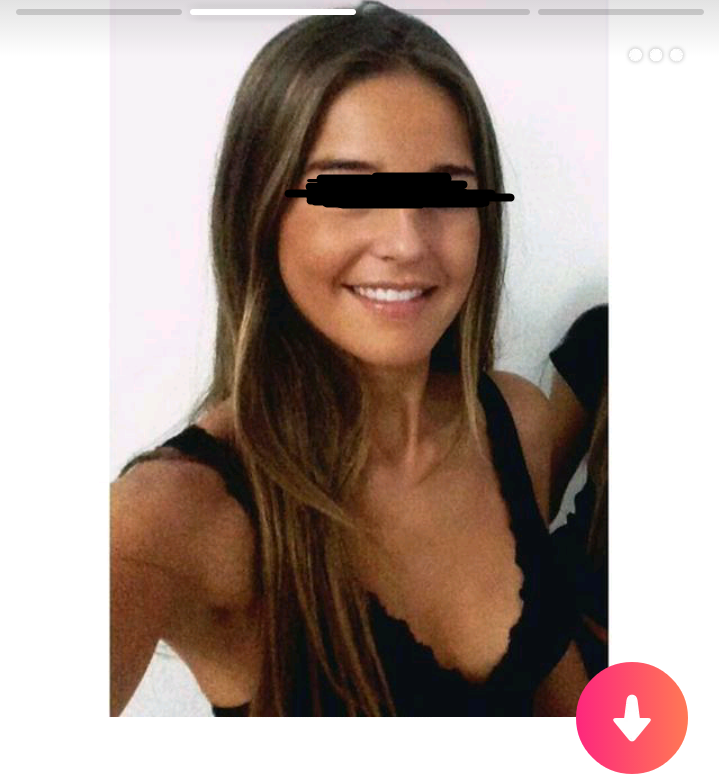
它还应该显示一个小箭头,向右或左,只有当点击,并显示以某种方式显示的图片(与小酒吧,如火药或点或什么)。
有图书馆吗?
编辑:澄清:我已经在Diolor/刷卡库的帮助下实现了Tinder刷卡。令人惊讶的是,我有点被困在了图片库中的Tinder 中。只有上面照片上的那部分。
回答 2
Stack Overflow用户
回答已采纳
发布于 2018-10-24 15:58:20
我的解决方案是添加两张箭头图片,在箭头上方放置两个布局,然后为布局添加onClickListeners,这将在适配器中选择要在ImageView中显示的下一个/前一个图片。
布局.xml文件:
<?xml version="1.0" encoding="utf-8"?>
<LinearLayout xmlns:android="http://schemas.android.com/apk/res/android"
    xmlns:app="http://schemas.android.com/apk/res-auto"
    xmlns:tools="http://schemas.android.com/tools"
    android:layout_width="match_parent"
    android:layout_height="match_parent"
    android:layout_gravity="center"
    android:clipToPadding="false"
    android:outlineProvider="bounds"
    android:paddingLeft="10sp"
    android:paddingTop="10sp"
    android:paddingRight="10sp"
    android:paddingBottom="100sp">

    <android.support.v7.widget.CardView
        android:id="@+id/cardView"
        android:layout_width="match_parent"
        android:layout_height="match_parent"
        android:layout_gravity="center"
        android:elevation="2dp"
        app:cardCornerRadius="4dp">

        <FrameLayout
            android:layout_width="match_parent"
            android:layout_height="match_parent"
            android:layout_gravity="center"
            android:orientation="vertical">


            <ImageView
                android:id="@+id/imageViewMainBackground"
                android:layout_width="match_parent"
                android:layout_height="match_parent"
                android:scaleType="centerCrop"
                android:src="@mipmap/ic_user_default" />

            <ImageView
                android:id="@+id/imageNext"
                android:layout_width="wrap_content"
                android:layout_height="wrap_content"
                android:layout_gravity="center_vertical|end"
                android:scaleType="centerCrop"
                android:src="@drawable/outline_keyboard_arrow_right_black_48" />

            <ImageView
                android:id="@+id/imagePrevious"
                android:layout_width="wrap_content"
                android:layout_height="wrap_content"
                android:layout_gravity="center_vertical"
                android:scaleType="centerCrop"
                android:src="@drawable/outline_keyboard_arrow_left_black_48" />

            <LinearLayout
                android:layout_width="match_parent"
                android:layout_height="match_parent"
                android:weightSum="1">

                <LinearLayout
                    android:id="@+id/previousLayout"
                    android:layout_width="0dp"
                    android:layout_height="match_parent"
                    android:layout_weight=".50"
                    android:orientation="horizontal" />

                <LinearLayout
                    android:id="@+id/nextLayout"
                    android:layout_width="0dp"
                    android:layout_height="match_parent"
                    android:layout_gravity="end"
                    android:layout_weight=".50"
                    android:orientation="horizontal" />
            </LinearLayout>

            <TextView
                android:id="@+id/nameTextView"
                android:layout_width="match_parent"
                android:layout_height="wrap_content"
                android:layout_gravity="bottom"
                android:padding="20sp"
                android:shadowColor="@color/colorBlack"
                android:shadowRadius="20"
                android:textColor="@color/colorWhite"
                android:textSize="30sp"
                tools:text="hello" />

            <ImageView
                android:id="@+id/infoImageViewItemCard"
                android:layout_width="wrap_content"
                android:layout_height="wrap_content"
                android:layout_gravity="bottom|end"
                android:scaleType="centerCrop"
                android:padding="20sp"
                android:shadowColor="@color/colorBlack"
                android:shadowRadius="20"
                android:src="@drawable/outline_info_white_48" />

            <LinearLayout
                android:id="@+id/bottomLayout"
                android:layout_width="match_parent"
                android:layout_height="110dp"
                android:layout_gravity="bottom"
                android:orientation="horizontal" />

        </FrameLayout>
    </android.support.v7.widget.CardView>


</LinearLayout>Stack Overflow用户
发布于 2018-10-06 22:32:55
页面原文内容由Stack Overflow提供。腾讯云小微IT领域专用引擎提供翻译支持
原文链接:
https://stackoverflow.com/questions/52683790
复制相关文章
相似问题
腾讯云开发者

Copyright © 2013 - 2026 Tencent Cloud. All Rights Reserved. 腾讯云 版权所有
深圳市腾讯计算机系统有限公司 ICP备案/许可证号:粤B2-20090059  粤公网安备44030502008569号
腾讯云计算(北京)有限责任公司 京ICP证150476号 | 京ICP备11018762号