
FMXDelphi10.2显示表单或任务执行时请等待面板
FMXDelphi10.2显示表单或任务执行时请等待面板
提问于 2018-10-06 16:29:42
我有几个任务按一下按钮。
例如:
- 显示表格或请等待面板.
- 从数据库加载数据(持续时间5-10秒)
- 清除所有TEdit字段
- 隐藏表单或请等待面板.
- ShowMessage(“已完成”)
是否有可能在单击按钮后显示,请等待面板或表单,并在所有完成后隐藏该面板。
如何一个一个地执行任务。
或者任何其他简单的解决方案。
回答 1
Stack Overflow用户
回答已采纳
发布于 2018-10-06 17:39:42
这是一个简单的示例,它创建了一个“占位符”,如下所示:
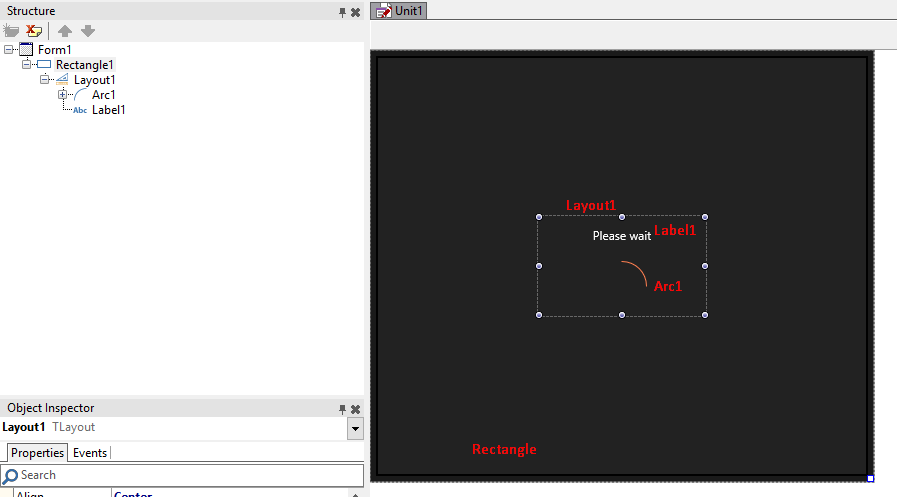
矩形有一个黑色的背景,包含一个与Center对齐的布局;在里面您可以找到一个标签(与Top对齐)和一个弧线(与Client对齐)。守则如下:
object Form1: TForm1
  Left = 0
  Top = 0
  Caption = 'Form1'
  ClientHeight = 418
  ClientWidth = 490
  FormFactor.Width = 320
  FormFactor.Height = 480
  FormFactor.Devices = [Desktop]
  OnCreate = FormCreate
  DesignerMasterStyle = 0
  object Rectangle1: TRectangle
    Align = Client
    Fill.Color = xFF222222
    Size.Width = 490.000000000000000000
    Size.Height = 418.000000000000000000
    Size.PlatformDefault = False
    Visible = False
    object Layout1: TLayout
      Align = Center
      Size.Width = 170.000000000000000000
      Size.Height = 102.000000000000000000
      Size.PlatformDefault = False
      TabOrder = 0
      object Label1: TLabel
        Align = Top
        StyledSettings = [Family, Size, Style]
        Size.Width = 170.000000000000000000
        Size.Height = 41.000000000000000000
        Size.PlatformDefault = False
        TextSettings.FontColor = claWhite
        TextSettings.HorzAlign = Center
        Text = 'Please wait'
        TabOrder = 0
      end
      object Arc1: TArc
        Align = Center
        Size.Width = 50.000000000000000000
        Size.Height = 50.000000000000000000
        Size.PlatformDefault = False
        Stroke.Color = claCoral
        EndAngle = -90.000000000000000000
        object FloatAnimation1: TFloatAnimation
          Enabled = True
          Duration = 1.000000000000000000
          Loop = True
          PropertyName = 'RotationAngle'
          StartValue = 0.000000000000000000
          StopValue = 360.000000000000000000
        end
      end
    end
  end
end矩形的Visible属性设置为False,这样就不会立即看到矩形。请注意,我在弧形组件中创建了一个动画,这样您就可以看到它在旋转:
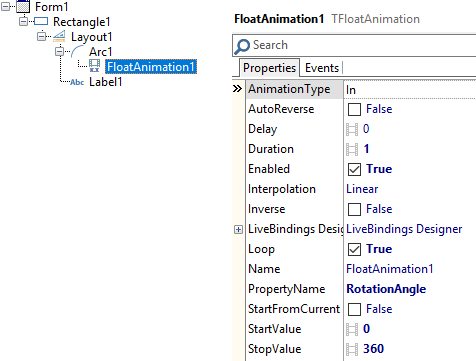
通过这种方式,您可以模拟加载旋转器。然后,我在表单的OnCreate事件中添加了这段代码,作为如何做到这一点的示例。
procedure TForm1.FormCreate(Sender: TObject);
begin
  TTask.Run(procedure
            begin
              TThread.Synchronize(nil, procedure
                                 begin
                                   Rectangle1.Visible := true;
                                   //Rectangle1.BringToFront;
                                   // ^ call the above if needed, just to be sure
                                   // that you'll always see the rectangle on screen
                                 end);

              Sleep(4000);

              TThread.Synchronize(nil, procedure
                                 begin
                                   Rectangle1.Visible := false;
                                   ShowMessage('Finish!');
                                 end);
            end);
end;Sleep(4000)模拟一个长任务,这段代码应该被您的任务替换。实际上我会做这样的事:
procedure TForm1.FormCreate(Sender: TObject);
begin
  TTask.Run(procedure
            var
              arr: array [0..1] of ITask;
            begin
              TThread.Synchronize(nil, procedure
                                 begin
                                   Rectangle1.Visible := true;
                                   Rectangle1.BringToFront;
                                 end);

              arr[0] := TTask.Run(procedure
                                  begin
                                    //load data from the database
                                  end);

              arr[1] := TTask.Run(procedure
                                  begin
                                    //something else
                                  end);

              //this call is blocking but you are calling this in a worker thread!
              //your UI won't freeze and at the end you'll see the message appearing
              TTask.WaitForAll(arr);
              TThread.Synchronize(nil, procedure
                                 begin
                                   Rectangle1.Visible := false;
                                   ShowMessage('Finish!');
                                 end);
            end);
end;
当然,您应该将这些代码放在ButtonClick中,而不是放在FormCreate事件处理程序中!
页面原文内容由Stack Overflow提供。腾讯云小微IT领域专用引擎提供翻译支持
原文链接:
https://stackoverflow.com/questions/52681088
复制相关文章
相似问题
腾讯云开发者

Copyright © 2013 - 2026 Tencent Cloud. All Rights Reserved. 腾讯云 版权所有
深圳市腾讯计算机系统有限公司 ICP备案/许可证号:粤B2-20090059  粤公网安备44030502008569号
腾讯云计算(北京)有限责任公司 京ICP证150476号 | 京ICP备11018762号