
从搜索结果中定义Java查找元素
从搜索结果中定义Java查找元素
提问于 2018-10-05 11:43:00
我刚开始使用Java实现,并且还在学习。
在我的步骤定义RetailTakePayment.java类中,我试图找到包含特定文本的元素,该元素显示在搜索结果中(在弹出窗口上),但由于某种原因,我一直无法找到并单击它。我到处寻找,并不是很幸运。因此,张贴我的问题,以获得一些指导。
希望这些能帮上忙。
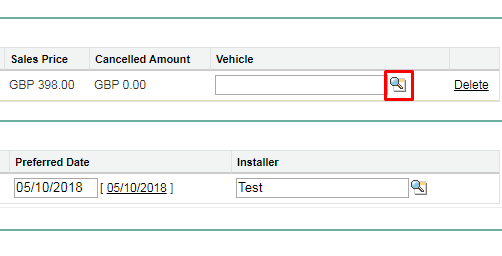
Salesforce页面车辆查找:
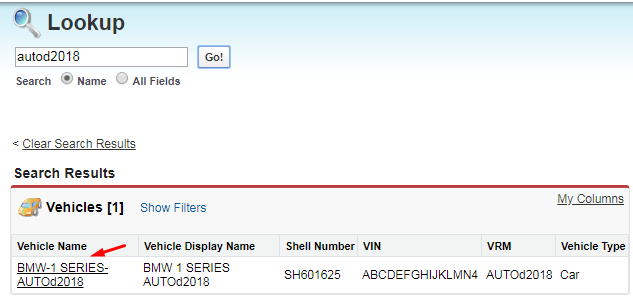
弹出-查找搜索结果:
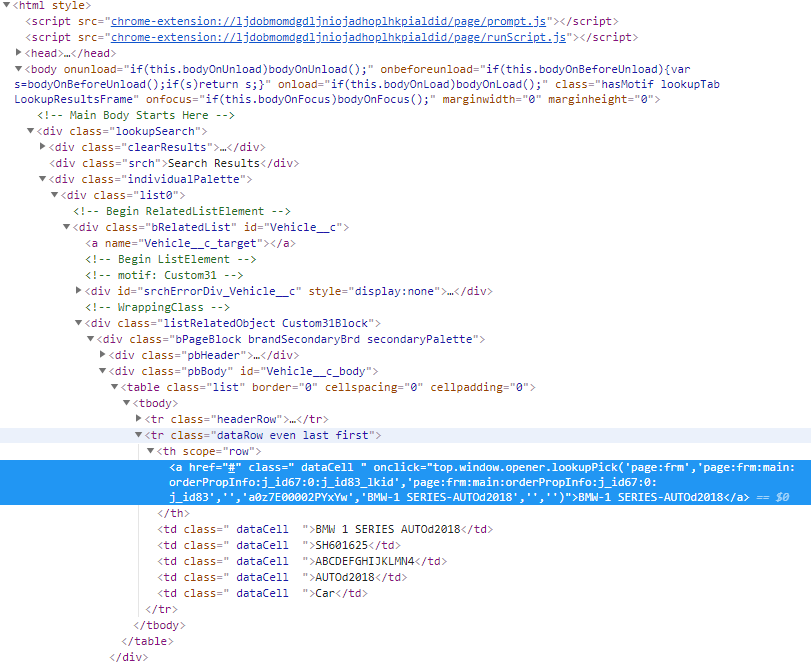
我的HTML:
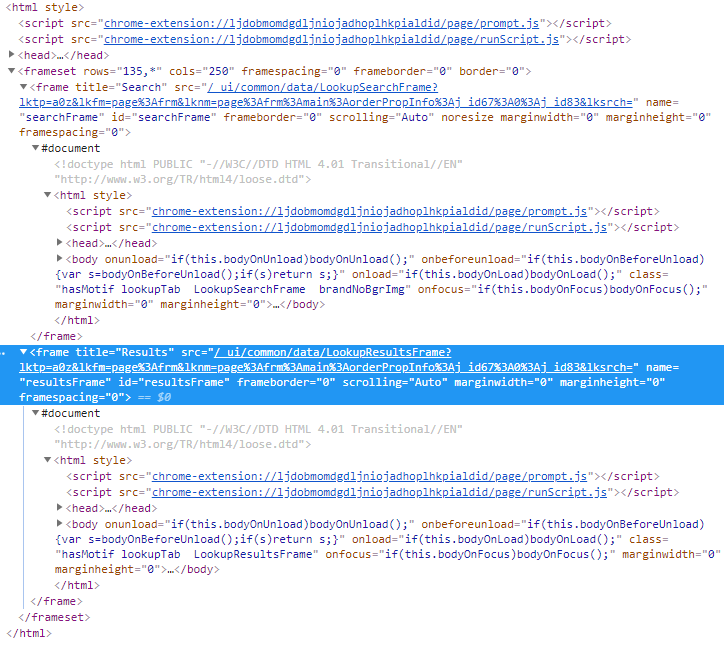
在我的HTML中有两个框架:
我的步态定义:
@Given("^user complete payment precheck$")
    public void user_complete_payment_precheck() throws Throwable {

        // inserting installer and preferred date
        driver.findElement(By.id("page:frm:main:jobsInfo:jobsRepeat2:0:j_id164")).sendKeys("Test");
        driver.findElement(By.xpath("/html/body/div[1]/div[2]/table/tbody/tr/td[2]/form/div[1]/div/div/div/div[2]/div[5]/div[2]/table/tbody/tr[1]/td/table/tbody/tr/td[4]/span/span")).click();

        // searching and selecting vehicle
        // click on lookup
        driver.findElement(By.xpath("//img[@alt='Vehicle Lookup (New Window)']")).click();
        Thread.sleep(2000);

        // window switch handler
        String parentWindowHandler = driver.getWindowHandle();
        String subWindowHandler = null;

                Set<String> handles = driver.getWindowHandles();
                Iterator<String> iterator = handles.iterator();
                while (iterator.hasNext()) {
                    subWindowHandler = iterator.next();
                }
                driver.switchTo().window(subWindowHandler);

        // switch by frame
        driver.switchTo().frame(0);

        // searching - this worked!!!
        driver.findElement(By.xpath("//form[@id='theForm']/div/div[2]/input")).sendKeys("autod2018");
        Thread.sleep(1000);
        driver.findElement(By.name("go")).click();
        Thread.sleep(2000);

        // searching for vehicle - STILL NOT WORKING....
        driver.findElement(By.xpath("//div[contains(text(),'BMW-1 SERIES-AUTOd2018')]")).click();
        // driver.findElement(By.xpath("/html/body/div[1]/div[3]/div/div/div[2]/div/div[2]/table/tbody/tr[2]/th/a")).click();

        // switching back to the parent window - works!
        driver.switchTo().window(parentWindowHandler);

        // save record
        driver.findElement(By.xpath("/html/body/div[1]/div[2]/table/tbody/tr/td[2]/form/div[1]/div/div/div/div[1]/table/tbody/tr/td[2]/input[1]")).click();


    }
我收到以下错误消息:
org.openqa.selenium.NoSuchElementException: no such element: Unable to locate element: {"method":"xpath","selector":"//div[contains(text(),'BMW-1 SERIES-AUTOd2018')]"}
  (Session info: chrome=69.0.3497.100)
  (Driver info: chromedriver=2.41.578737 (49da6702b16031c40d63e5618de03a32ff6c197e),platform=Windows NT 6.1.7601 SP1 x86_64) (WARNING: The server did not provide any stacktrace information)
Command duration or timeout: 0 milliseconds
For documentation on this error, please visit: http://seleniumhq.org/exceptions/no_such_element.html
Build info: version: '3.13.0', revision: '2f0d292', time: '2018-06-25T15:32:19.891Z'
System info: host: 'TR-UXB0509', ip: '10.175.139.35', os.name: 'Windows 7', os.arch: 'amd64', os.version: '6.1', java.version: '1.8.0_151'
Driver info: org.openqa.selenium.chrome.ChromeDriver
Capabilities {acceptInsecureCerts: false, acceptSslCerts: false, applicationCacheEnabled: false, browserConnectionEnabled: false, browserName: chrome, chrome: {chromedriverVersion: 2.41.578737 (49da6702b16031..., userDataDir: C:\Users\qureshiz\AppData\L...}, cssSelectorsEnabled: true, databaseEnabled: false, goog:chromeOptions: {debuggerAddress: localhost:57721}, handlesAlerts: true, hasTouchScreen: false, javascriptEnabled: true, locationContextEnabled: true, mobileEmulationEnabled: false, nativeEvents: true, networkConnectionEnabled: false, pageLoadStrategy: normal, platform: XP, platformName: XP, rotatable: false, setWindowRect: true, takesHeapSnapshot: true, takesScreenshot: true, unexpectedAlertBehaviour: , unhandledPromptBehavior: , version: 69.0.3497.100, webStorageEnabled: true}
Session ID: 6282cc65ad89a6e8dd4fe4b996269b19
*** Element info: {Using=xpath, value=//div[contains(text(),'BMW-1 SERIES-AUTOd2018')]}
    at sun.reflect.NativeConstructorAccessorImpl.newInstance0(Native Method)
    at sun.reflect.NativeConstructorAccessorImpl.newInstance(Unknown Source)
    at sun.reflect.DelegatingConstructorAccessorImpl.newInstance(Unknown Source)
    at java.lang.reflect.Constructor.newInstance(Unknown Source)
    at org.openqa.selenium.remote.ErrorHandler.createThrowable(ErrorHandler.java:214)
    at org.openqa.selenium.remote.ErrorHandler.throwIfResponseFailed(ErrorHandler.java:166)
    at org.openqa.selenium.remote.http.JsonHttpResponseCodec.reconstructValue(JsonHttpResponseCodec.java:40)
    at org.openqa.selenium.remote.http.AbstractHttpResponseCodec.decode(AbstractHttpResponseCodec.java:80)
    at org.openqa.selenium.remote.http.AbstractHttpResponseCodec.decode(AbstractHttpResponseCodec.java:44)
    at org.openqa.selenium.remote.HttpCommandExecutor.execute(HttpCommandExecutor.java:158)
    at org.openqa.selenium.remote.service.DriverCommandExecutor.execute(DriverCommandExecutor.java:83)
    at org.openqa.selenium.remote.RemoteWebDriver.execute(RemoteWebDriver.java:548)
    at org.openqa.selenium.remote.RemoteWebDriver.findElement(RemoteWebDriver.java:322)
    at org.openqa.selenium.remote.RemoteWebDriver.findElementByXPath(RemoteWebDriver.java:424)
    at org.openqa.selenium.By$ByXPath.findElement(By.java:353)
    at org.openqa.selenium.remote.RemoteWebDriver.findElement(RemoteWebDriver.java:314)
    at stepDefinitions.RetailTakePayment.user_complete_payment_precheck(RetailTakePayment.java:64)
    at ?.Given user complete payment precheck(C:/Users/qureshiz/ECLIPSE/Workspace/MultipleFeaturesAndSteps/src/test/resources/features/RetailJourney.feature:69)
其他xpath尝试过,但都失败了:
//valid xpath-1 - from ranorex selocity - didnt work
driver.findElement(By.xpath("/html//div[@id='Vehicle__c_body']/table[@class='list']//a[@href='#']")).click();

//valid xpath-2 - custom xpath - didn't work
driver.findElement(By.xpath("//*[text()='BMW-1 SERIES-AUTOd2018']")).click();

//valid xpath-3 - from chrome - didn't work
driver.findElement(By.xpath("//*[@id=\"Vehicle__c_body\"]/table/tbody/tr[2]/th/a")).click();

//valid xpath 4 - from firefox - didn't work
driver.findElement(By.xpath("/html/body/div/div[3]/div/div/div[2]/div/div[2]/table/tbody/tr[2]/th/a")).click();回答 2
Stack Overflow用户
回答已采纳
发布于 2018-10-06 02:51:25
由于搜索表单和结果表位于不同的框架中,因此在与其中的元素交互之前,需要切换到相应的框架。
 // switch to search form frame
 driver.switchTo().frame(0);

 // enter search keywords and click go
 ...

 // switch back to topmost frame in the current window.
 // this is very important, you can't directly switch to result table frame
 // from search form frame ( because it's not includes the result table frame).
 // Most of time, we back to the top frame, then jump into other frame.
 driver.switchTo().defaultContent();

 // then switch to result table frame
driver.switchTo().frame(<index_or_name_of_result_table_frame>);Stack Overflow用户
发布于 2018-10-05 13:21:50
尝试:
driver.findElement(By.xpath("//a[contains(text(),'AUTOd2018')]")).click();当前代码正在查找div元素:
driver.findElement(By.xpath("//**div**[contains(text(),'BMW-1 SERIES-AUTOd2018')]")).click();提供的html有一个元素名。
<a...>BMW-1 SERIES-AUTOd2018< /a>页面原文内容由Stack Overflow提供。腾讯云小微IT领域专用引擎提供翻译支持
原文链接:
https://stackoverflow.com/questions/52664902
复制相关文章
相似问题
腾讯云开发者

Copyright © 2013 - 2026 Tencent Cloud. All Rights Reserved. 腾讯云 版权所有
深圳市腾讯计算机系统有限公司 ICP备案/许可证号:粤B2-20090059  粤公网安备44030502008569号
腾讯云计算(北京)有限责任公司 京ICP证150476号 | 京ICP备11018762号