
Kivy ScreenManager破坏BoxLayout
Kivy ScreenManager破坏BoxLayout
提问于 2018-10-04 10:36:33
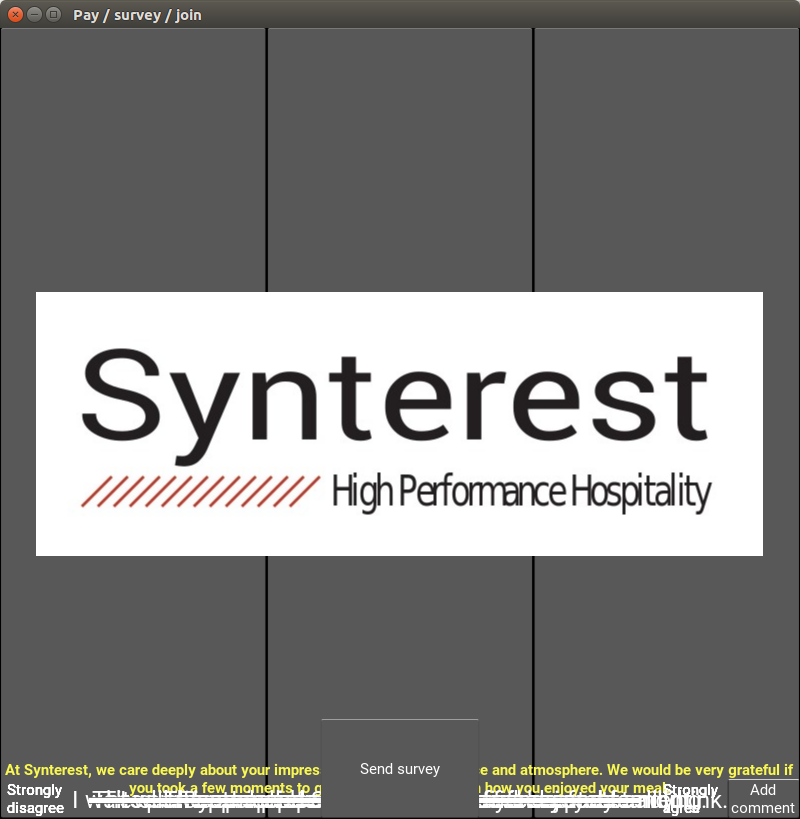
我是新来的基维,但能够创造一个屏幕应用程序。这一切看起来都很好,直到我需要增加更多的屏幕。一个页面的应用程序显示正确,但是当我添加屏幕时,BoxLayouts不再像我预期的那样工作了。小部件都是在屏幕的瓶盖上呈现的。我的问题是,在实现ScreenManager时,我做错了什么?
一个屏幕的应用程序如下所示:
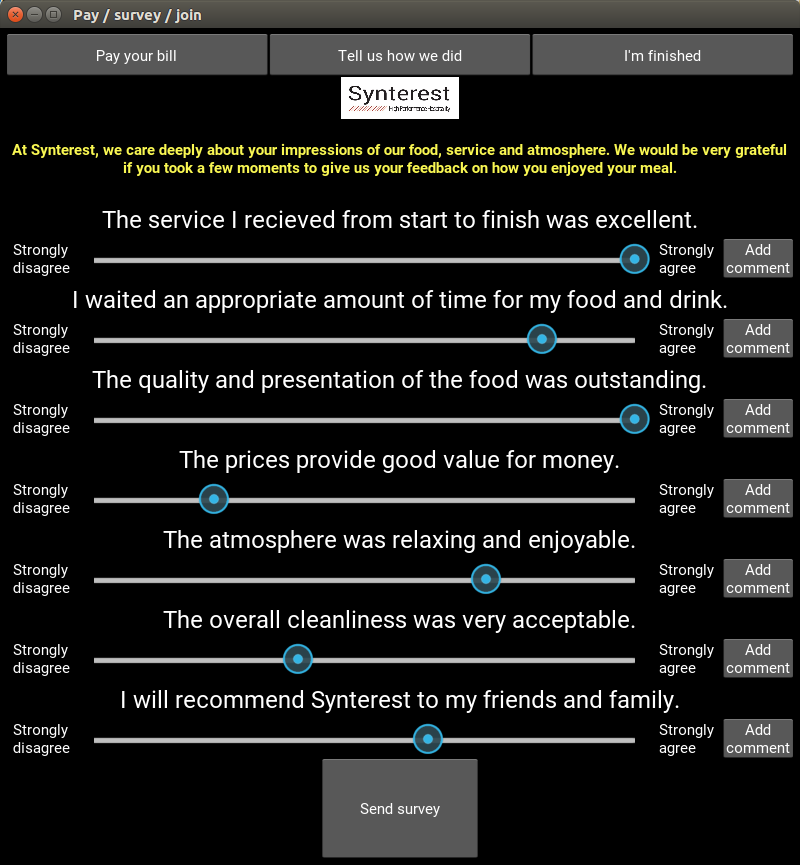
我决定将其设置为多屏幕,但当我添加ScreenManager逻辑时,其结果屏幕如下所示:
我从本教程那里得到了信息
我的main.py文件如下所示:
from kivy.app import App
from kivy.uix.boxlayout import BoxLayout
from kivy.uix.label import Label
from kivy.uix.button import Button
from kivy.uix.popup import Popup
from kivy.properties import ObjectProperty
from kivy.uix.screenmanager import ScreenManager, Screen, FadeTransition

class Pay_screen(Screen):
    pass

class Survey_screen(Screen):
    pass

class Finish_screen(Screen):
    pass

class Sm(ScreenManager):
    pass

class Next_root(BoxLayout):
    pass

class Nq_disagree_label(Label):
    pass

class Nq_question_label(Label):
    pass

class Nq_button(Button):
    pass

class survey_form(BoxLayout):
    #dept_button = ObjectProperty()

    def send_survey(self):
        mypopup = MyPopup()
        mypopup.show_popup('Survey', 'Survey sent!', 'OK!')

    def add_comment(self):
        mypopup = MyPopup()
        mypopup.show_popup('Comment', 'This is where a comment is added.', 'OK!')

    def close_app(self):
        App.get_running_app().stop()

class MyPopup(Popup):
    def show_popup(self, title_text, label_text, button_text):
        mytext= label_text
        content = BoxLayout(orientation="vertical")
        content.add_widget(Label(text=mytext, font_size=20, text_size=(300, None)))
        mybutton = Button(text="Ok!", size_hint=(1,.20), font_size=20)
        content.add_widget(mybutton)
        mypopup = Popup(content = content,
                        title = title_text,
                        auto_dismiss = False,
                        size_hint = (.5, .5)) #,
                        #font_size = 20)
        mybutton.bind(on_press=mypopup.dismiss)
        mypopup.open()

class nextqualApp(App):
    icon = 'nextqual.png'
    title = 'Pay / survey / join'


if __name__ == '__main__':

    nextqualApp().run()
屏幕管理器中的KV文件如下所示:
#: import FadeTransition kivy.uix.screenmanager.FadeTransition

Sm:
    transition: FadeTransition()
    Survey_screen:
    Pay_screen:


<nq_button@Button>:
    halign: "center"
    text: "Add\ncomment"
    size_hint_x: 10

<Nq_disagree_label@Label>:
    halign: "left"
    size_hint_x: 10
    text:"Strongly\ndisagree"

<Nq_agree_label@Label>:
    halign: "left"
    size_hint_x: 10
    text:"Strongly\nagree"

<Nq_question_label@Label>:
    halign: "left"
    font_size: "24"
    size_hint_x: 25

<Pay_screen>:
    name: 'pay'
    #orientation: "vertical"
    #padding: 6
    #font_size: 24
    BoxLayout:
        height: "40dp"
        Button:
            text: "Pay your bill"
            on_release: app.root.current = 'pay'
        Button:
            text: "Tell us how we did"
            on_release: app.root.current = 'survey'
        Button:
            text: "I'm finished"
    BoxLayout:
        Button:
            text: "Pay your bill"
            on_release: app.root.current = 'survey'

<Survey_screen>:
    name: "survey"
    #orientation: "vertical"
    #padding: 6
    #font_size: "24"

    BoxLayout:
        height: "40dp"
        Button:
            text: "Pay your bill"
            on_release: app.root.current = 'pay'

        Button:
            text: "Tell us how we did"
            on_release: app.root.current = 'survey'
        Button:
            text: "I'm finished"

    BoxLayout:
        halign: "center"
        Image:
            source: "logo.jpg"
            #size: self.size

    BoxLayout:
        height: "80dp"
        size_hint_y: None
        Label:
            bold: True
            #color: 10,10,10,10
            #halign: "center"
            #text_size: self.size
            markup: True
            text: "[color=f9f752]Description[/color]"
            multiline: True
            #size_hint_x: 25
            text_size: self.size
            halign: 'center'
            valign: 'middle'


    BoxLayout:
        height: "40dp"
        size_hint_y: None
        Nq_question_label:
            text: "The service I recieved from start to finish was excellent."

    BoxLayout:
        height: "40dp"
        size_hint_y: None
        Nq_disagree_label:
        Slider:
            size_hint_x: 80
            value: 50
        Nq_agree_label:
        nq_button:
            on_press: root.add_comment()

    BoxLayout:
        height: "40dp"
        size_hint_y: None
        Nq_question_label:
            text: "I waited an appropriate amount of time for my food and drink."
    BoxLayout:
        height: "40dp"
        size_hint_y: None
        Nq_disagree_label:
        Slider:
            size_hint_x: 80
            value: 50
        Nq_agree_label:
        nq_button:
            on_press: root.add_comment()


    BoxLayout:
        height: "40dp"
        size_hint_y: None
        Nq_question_label:
            text: "The quality and presentation of the food was outstanding."
    BoxLayout:
        height: "40dp"
        size_hint_y: None
        Nq_disagree_label:
        Slider:
            size_hint_x: 80
            value: 50
        Nq_agree_label:
        nq_button:
            on_press: root.add_comment()


    BoxLayout:
        height: "40dp"
        size_hint_y: None
        Nq_question_label:
            text: "The prices provide good value for money."
    BoxLayout:
        height: "40dp"
        size_hint_y: None
        Nq_disagree_label:
        Slider:
            size_hint_x: 80
            value: 50
        Nq_agree_label:
        nq_button:
            on_press: root.add_comment()

    BoxLayout:
        height: "40dp"
        size_hint_y: None
        Nq_question_label:
            text: "The atmosphere was relaxing and enjoyable."
    BoxLayout:
        height: "40dp"
        size_hint_y: None
        Nq_disagree_label:
        Slider:
            size_hint_x: 80
            value: 50
        Nq_agree_label:
        nq_button:
            on_press: root.add_comment()

    BoxLayout:
        height: "40dp"
        size_hint_y: None
        Nq_question_label:
            text: "The overall cleanliness was very acceptable."
    BoxLayout:
        height: "40dp"
        size_hint_y: None
        Nq_disagree_label:
        Slider:
            size_hint_x: 80
            value: 50
        Nq_agree_label:
        nq_button:
            on_press: root.add_comment()

    BoxLayout:
        height: "40dp"
        size_hint_y: None
        Nq_question_label:
            text: "I will recommend Synterest to my friends and family."
    BoxLayout:
        height: "40dp"
        size_hint_y: None
        Nq_disagree_label:
        Slider:
            size_hint_x: 80
            value: 50
        Nq_agree_label:
        nq_button:
            on_press: root.add_comment()


    BoxLayout:
        height: "100dp"
        size_hint_y: None

        Label:
            size_hint_x: 40
        Button:
            size_hint_x: 20
            text:"Send survey"
            halign: "center"
            on_press: root.send_survey()
        Label:
            size_hint_x: 40
没有屏幕管理器的KV文件如下所示:
nq_button@Button>:
    halign: "center"
    text: "Add\ncomment"
    size_hint_x: 10

<Nq_disagree_label@Label>:
    halign: "left"
    size_hint_x: 10
    text:"Strongly\ndisagree"

<Nq_agree_label@Label>:
    halign: "left"
    size_hint_x: 10
    text:"Strongly\nagree"

<Nq_question_label@Label>:
    halign: "left"
    font_size: "24"
    size_hint_x: 25

survey_form:

<survey_form>:
    name: "survey"
    orientation: "vertical"
    padding: 6
    font_size: "24"

    BoxLayout:
        height: "40dp"
        Button:
            text: "Pay your bill"
            on_release: app.root.current = 'pay'

        Button:
            text: "Tell us how we did"
            on_release: app.root.current = 'survey'
        Button:
            text: "I'm finished"

    BoxLayout:
        halign: "center"
        Image:
            source: "logo.jpg"
            #size: self.size

    BoxLayout:
        height: "80dp"
        size_hint_y: None
        Label:
            bold: True
            #color: 10,10,10,10
            #halign: "center"
            #text_size: self.size
            markup: True
            text: "[color=f9f752]At Synterest, we care deeply about your impressions of our food, service and atmosphere. We would be very grateful if you took a few moments to give us your feedback on how you enjoyed your meal.[/color]"
            multiline: True
            #size_hint_x: 25
            text_size: self.size
            halign: 'center'
            valign: 'middle'


    BoxLayout:
        height: "40dp"
        size_hint_y: None
        Nq_question_label:
            text: "The service I recieved from start to finish was excellent."

    BoxLayout:
        height: "40dp"
        size_hint_y: None
        Nq_disagree_label:
        Slider:
            size_hint_x: 80
            value: 50
        Nq_agree_label:
        nq_button:
            on_press: root.add_comment()

    BoxLayout:
        height: "40dp"
        size_hint_y: None
        Nq_question_label:
            text: "I waited an appropriate amount of time for my food and drink."
    BoxLayout:
        height: "40dp"
        size_hint_y: None
        Nq_disagree_label:
        Slider:
            size_hint_x: 80
            value: 50
        Nq_agree_label:
        nq_button:
            on_press: root.add_comment()


    BoxLayout:
        height: "40dp"
        size_hint_y: None
        Nq_question_label:
            text: "The quality and presentation of the food was outstanding."
    BoxLayout:
        height: "40dp"
        size_hint_y: None
        Nq_disagree_label:
        Slider:
            size_hint_x: 80
            value: 50
        Nq_agree_label:
        nq_button:
            on_press: root.add_comment()


    BoxLayout:
        height: "40dp"
        size_hint_y: None
        Nq_question_label:
            text: "The prices provide good value for money."
    BoxLayout:
        height: "40dp"
        size_hint_y: None
        Nq_disagree_label:
        Slider:
            size_hint_x: 80
            value: 50
        Nq_agree_label:
        nq_button:
            on_press: root.add_comment()

    BoxLayout:
        height: "40dp"
        size_hint_y: None
        Nq_question_label:
            text: "The atmosphere was relaxing and enjoyable."
    BoxLayout:
        height: "40dp"
        size_hint_y: None
        Nq_disagree_label:
        Slider:
            size_hint_x: 80
            value: 50
        Nq_agree_label:
        nq_button:
            on_press: root.add_comment()

    BoxLayout:
        height: "40dp"
        size_hint_y: None
        Nq_question_label:
            text: "The overall cleanliness was very acceptable."
    BoxLayout:
        height: "40dp"
        size_hint_y: None
        Nq_disagree_label:
        Slider:
            size_hint_x: 80
            value: 50
        Nq_agree_label:
        nq_button:
            on_press: root.add_comment()

    BoxLayout:
        height: "40dp"
        size_hint_y: None
        Nq_question_label:
            text: "I will recommend Synterest to my friends and family."
    BoxLayout:
        height: "40dp"
        size_hint_y: None
        Nq_disagree_label:
        Slider:
            size_hint_x: 80
            value: 50
        Nq_agree_label:
        nq_button:
            on_press: root.add_comment()


    BoxLayout:
        height: "100dp"
        size_hint_y: None

        Label:
            size_hint_x: 40
        Button:
            size_hint_x: 20
            text:"Send survey"
            halign: "center"
            on_press: root.send_survey()
        Label:
size_hint_x: 40回答 2
Stack Overflow用户
回答已采纳
发布于 2018-10-04 11:11:10
在经历了很长一段时间的汗流浃背之后,答案有时变得明显起来。
Survey_screen和Pay_screen是从Main.py文件中的屏幕继承的。当我制作最初的一个页面应用程序时,根小部件继承自BoxLayout。
我在BoxLayout文件中的每个屏幕上添加了一个.kv,并将所有内容放在正确的位置。
例如,
<Survey_screen>:
    name: "survey"
    BoxLayout:
        orientation: "vertical"
        padding: 6
        BoxLayout:
            height: "40dp"
            size_hint_y: None

            Button:
等
Stack Overflow用户
发布于 2019-04-27 07:13:59
我设法使屏幕管理器工作,并在所有屏幕上共享小部件属性。
class XDispLayout(Screen):

    intr_str01 = str('This application advises --')


    def start01_value(self):

      xclr=[random.random(), random.random(), random.random()]+[1]

      self.ids.x1.color=xclr
      self.ids.set_ipbtn.color=xclr
      app = App.get_running_app()
      print ('text imported is '+ str(app.INT_TEXT))
      app.INT_TEXT = app.INT_TEXT + 1

      app.COLOR_STX=xclr
      print ('screen-Main app.COLOR_STX -is >'+ str(app.COLOR_STX))
      self.ids.ip_add01.color=app.COLOR_STX
      #below is an example of how you update on another screen, Year05 screen for eg.
      app.root.pyear05.ids.sfayear05.color =app.COLOR_STX

      return()

class Year01(Screen):
    def set_chk_same_cshint_y1(self,guess, *arg):
        if guess.active:
           temp_int=float(self.ids.cshint_y1m1.value)
           print ('tttt-is >'+ str(temp_int))
           app = App.get_running_app()
           self.ids.sfayear06.color=app.COLOR_STX
           print ('app.root.pyear01.ids.int_ylm2.value -is >'+ str(app.root.pyear01.ids.int_ylm1.value))
           #since the above is actually the same object, you can use
           #different ways....
           #self.ids.int_ylm1.value==temp_int
           #app.root.pyear01.ids.int_ylm1.value=temp_int


class CManager(ScreenManager):
      #below is important when you want to change something on another screen
      pmain = ObjectProperty(None)
      pyear01 = ObjectProperty(None)
      pyear02 = ObjectProperty(None)
      pyear03 = ObjectProperty(None)
      pyear04 = ObjectProperty(None)
      pyear05 = ObjectProperty(None)
      pyear06 = ObjectProperty(None)
      #self.transition=NoTransition()
      pass


class FinDispApp(App):

  # the below values can be accessed using app.INT_TEXT, app.COLOR_STX
  INT_TEXT = 55
  COLOR_STX = [1,0,0,1]
  CASHOUT_00=0

  #.....
  #.......

   def build(self):
      sm = CManager(transition=NoTransition())
      sm.current='main'
      return sm


if __name__ == "__main__":
   FinDispApp().run()


<CManager>:
    #this is the root widget
    id:screen_manager01
    #below maps python object property to kivy Ids
    pmain : idmain
    pyear01 : idyear01
    pyear02 : idyear02
    pyear03 : idyear03
    pyear04 : idyear04
    pyear05 : idyear05
    pyear06 : idyear06

    XDispLayout:
        id:idmain
        name:'main'
        manager:screen_manager01
    Year01:
        id:idyear01
        name:'year01'
        manager:screen_manager01
    Year02:
        id:idyear02
        name:'year02'
        manager:screen_manager01
    Year03:
        id:idyear03
        name:'year03'
        manager:screen_manager01
    Year04:
        id:idyear04
        name:'year04'
        manager:screen_manager01
    Year05:
        id:idyear05
        name:'year05'
        manager:screen_manager01
    Year06:
        id:idyear06
        name:'year06'
        manager:screen_manager01

<XDispLayout>:
    name: 'main'
    orientation: "horizontal"
    BoxLayout:
        orientation:'vertical'


        BoxLayout:
            orientation:'horizontal'
            size_hint_x :1
            size_hint_y :0.08
            Button:
                id: btn_yr06
                text:'go to year06'
                o#pacity : 0
                #disabled : True
                on_press:
                    #root.setvalue_00()
                on_release:
                    root.manager.current = 'year06'
                    root.manager.transition.direction = 'right'
            Button:
                id: btn_yr01
                text:'go to year01'
                opacity : 0
                disabled : True
                on_press:
                    #root.enable_y06()
                    #root.setvalue_00()
                on_release:
                    root.manager.current = 'year01'
                    root.manager.transition.direction = 'left'


<Year01>:
    name: 'year01'
    BoxLayout:
        orientation:'vertical'
        Label:
            id:sfayear01
            text: "Year01"


<Year02>:
    name: 'year02'
    BoxLayout:
        orientation:'vertical'
        Label:
            id:sfayear02
            text: "Year02"
            halign : 'right'
            valign : 'middle'


<Year06>:
    name: 'year06'
    BoxLayout:
        orientation:'vertical'
        Label:
            id:sfayear06
            text: "blah blah blas"
            font_size: 20

        BoxLayout:
            orientation:'horizontal'
        BoxLayout:
            orientation:'horizontal'
            size_hint_x :1
            size_hint_y :0.4
            Button:
                text:'go to year05'
                on_press:
                    root.manager.current = 'year05'
                    root.manager.transition.direction = 'right'
            Button:
                text:'go to main'
                on_press:
                    root.manager.current = 'main'
root.manager.transition.direction = 'left'页面原文内容由Stack Overflow提供。腾讯云小微IT领域专用引擎提供翻译支持
原文链接:
https://stackoverflow.com/questions/52644626
复制相关文章
相似问题
腾讯云开发者

Copyright © 2013 - 2026 Tencent Cloud. All Rights Reserved. 腾讯云 版权所有
深圳市腾讯计算机系统有限公司 ICP备案/许可证号:粤B2-20090059  粤公网安备44030502008569号
腾讯云计算(北京)有限责任公司 京ICP证150476号 | 京ICP备11018762号