
移动li文本,而不是列表类型图像
移动li文本,而不是列表类型图像
提问于 2018-10-03 13:24:35
我如何可能使li文本垂直对齐‘列表圈’。如果不移动圆圈,我就不能把文字往上移动一点。是否有只在li文本上工作的CSS样式?
预期最终结果
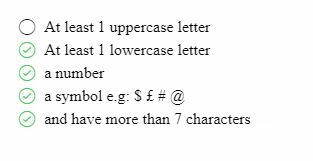
angular.module('app',[])

.controller('mainCtrl',function(){
  var vm = this;
  vm.disableSave = true
}).password-strength {
list-style: none;
}
.password-strength > li:before {
font-family: Ionicons !important;
content: '\f170';
font-size: 20px;
padding-right: 10px;
}
.password-strength > li.checked:before {
font-family: Ionicons !important;
content: '\f16d';
padding-right: 10px;
font-size: 20px;
color: #46cb4f;
}<html ng-app="app">
<head>
<script src="https://ajax.googleapis.com/ajax/libs/angularjs/1.2.23/angular.min.js"></script>
<link href="http://code.ionicframework.com/ionicons/1.5.2/css/ionicons.min.css" rel="stylesheet">
</head>
<body>
<div controller="mainCtrl as vm" class="top20">
<password-strength ng-model="vm.model.newPassword"></password-strength>
<h4>Your password must contain the following:</h4>
<ul class="password-strength">
<li ng-class="{'checked': false}">At least 1 uppercase letter</li>
<li ng-class="{'checked': true}">At least 1 lowercase letter</li>
<li ng-class="{'checked': true}">a number</li>
<li ng-class="{'checked': true}">a symbol e.g: $ £ # @</li>
<li ng-class="{'checked': true}">and have more than 7 characters</li>
</ul>
</div>
</body>
回答 3
Stack Overflow用户
回答已采纳
发布于 2018-10-03 13:33:05
试着做这样的事情:
angular.module('app', [])

  .controller('mainCtrl', function() {
    var vm = this;
    vm.disableSave = true
}).password-strength {
list-style: none;
}
.password-strength>li:before {
font-family: Ionicons !important;
content: '\f170';
font-size: 20px;
padding-right: 10px;
vertical-align: -2px;
}
.password-strength>li.checked:before {
font-family: Ionicons !important;
content: '\f16d';
padding-right: 10px;
font-size: 20px;
color: #46cb4f;
}<html ng-app="app">
<head>
<script src="https://ajax.googleapis.com/ajax/libs/angularjs/1.2.23/angular.min.js"></script>
<link href="http://code.ionicframework.com/ionicons/1.5.2/css/ionicons.min.css" rel="stylesheet">
</head>
<body>
<div controller="mainCtrl as vm" class="top20">
<password-strength ng-model="vm.model.newPassword"></password-strength>
<h4>Your password must contain the following:</h4>
<ul class="password-strength">
<li ng-class="{'checked': false}">At least 1 uppercase letter</li>
<li ng-class="{'checked': true}">At least 1 lowercase letter</li>
<li ng-class="{'checked': true}">a number</li>
<li ng-class="{'checked': true}">a symbol e.g: $ £ # @</li>
<li ng-class="{'checked': true}">and have more than 7 characters</li>
</ul>
</div>
</body>
Stack Overflow用户
发布于 2018-10-03 13:31:43
刚在li:before中添加下面的css
display: inline-block; vertical-align: middle;
angular.module('app',[])

.controller('mainCtrl',function(){
  var vm = this;
  vm.disableSave = true
}).password-strength {
list-style: none;
}
.password-strength > li:before {
font-family: Ionicons !important;
content: '\f170';
font-size: 20px;
padding-right: 10px;
display: inline-block;
vertical-align: middle;
}
.password-strength > li.checked:before {
font-family: Ionicons !important;
content: '\f16d';
padding-right: 10px;
font-size: 20px;
color: #46cb4f;
}<html ng-app="app">
<head>
<script src="https://ajax.googleapis.com/ajax/libs/angularjs/1.2.23/angular.min.js"></script>
<link href="http://code.ionicframework.com/ionicons/1.5.2/css/ionicons.min.css" rel="stylesheet">
</head>
<body>
<div controller="mainCtrl as vm" class="top20">
<password-strength ng-model="vm.model.newPassword"></password-strength>
<h4>Your password must contain the following:</h4>
<ul class="password-strength">
<li ng-class="{'checked': false}">At least 1 uppercase letter</li>
<li ng-class="{'checked': true}">At least 1 lowercase letter</li>
<li ng-class="{'checked': true}">a number</li>
<li ng-class="{'checked': true}">a symbol e.g: $ £ # @</li>
<li ng-class="{'checked': true}">and have more than 7 characters</li>
</ul>
</div>
</body>
Stack Overflow用户
发布于 2018-10-03 13:34:44
向伪元素添加位置和顶部属性
angular.module('app',[])

.controller('mainCtrl',function(){
  var vm = this;
  vm.disableSave = true
}).password-strength {
list-style: none;
}
.password-strength > li:before {
font-family: Ionicons !important;
content: '\f170';
font-size: 20px;
padding-right: 10px;
position: relative;
top: 3px;
}
.password-strength > li.checked:before {
font-family: Ionicons !important;
content: '\f16d';
padding-right: 10px;
font-size: 20px;
color: #46cb4f;
position: relative;
top: 3px;
}<html ng-app="app">
<head>
<script src="https://ajax.googleapis.com/ajax/libs/angularjs/1.2.23/angular.min.js"></script>
<link href="http://code.ionicframework.com/ionicons/1.5.2/css/ionicons.min.css" rel="stylesheet">
</head>
<body>
<div controller="mainCtrl as vm" class="top20">
<password-strength ng-model="vm.model.newPassword"></password-strength>
<h4>Your password must contain the following:</h4>
<ul class="password-strength">
<li ng-class="{'checked': false}">At least 1 uppercase letter</li>
<li ng-class="{'checked': true}">At least 1 lowercase letter</li>
<li ng-class="{'checked': true}">a number</li>
<li ng-class="{'checked': true}">a symbol e.g: $ £ # @</li>
<li ng-class="{'checked': true}">and have more than 7 characters</li>
</ul>
</div>
</body>
页面原文内容由Stack Overflow提供。腾讯云小微IT领域专用引擎提供翻译支持
原文链接:
https://stackoverflow.com/questions/52628076
复制相关文章
相似问题
腾讯云开发者

Copyright © 2013 - 2026 Tencent Cloud. All Rights Reserved. 腾讯云 版权所有
深圳市腾讯计算机系统有限公司 ICP备案/许可证号:粤B2-20090059  粤公网安备44030502008569号
腾讯云计算(北京)有限责任公司 京ICP证150476号 | 京ICP备11018762号