
保持在gganimate点
保持在gganimate点
提问于 2018-10-02 18:22:05
我想用gganimate记录一下测试情况的进展:我已经完成了以下工作:
library(tidyverse)
library(gganimate)

data <- tribble(~user, ~agree, ~accord, ~messung,
            "1", .8, .9, 1,
            "2",.7, .8, 1,
           "3", .6, .9, 1)
data2 <- tribble(~user, ~agree2, ~accord2, ~messung2,
           "1",  .4, .7, 2,
            "2", .5, .9, 2,
            "3", .9, .9, 2)

data%>%
left_join(data2)%>%
 mutate(user = as.numeric(user))%>%
 ggplot(aes(x = accord, y = agree))+
 geom_point(aes(fill = "grey"), color = "grey", size = 2)+
 geom_point(aes(x = accord2, y = agree2), color = "green",
         size = 2)+
 xlim(0,1)+
 ylim(0,1)+
 geom_segment(aes(x = accord,
               y = agree,
               xend = accord2,
               yend = agree2),
           size = 0.5, arrow = arrow(type="closed", length =
                                       unit(.08, "inches"), angle = 30),
color = "grey")+
theme_minimal()+
guides(fill=FALSE, color=FALSE)+
transition_manual(user)
颜色和表象首先是次要的。这将是重要的学习如何动画点一个又一个,而不是以前的点消失了?欢迎任何帮助!谢谢
回答 2
Stack Overflow用户
回答已采纳
发布于 2018-10-03 00:14:26
也许只需创建另一个保存前面观察结果的数据,并使用geom_point添加它。
## Your example:
dat <- data %>%
  left_join(data2) %>%
  mutate(user = as.numeric(user))
ggplot(dat) +
  geom_point(aes(x = accord, y = agree)) +
  geom_point(aes(x = accord2, y = agree2), color = "green") +
  xlim(0, 1) +
  ylim(0, 1) +
  geom_segment(aes(
    x = accord,
    y = agree,
    xend = accord2,
    yend = agree2
  )) +
  transition_manual(user) -> p

# Now add:
rows <- unlist(sapply(2:nrow(dat), seq))
cols <- grep("agree|accord", names(dat), val = T)
df_points <- dat[rows, cols]
df_points$user <- rep(dat$user[-1], 2:nrow(dat))
p +
  geom_point(aes(x = accord, y = agree), df_points) +
  geom_point(aes(x = accord2, y = agree2), df_points, color = "green")
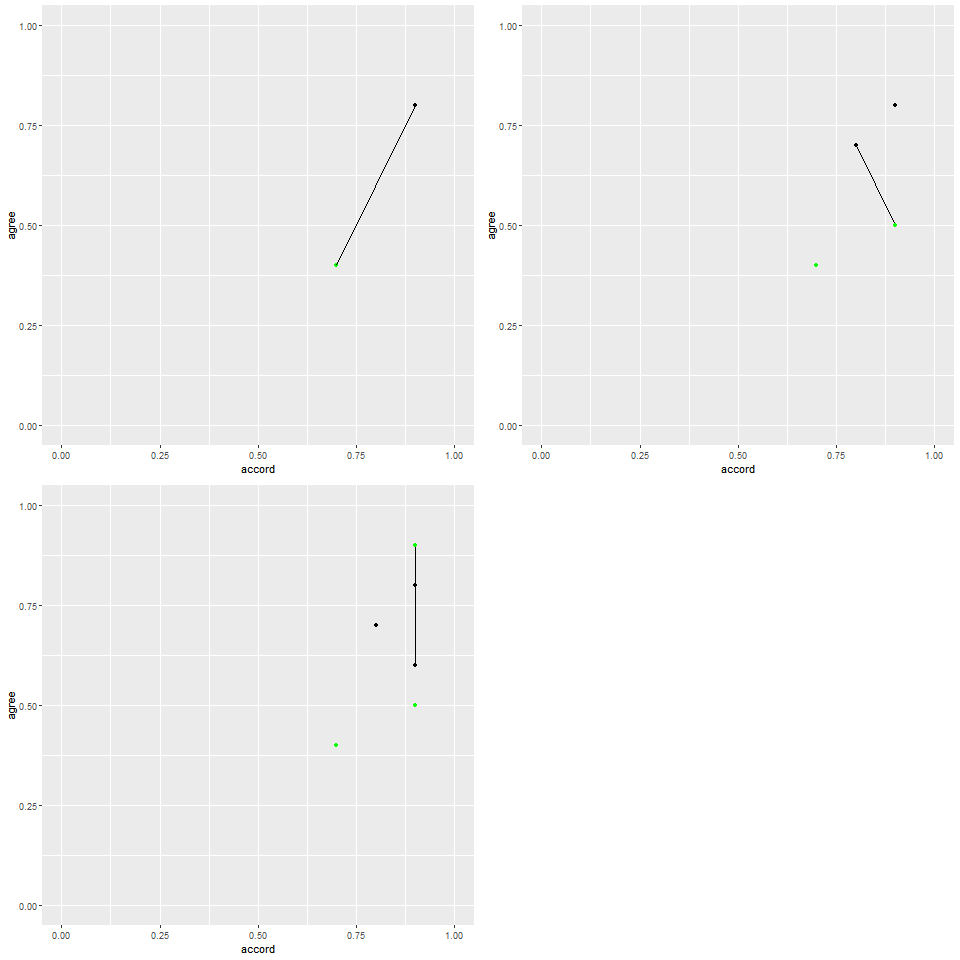
Stack Overflow用户
发布于 2018-10-02 23:44:25
我无法让它与transition_manual一起工作,但您可以使用transition_states获得所需的输出。如果不需要转换,可以将transition_length设置为零。
data%>%
  left_join(data2)%>%
  mutate(user = as.numeric(user)) %>%

  ggplot() +
  geom_point(aes(x = accord,  y = agree),  color = "grey",  size = 2,  fill = "grey") +
  geom_point(aes(x = accord2, y = agree2), color = "green", size = 2)+
  xlim(0,1)+ ylim(0,1)+
  geom_segment(aes(x = accord, y = agree, xend = accord2, yend = agree2),
               size = 0.5, color = "grey",
               arrow = arrow(type="closed", length = unit(.08, "inches"), angle = 30))+
  theme_minimal() +
  # Use zero for "transition_length" to remove animation easing altogether
  transition_states(user, transition_length = 1, state_length = 2) +
  # shadow_mark(exclude_layer = 3) # This hides the arrow from animating
  shadow_mark()
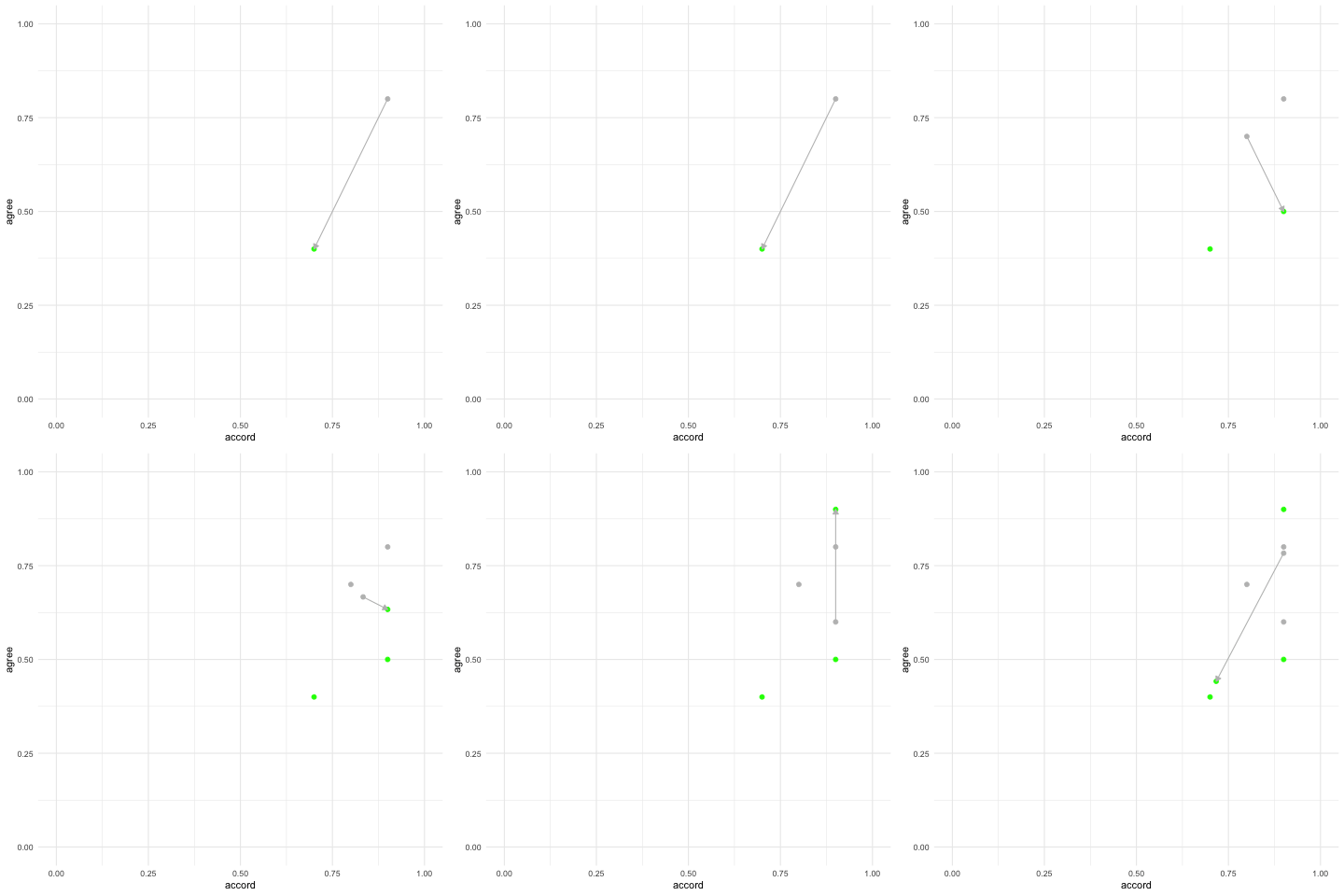
页面原文内容由Stack Overflow提供。腾讯云小微IT领域专用引擎提供翻译支持
原文链接:
https://stackoverflow.com/questions/52614197
复制相关文章
相似问题
腾讯云开发者

Copyright © 2013 - 2026 Tencent Cloud. All Rights Reserved. 腾讯云 版权所有
深圳市腾讯计算机系统有限公司 ICP备案/许可证号:粤B2-20090059  粤公网安备44030502008569号
腾讯云计算(北京)有限责任公司 京ICP证150476号 | 京ICP备11018762号