
API网关Cloudformation
我正在尝试使用cloudformation在API网关中部署一个API。这些方法需要启用CORS,我在这里遵循了模板Enable CORS for API Gateway in Cloudformation template。这是我的模板
AuthorizerRole:
    Type: AWS::IAM::Role
    Properties:
      AssumeRolePolicyDocument:
        Version: "2012-10-17"
        Statement:
          - Action:
              - "sts:AssumeRole"
            Effect: "Allow"
            Principal:
              Service:
                - "apigateway.amazonaws.com"
      Policies:
        - PolicyDocument:
            Version: "2012-10-17"
            Statement:
              - Action:
                  - "lambda:invokeFunction"
                Effect: "Allow"
                Resource:
                  - !GetAtt "MyAPIAuthorizer.Arn"
          PolicyName: "lambda"

Authorizer:
  Type: AWS::ApiGateway::Authorizer
  Properties:
    AuthorizerResultTtlInSeconds: 0
    AuthorizerCredentials: !GetAtt "AuthorizerRole.Arn"
    AuthorizerUri:
      Fn::Join:
        - ""
        -
          - "arn:aws:apigateway:"
          - Ref: "AWS::Region"
          - ":lambda:path/2015-03-31/functions/"
          - Fn::GetAtt:
              - "MyAPIAuthorizer"
              - "Arn"
          - "/invocations"
    Type: "TOKEN"
    IdentitySource: "method.request.header.token"
    Name: "DefaultAuthorizer"
    RestApiId: !Ref RestApi

MyAPIAuthorizer:
    Type: AWS::Lambda::Function
    Properties:
      Code:
        S3Bucket: my-My-lambda-us-east-1
        S3Key: node_lambdas.zip
      Handler: My-APIAuthorizer.handler
      Role: !Ref Role
      Runtime: nodejs6.10
      Timeout: 300
      VpcConfig:
        SecurityGroupIds:
          - !Ref SecurityGroup
        SubnetIds: !Ref Subnets

MyAuthenticateUser:
    Type: AWS::Lambda::Function
    Properties:
      Code:
        S3Bucket: My-My-lambda-us-east-1
        S3Key: node_lambdas.zip
      Handler: My-AuthenticateUser.handler
      Role: !Ref Role
      Runtime: nodejs6.10
      Timeout: 300
      VpcConfig:
        SecurityGroupIds:
          - !Ref SecurityGroup
        SubnetIds: !Ref Subnets
      #Policies: AWSLambdaDynamoDBExecutionRole

MyAuthenticateUserApiGatewayInvoke:
    Type: AWS::Lambda::Permission
    Properties:
      Action: lambda:InvokeFunction
      FunctionName: !GetAtt "MyAuthenticateUser.Arn"
      Principal: "apigateway.amazonaws.com"
      SourceArn: !Sub "arn:aws:execute-api:${AWS::Region}:${AWS::AccountId}:${RestApi}/*/*/*"
MyAuthenticateUserResource:
     Type: AWS::ApiGateway::Resource
     Properties:
       RestApiId: !Ref RestApi
       ParentId: !Ref ApiResourceParent
       PathPart: authenticateuser
MyAuthenticateUserPost:
      Type: AWS::ApiGateway::Method
      Properties:
        RestApiId: !Ref RestApi
        ResourceId: !Ref MyAuthenticateUserResource
        HttpMethod: POST
        AuthorizationType: NONE
        Integration:
          IntegrationHttpMethod: POST
          Type: AWS
          Uri: !Sub
            - "arn:aws:apigateway:${AWS::Region}:lambda:path/2015-03-31/functions/${lambdaArn}/invocations"
            - lambdaArn: !GetAtt "MyAuthenticateUser.Arn"
          IntegrationResponses:
          - StatusCode: 200
            ResponseParameters:
              method.response.header.Access-Control-Allow-Origin: "'*'"
        MethodResponses:
        - StatusCode: 200
          ResponseModels:
            application/json: 'Empty'
          ResponseParameters:
              method.response.header.Access-Control-Allow-Origin: true
MyAuthenticateUserOptions:
      Type: AWS::ApiGateway::Method
      Properties:
        RestApiId: !Ref RestApi
        ResourceId: !Ref MyAuthenticateUserResource
        HttpMethod: OPTIONS
        AuthorizationType: NONE
        Integration:
            IntegrationHttpMethod: POST
            IntegrationResponses:
            - StatusCode: 200
              ResponseParameters:
                method.response.header.Access-Control-Allow-Headers: "'Content-Type,X-Amz-Date,Authorization,X-Api-Key,X-Amz-Security-Token,token'"
                method.response.header.Access-Control-Allow-Methods: "'POST,OPTIONS'"
                method.response.header.Access-Control-Allow-Origin: "'*'"
            Type: MOCK
        MethodResponses:
        - StatusCode: 200
          ResponseModels:
            application/json: 'Empty'
          ResponseParameters:
              method.response.header.Access-Control-Allow-Headers: true
              method.response.header.Access-Control-Allow-Methods: true
              method.response.header.Access-Control-Allow-Origin: true

MyFunction:
    Type: AWS::Lambda::Function
    Properties:
      Code:
        S3Bucket: My-My-lambda-us-east-1
        S3Key: node_lambdas.zip
      Handler: My-Function.handler
      Role: !Ref Role
      Runtime: nodejs6.10
      Timeout: 300
      VpcConfig:
        SecurityGroupIds:
          - !Ref SecurityGroup
        SubnetIds: !Ref Subnets
      #Policies: AWSLambdaDynamoDBExecutionRole

MyFunctionApiGatewayInvoke:
    Type: AWS::Lambda::Permission
    Properties:
      Action: lambda:InvokeFunction
      FunctionName: !GetAtt "MyFunction.Arn"
      Principal: "apigateway.amazonaws.com"
      SourceArn: !Sub "arn:aws:execute-api:${AWS::Region}:${AWS::AccountId}:${RestApi}/*/*/*"
MyFunctionResource:
     Type: AWS::ApiGateway::Resource
     Properties:
       RestApiId: !Ref RestApi
       ParentId: !Ref ApiResourceParent
       PathPart: Function
MyFunctionGet:
      Type: AWS::ApiGateway::Method
      Properties:
        RestApiId: !Ref RestApi
        ResourceId: !Ref MyFunctionResource
        HttpMethod: GET
        AuthorizationType: CUSTOM
        AuthorizerId: !Ref Authorizer
        Integration:
          IntegrationHttpMethod: GET
          Type: AWS
          Uri: !Sub
            - "arn:aws:apigateway:${AWS::Region}:lambda:path/2015-03-31/functions/${lambdaArn}/invocations"
            - lambdaArn: !GetAtt "MyFunction.Arn"
          IntegrationResponses:
          - StatusCode: 200
            ResponseParameters:
              method.response.header.Access-Control-Allow-Origin: "'*'"
        MethodResponses:
        - StatusCode: 200
          ResponseModels:
            application/json: 'Empty'
          ResponseParameters:
              method.response.header.Access-Control-Allow-Origin: true
MyFunctionOptions:
      Type: AWS::ApiGateway::Method
      Properties:
        RestApiId: !Ref RestApi
        ResourceId: !Ref MyFunctionResource
        HttpMethod: OPTIONS
        AuthorizationType: NONE
        Integration:
            IntegrationHttpMethod: GET
            IntegrationResponses:
            - StatusCode: 200
              ResponseParameters:
                method.response.header.Access-Control-Allow-Headers: "'Content-Type,X-Amz-Date,Authorization,X-Api-Key,X-Amz-Security-Token,token'"
                method.response.header.Access-Control-Allow-Methods: "'GET,OPTIONS'"
                method.response.header.Access-Control-Allow-Origin: "'*'"
            Type: MOCK
        MethodResponses:
        - StatusCode: 200
          ResponseModels:
            application/json: 'Empty'
          ResponseParameters:
              method.response.header.Access-Control-Allow-Headers: true
              method.response.header.Access-Control-Allow-Methods: true
method.response.header.Access-Control-Allow-Origin: true在部署API之后,MyAuthenticateUserPost方法返回包含以下响应头的200
访问-控制-允许-源→* 连接→保持活力 内容长度→249 内容类型的→应用程序/json 2018年9月28日→星期五21:15:38格林尼治时间 Via sdlkfnsdlk.cloudfront.net 1.1→(CloudFront) X-Amz-Cf-Id→dflknsdlfkn X-Amzn-追踪-Id→Root=sdlkfnsdlk;Sampled=0 来自云端的高速缓存→小姐 X-amz-apigw id→sdklfnsdlk X-→slkfnlsdk
但是MyFunctionGet方法返回具有以下响应头的500
连接→保持活力 内容长度→36 内容类型的→应用程序/json →星期五2018年9月28日21:19:04格林尼治时间 Via slkdfnk.cloudfront.net 1.1→(CloudFront) →dsklfnsdlk 来自cloudfront的X-缓存→错误 x-amz-apigw-id→dlsfknsdlkfn →sdkfnsdkln
500个响应缺少Access-Control-Allow-Origin和X-Amzn-Trace-Id头。这两种方法的不同之处在于,工作方法是POST,没有授权,而不工作的方法是GET和自定义授权器。如果我进入API网关控制台,选择GET方法->Integration Request,然后按如下方式保存Lambda函数,我就可以使返回500的方法工作
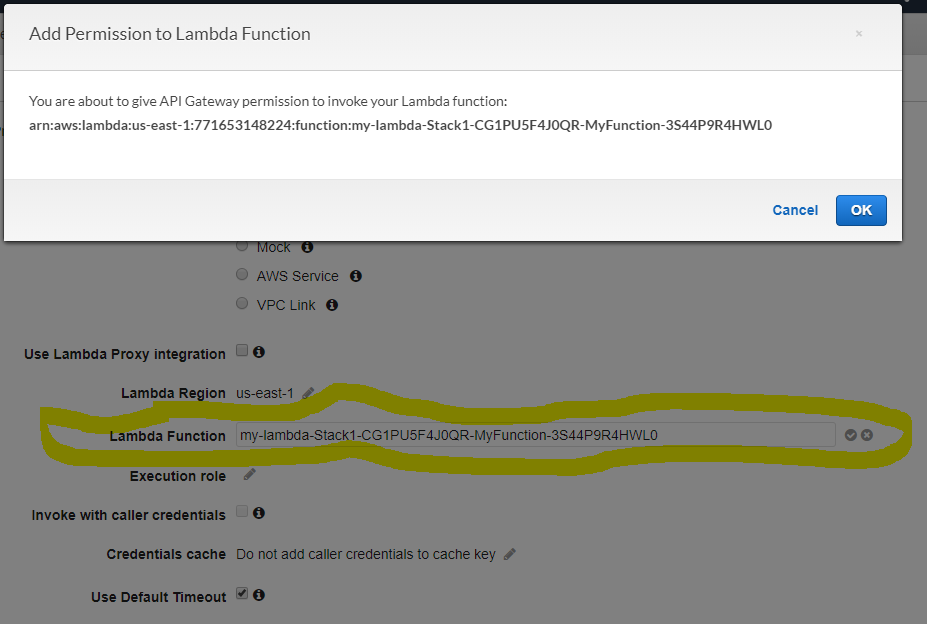
该函数已经在cloudformation之后出现在该字段中,并且我已经在模板中添加了权限,但是除非执行此手动步骤,否则API Gateway方法将无法工作。我有大约50种方法,所以我想完全自动化这一点。我是不是在模板里遗漏了什么?
更新:响应@jny,我更新了Get方法中的集成响应如下
IntegrationResponses:
              - StatusCode: 200
                SelectionPattern: "2\\{d}2"
                ResponseParameters:
                  method.response.header.Access-Control-Allow-Origin: "'*'"
              - StatusCode: 300
                SelectionPattern: "3\\{d}2"
                ResponseParameters:
                  method.response.header.Access-Control-Allow-Origin: "'*'"
              - StatusCode: 400
                SelectionPattern: "4\\{d}2"
                ResponseParameters:
                  method.response.header.Access-Control-Allow-Origin: "'*'"
              - StatusCode: 500
                SelectionPattern: "5\\{d}2"
                ResponseParameters:
                  method.response.header.Access-Control-Allow-Origin: "'*'"
            MethodResponses:
            - StatusCode: 200
              ResponseModels:
                application/json: 'Empty'
              ResponseParameters:
                  method.response.header.Access-Control-Allow-Origin: true
            - StatusCode: 300
              ResponseModels:
                application/json: 'Empty'
              ResponseParameters:
                  method.response.header.Access-Control-Allow-Origin: true
            - StatusCode: 400
              ResponseModels:
                application/json: 'Empty'
              ResponseParameters:
                  method.response.header.Access-Control-Allow-Origin: true
            - StatusCode: 500
              ResponseModels:
                application/json: 'Empty'
              ResponseParameters:
                  method.response.header.Access-Control-Allow-Origin: true
我还对我的选项方法进行了相同的更新。
IntegrationResponses:
                - StatusCode: 200
                  SelectionPattern: "2\\{d}2"
                  ResponseParameters:
                    method.response.header.Access-Control-Allow-Headers: "'Content-Type,X-Amz-Date,Authorization,X-Api-Key,X-Amz-Security-Token,token'"
                    method.response.header.Access-Control-Allow-Methods: "'GET,OPTIONS'"
                    method.response.header.Access-Control-Allow-Origin: "'*'"
                - StatusCode: 300
                  SelectionPattern: "3\\{d}2"
                  ResponseParameters:
                    method.response.header.Access-Control-Allow-Headers: "'Content-Type,X-Amz-Date,Authorization,X-Api-Key,X-Amz-Security-Token,token'"
                    method.response.header.Access-Control-Allow-Methods: "'GET,OPTIONS'"
                    method.response.header.Access-Control-Allow-Origin: "'*'"
                - StatusCode: 400
                  SelectionPattern: "4\\{d}2"
                  ResponseParameters:
                    method.response.header.Access-Control-Allow-Headers: "'Content-Type,X-Amz-Date,Authorization,X-Api-Key,X-Amz-Security-Token,token'"
                    method.response.header.Access-Control-Allow-Methods: "'GET,OPTIONS'"
                    method.response.header.Access-Control-Allow-Origin: "'*'"
                - StatusCode: 500
                  SelectionPattern: "5\\{d}2"
                  ResponseParameters:
                    method.response.header.Access-Control-Allow-Headers: "'Content-Type,X-Amz-Date,Authorization,X-Api-Key,X-Amz-Security-Token,token'"
                    method.response.header.Access-Control-Allow-Methods: "'GET,OPTIONS'"
                    method.response.header.Access-Control-Allow-Origin: "'*'"
            MethodResponses:
            - StatusCode: 200
              ResponseModels:
                application/json: 'Empty'
              ResponseParameters:
                  method.response.header.Access-Control-Allow-Headers: false
                  method.response.header.Access-Control-Allow-Methods: false
                  method.response.header.Access-Control-Allow-Origin: false
            - StatusCode: 300
              ResponseModels:
                application/json: 'Empty'
              ResponseParameters:
                  method.response.header.Access-Control-Allow-Headers: false
                  method.response.header.Access-Control-Allow-Methods: false
                  method.response.header.Access-Control-Allow-Origin: false
            - StatusCode: 400
              ResponseModels:
                application/json: 'Empty'
              ResponseParameters:
                  method.response.header.Access-Control-Allow-Headers: false
                  method.response.header.Access-Control-Allow-Methods: false
                  method.response.header.Access-Control-Allow-Origin: false
            - StatusCode: 500
              ResponseModels:
                application/json: 'Empty'
              ResponseParameters:
                  method.response.header.Access-Control-Allow-Headers: false
                  method.response.header.Access-Control-Allow-Methods: false
                  method.response.header.Access-Control-Allow-Origin: false
在调用API方法时,我仍然可以看到500响应。
回答 1
Stack Overflow用户
发布于 2018-10-03 21:32:18
您必须为所有状态配置ResponseParameters,而不仅仅是200。
就像这样:
   "IntegrationResponses": [
        {
          "ResponseParameters":{
            "method.response.header.Access-Control-Allow-Origin": "'*'"
          },
        "StatusCode": 200,
        "ResponseTemplates": {
        ....
        }
      },
        {
          "StatusCode": 500,
          "SelectionPattern": "5\\{d}2",
          "ResponseTemplates": {
              ....
          }
        }
      ],
方法响应也是相同的,例如:
"MethodResponses": [{
      "ResponseModels": {
        "application/json": "Empty"
      },
      "ResponseParameters":{
        "method.response.header.Access-Control-Allow-Origin": "'*'"
      },
      "StatusCode": "200"
    },
      {
        "StatusCode": "500"
      }
]https://stackoverflow.com/questions/52563022
复制相似问题
腾讯云开发者

Copyright © 2013 - 2026 Tencent Cloud. All Rights Reserved. 腾讯云 版权所有
深圳市腾讯计算机系统有限公司 ICP备案/许可证号:粤B2-20090059  粤公网安备44030502008569号
腾讯云计算(北京)有限责任公司 京ICP证150476号 | 京ICP备11018762号