
无法从主机停靠器访问windows堆栈的容器IP
我正在使用下面的docker组合文件来构建我的坞群堆栈,该堆栈的windows容器部署在Windows 10中:
version: '3.2'

services:
  service1:
    image: myrepository/dotnet-framework:3.5-windowsservercore
    environment:
      - my_path="C:/app/build/app.exe"
      - my_arg= 1
    deploy:
      replicas: 1
      placement:
        constraints:
          - node.id == asdfasdgasgasg
    volumes:
      - service1:C:/app
  service1:
    image: myrepository/dotnet-framework:3.5-windowsservercore
    ports:
      - target: 7878
        published: 7878
        mode: host
    environment:
      - my_path="C:/app/app.exe"
      - my_arg= 2
    deploy:
      replicas: 1
      placement:
        constraints:
          - node.id == asdfasdgasgasg
    volumes:
      - service1:C:/app

volumes:
  service2:
    external:
      name: service1
  service1:
    external:
name: service1如您所见,service2正在端口7878中监听。我知道,如这 post所示,我无法使用localhost:7878到达这个端口。因此,我运行命令docker inspect containerID来计算容器的IP地址。
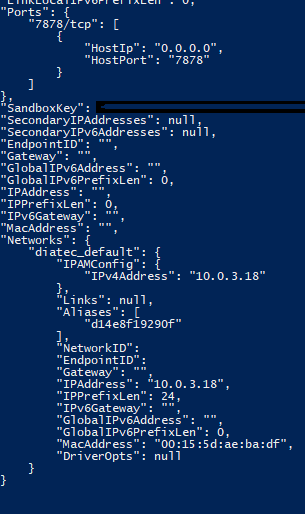
如果我从service2中选择容器service1,它就会做出响应。但是,如果我试图从主机访问端口10.0.3.18:7878,就没有响应。我怎么才能从港口到达7878港?另一方面,我的Linux容器必须到达“service2”窗口容器。
回答 2
Stack Overflow用户
发布于 2018-10-20 14:29:42
窗口更新,一切都按预期工作。
Stack Overflow用户
发布于 2018-09-26 22:06:01
默认情况下,服务中的每个码头容器都可以在自己的专用网络上启动时相互通信。这就是为什么您可以在服务容器之间切换的原因。
您打开的端口7878也可以通过主机的ip地址(而不是容器ip地址)访问主机windows 10 os。容器的IP地址是私有的,甚至对主机os也是如此。
Ping可能无法工作,因为您没有在服务中打开ping端口,并且图像中可能没有ping服务来响应您的ping请求。在最后一点上,我可能是错的。Ping不是检验容器是否工作的好方法。
https://stackoverflow.com/questions/52517499
复制相似问题
腾讯云开发者

Copyright © 2013 - 2026 Tencent Cloud. All Rights Reserved. 腾讯云 版权所有
深圳市腾讯计算机系统有限公司 ICP备案/许可证号:粤B2-20090059  粤公网安备44030502008569号
腾讯云计算(北京)有限责任公司 京ICP证150476号 | 京ICP备11018762号