
TabLayout视觉缺陷:两侧灰色透明条
在我的TabLayout的两边有两个透明的垂直条。看起来是这样的:

它是在我从android:theme="@style/AppTheme.ActionBar"中删除TabLayout之后出现的,因为它没有显示TabLayout指示器:

可能会有什么问题?
我的布局:
 <android.support.design.widget.CoordinatorLayout
    android:layout_width="match_parent"
    android:layout_height="match_parent"
    app:layout_behavior="@string/appbar_scrolling_view_behavior"
    tools:context="my.beeline.kz.ui.ScrollableController">

    <android.support.design.widget.AppBarLayout
        android:id="@+id/appbar"
        android:layout_width="match_parent"
        android:layout_height="wrap_content"
        android:background="@null"
        android:theme="@style/ThemeOverlay.AppCompat.Dark.ActionBar">

        <android.support.v7.widget.Toolbar
            android:id="@+id/toolbar"
            android:layout_width="match_parent"
            android:layout_height="?attr/actionBarSize"
            android:theme="@style/AppTheme.ActionBar"
            app:layout_collapseMode="none"
            app:layout_scrollFlags="scroll|enterAlways|snap"
            app:titleMarginStart="@dimen/toolbar_title_margin"/>

        <android.support.design.widget.TabLayout
            android:id="@+id/tab_layout"
            android:layout_width="match_parent"
            android:layout_height="wrap_content"
            android:background="@null"
            app:tabMinWidth="120dp"
            app:tabSelectedTextColor="@color/black"
            app:tabTextAppearance="@android:style/TextAppearance.Widget.TabWidget"
            app:tabTextColor="@color/gray_solid"/>

    </android.support.design.widget.AppBarLayout>

    <android.support.v4.view.ViewPager
        android:id="@+id/viewpager"
        android:layout_width="match_parent"
        android:layout_height="match_parent"
        android:background="@color/gray_very_light"
        app:layout_behavior="@string/appbar_scrolling_view_behavior"/>

</android.support.design.widget.CoordinatorLayout>
更新:
解决方案是将android:background="@null"从AppBarLayout中删除。
回答 2
Stack Overflow用户
发布于 2018-09-25 06:30:21
这个代码对我有用,我希望它对你有用:
<android.support.design.widget.CoordinatorLayout xmlns:android="http://schemas.android.com/apk/res/android"
    xmlns:app="http://schemas.android.com/apk/res-auto"
    android:layout_width="match_parent"
    android:layout_height="match_parent">

    <android.support.design.widget.AppBarLayout
        android:layout_width="match_parent"
        android:layout_height="wrap_content"
        android:theme="@style/ThemeOverlay.AppCompat.Dark.ActionBar">

        <android.support.v7.widget.Toolbar
            android:id="@+id/toolbar"
            android:layout_width="match_parent"
            android:layout_height="?attr/actionBarSize"
            android:background="?attr/colorPrimary"
            app:layout_scrollFlags="scroll|enterAlways"
            app:popupTheme="@style/ThemeOverlay.AppCompat.Light" />

        <android.support.design.widget.TabLayout
            android:id="@+id/tabs"
            android:layout_width="match_parent"
            android:layout_height="wrap_content"
            app:tabMode="fixed"
            app:tabGravity="fill"/>
    </android.support.design.widget.AppBarLayout>

    <android.support.v4.view.ViewPager
        android:id="@+id/viewpager"
        android:layout_width="match_parent"
        android:layout_height="match_parent"
        app:layout_behavior="@string/appbar_scrolling_view_behavior"  />
</android.support.design.widget.CoordinatorLayout>Stack Overflow用户
发布于 2018-09-25 06:56:08
在这里,我将向您展示如何在android应用程序中实现材料设计选项卡。
1.打开应用程序级的build.gradle并添加设计支持库,因为TabLayout是:的一部分
compile 'com.android.support:design:27.0.2'activity_main.xml 2.在布局中添加选项卡布局和视图寻呼机,、、或任何您愿意添加的地方
 <?xml version="1.0" encoding="utf-8"?>
 <LinearLayout xmlns:android="http://schemas.android.com/apk/res/android"
    xmlns:app="http://schemas.android.com/apk/res-auto"
    android:layout_width="match_parent"
    android:layout_height="match_parent"
    android:orientation="vertical">

    <include layout="@layout/app_bar" />

    <android.support.design.widget.TabLayout
    android:id="@+id/tabLayout"
    android:layout_width="match_parent"
    android:layout_height="wrap_content"
    android:minHeight="?actionBarSize"
    app:tabGravity="fill"
    app:tabIndicatorColor="@color/white"
    app:tabIndicatorHeight="4dp"
    app:tabBackground="@color/colorPrimary"
    app:tabMode="fixed">
    </android.support.design.widget.TabLayout>

    <android.support.v4.view.ViewPager
    android:id="@+id/viewPager"
    android:layout_width="match_parent"
    android:layout_height="match_parent">
    </android.support.v4.view.ViewPager>

</LinearLayout>
app_bar.xml 3.工具栏的
<?xml version="1.0" encoding="utf-8"?>
<android.support.v7.widget.Toolbar xmlns:android="http://schemas.android.com/apk/res/android"
xmlns:app="http://schemas.android.com/apk/res-auto"
android:id="@+id/toolbar"
android:layout_width="match_parent"
android:layout_height="?attr/actionBarSize"
android:background="@color/colorPrimary"
android:gravity="center_vertical"
app:layout_collapseMode="pin"
app:layout_scrollFlags="scroll|enterAlways"
app:theme="@style/MyToolbarTheme"
app:title="@string/app_name"/>
style.xml 4.
<style name="MyToolbarTheme"
parent="@style/ThemeOverlay.AppCompat.Dark">
 <item name="colorControlNormal">@color/white</item>
 <item name="titleTextColor">@color/white</item>
</style>- 自定义选项卡外观的一些选项:
导航标签重力的app:tabGravity=”fill”。另一个是从中心放置导航标签的中心。
app:tabIndicatorColor=”@color/white”表示选项卡中的指示符。在这里你可以看到白色指示灯。
app:tabIndicatorHeight=”4dp”表示指示高度。
选项卡模式的app:tabMode=”fixed”。其他选项卡可滚动到更多选项卡。
app:tabTextColor=”@color/semi_yellow”用于未选定的选项卡文本颜色。
app:tabSelectedTextColor=”@color/yellow”用于选定的选项卡文本颜色。
如果要向选项卡添加图标,则必须调用选项卡的setIcon()方法。创建图标数组并为每个选项卡分配每一个,如下所示:
带有图标的选项卡:
private int[] tabIcons = {
 R.drawable.home,
 R.drawable.notification,
 R.drawable.star
};
tabLayout.getTabAt(0).setIcon(tabIcons[0]);
tabLayout.getTabAt(1).setIcon(tabIcons[1]);
tabLayout.getTabAt(2).setIcon(tabIcons[2]);
结果的时间:
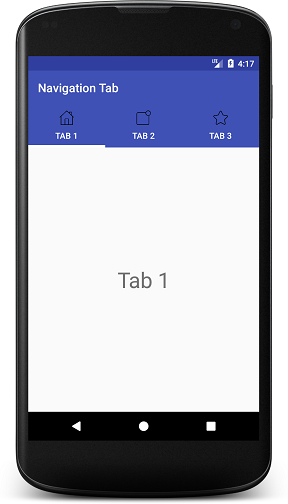
无图标
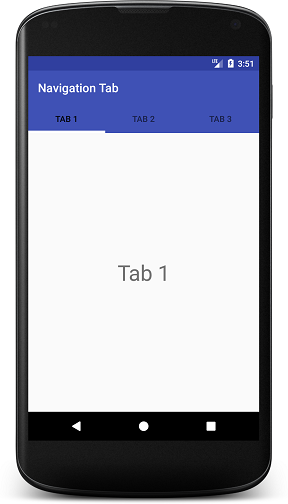
快乐编码!
https://stackoverflow.com/questions/52491797
复制相似问题
腾讯云开发者

Copyright © 2013 - 2026 Tencent Cloud. All Rights Reserved. 腾讯云 版权所有
深圳市腾讯计算机系统有限公司 ICP备案/许可证号:粤B2-20090059  粤公网安备44030502008569号
腾讯云计算(北京)有限责任公司 京ICP证150476号 | 京ICP备11018762号