
自举4网吧/吐司
自举4网吧/吐司
提问于 2018-09-22 16:07:40
我正在尝试用Bootstra4创建一个snackbar /土司版本。我从w3schools的本教程开始。
更新:i试图为Bootstrap 4实现一个自定义的快捷键或烤面包条,但是现在还没有必要,因为正如@Zim所说的,4包含了4.2版的这个选项。
回答 5
Stack Overflow用户
回答已采纳
发布于 2018-12-29 12:44:10
引导4.2现在包括 吐司 通知
下面是一个例子:
<div class="toast" role="alert" aria-live="assertive" aria-atomic="true">
<div class="toast-header">
<strong class="mr-auto">Title</strong>
<small>5 mins ago</small>
<button type="button" class="ml-2 mb-1 close" data-dismiss="toast" aria-label="Close">
<span aria-hidden="true">×</span>
</button>
</div>
<div class="toast-body">
Content... this is a toast message.
</div>
</div>更多自举烤面包布局/位置示例:
垂直堆叠:https://codeply.com/go/3ZvZa9b8Im
Stack Overflow用户
发布于 2019-02-19 13:48:28
I ()为烤面包组件创建了一个jQuery插件,以使它们更易于使用,回购可以找到这里。其目的是能够通过JavaScript在飞行中召唤祝酒词。
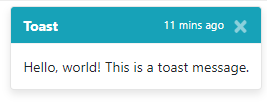
烤面包
$.toast({
  title: 'Toast',
  subtitle: '11 mins ago',
  content: 'Hello, world! This is a toast message.',
  type: 'info',
  delay: 5000
});
Snack
$.toast({
  title: 'A small bitesize snack, not a toast!',
  type: 'info',
  delay: 5000
});

动态示例
(function(b){b.toast=function(a,h,g,l,k){b("#toast-container").length||(b("body").prepend('<div id="toast-container" aria-live="polite" aria-atomic="true"></div>'),b("#toast-container").append('<div id="toast-wrapper"></div>'));var c="",d="",e="text-muted",f="",m="object"===typeof a?a.title||"":a||"Notice!";h="object"===typeof a?a.subtitle||"":h||"";g="object"===typeof a?a.content||"":g||"";k="object"===typeof a?a.delay||3E3:k||3E3;switch("object"===typeof a?a.type||"":l||"info"){case "info":c="bg-info";
f=e=d="text-white";break;case "success":c="bg-success";f=e=d="text-white";break;case "warning":case "warn":c="bg-warning";f=e=d="text-white";break;case "error":case "danger":c="bg-danger",f=e=d="text-white"}a='<div class="toast" role="alert" aria-live="assertive" aria-atomic="true" data-delay="'+k+'">'+('<div class="toast-header '+c+" "+d+'">')+('<strong class="mr-auto">'+m+"</strong>");a+='<small class="'+e+'">'+h+"</small>";a+='<button type="button" class="ml-2 mb-1 close" data-dismiss="toast" aria-label="Close">';
a+='<span aria-hidden="true" class="'+f+'">×</span>';a+="</button>";a+="</div>";""!==g&&(a+='<div class="toast-body">',a+=g,a+="</div>");a+="</div>";b("#toast-wrapper").append(a);b("#toast-wrapper .toast:last").toast("show")}})(jQuery);
const TYPES = ['info', 'warning', 'success', 'error'],
TITLES = {
'info': 'Notice!',
'success': 'Awesome!',
'warning': 'Watch Out!',
'error': 'Doh!'
},
CONTENT = {
'info': 'Hello, world! This is a toast message.',
'success': 'The action has been completed.',
'warning': 'It\'s all about to go wrong',
'error': 'It all went wrong.'
};
function show_random_toast()
{
let type = TYPES[Math.floor(Math.random() * TYPES.length)],
title = TITLES[type],
content = CONTENT[type];
$.toast({
title: title,
subtitle: '11 mins ago',
content: content,
type: type,
delay: 5000
});
}
function show_random_snack()
{
let type = TYPES[Math.floor(Math.random() * TYPES.length)],
content = CONTENT[type].replace('toast', 'snack');
$.toast({
title: content,
type: type,
delay: 5000
});
}#toast-container {
position: sticky;
z-index: 1055;
top: 0
}
#toast-wrapper {
position: absolute;
top: 0;
right: 0;
margin: 5px
}
#toast-container > #toast-wrapper > .toast {
min-width: 150px
}
#toast-container > #toast-wrapper > .toast >.toast-header strong {
padding-right: 20px
}<!DOCTYPE html>
<html>
<head>
<meta charset="utf-8">
<meta name="viewport" content="width=device-width">
<title>repl.it</title>
<link rel="stylesheet" href="https://stackpath.bootstrapcdn.com/bootstrap/4.3.1/css/bootstrap.min.css" integrity="sha384-ggOyR0iXCbMQv3Xipma34MD+dH/1fQ784/j6cY/iJTQUOhcWr7x9JvoRxT2MZw1T" crossorigin="anonymous">
</head>
<body>
<button class="btn-block btn-primary" onclick="show_random_toast();">Show Random Toast</button>
<br>
<button class="btn-block btn-primary" onclick="show_random_snack();">Show Random Snack</button>
<script src="https://code.jquery.com/jquery-3.3.1.slim.min.js" integrity="sha384-q8i/X+965DzO0rT7abK41JStQIAqVgRVzpbzo5smXKp4YfRvH+8abtTE1Pi6jizo" crossorigin="anonymous"></script>
<script src="https://cdnjs.cloudflare.com/ajax/libs/popper.js/1.14.7/umd/popper.min.js" integrity="sha384-UO2eT0CpHqdSJQ6hJty5KVphtPhzWj9WO1clHTMGa3JDZwrnQq4sF86dIHNDz0W1" crossorigin="anonymous"></script>
<script src="https://stackpath.bootstrapcdn.com/bootstrap/4.3.1/js/bootstrap.min.js" integrity="sha384-JjSmVgyd0p3pXB1rRibZUAYoIIy6OrQ6VrjIEaFf/nJGzIxFDsf4x0xIM+B07jRM" crossorigin="anonymous"></script>
</body>
</html>
Stack Overflow用户
发布于 2020-10-08 02:17:51
您可以使用声音尝试此自举吐司通知。
$(document).ready(function() {

//success toast


var options = {
autoClose: true,
progressBar: true,
enableSounds: true,
sounds: {

info: "https://res.cloudinary.com/dxfq3iotg/video/upload/v1557233294/info.mp3",
// path to sound for successfull message:
success: "https://res.cloudinary.com/dxfq3iotg/video/upload/v1557233524/success.mp3",
// path to sound for warn message:
warning: "https://res.cloudinary.com/dxfq3iotg/video/upload/v1557233563/warning.mp3",
// path to sound for error message:
error: "https://res.cloudinary.com/dxfq3iotg/video/upload/v1557233574/error.mp3",
},
};

var toast = new Toasty(options);
toast.configure(options);


$('#successtoast').click(function() {

toast.success("This toast notification with sound");

});

$('#infotoast').click(function() {

toast.info("This toast notification with sound");

});

$('#warningtoast').click(function() {

toast.warning("This toast notification with sound");

});

$('#errortoast').click(function() {

toast.error("This toast notification with sound");

});

});.btn {
margin-right: 0.5rem !important
}
.btn {
font-size: 0.875rem;
line-height: 1;
font-weight: 400;
padding: .7rem 1.5rem;
border-radius: 0.1275rem
}
.container {
margin-top: 100px
}
.toast {
transition: 0.32s all ease-in-out
}
.toast-container--fade {
right: 0;
bottom: 0
}
.toast-container--fade .toast-wrapper {
display: inline-block
}
.toast.fade-init {
opacity: 0
}
.toast.fade-show {
opacity: 1
}
.toast.fade-hide {
opacity: 0
}<script src="https://cdnjs.cloudflare.com/ajax/libs/jquery/2.2.4/jquery.min.js"></script>
<link href="https://res.cloudinary.com/dxfq3iotg/raw/upload/v1557232134/toasty.css" rel="stylesheet" />
<script src="https://res.cloudinary.com/dxfq3iotg/raw/upload/v1557232134/toasty.js"></script>
<div class="page-content page-container" id="page-content">
<div class="padding">
<div class="row container d-flex justify-content-center"> <button type="button" id="successtoast" class="btn btn-success btn-icon-text"> <i class="fa fa-check btn-icon-prepend"></i>Toast Notification success sound </button> <button type="button" id="infotoast" class="btn btn-info btn-icon-text"> <i class="fa fa-check btn-icon-prepend"></i>Toast Notification info sound </button> <button type="button" id="warningtoast" class="btn btn-warning btn-icon-text"> <i class="fa fa-check btn-icon-prepend"></i>Toast Notification warning sound </button> <button type="button" id="errortoast" class="btn btn-primary btn-icon-text"> <i class="fa fa-check btn-icon-prepend"></i>Toast Notification error sound</button> </div>
</div>
</div>
页面原文内容由Stack Overflow提供。腾讯云小微IT领域专用引擎提供翻译支持
原文链接:
https://stackoverflow.com/questions/52458430
复制相关文章
相似问题
腾讯云开发者

Copyright © 2013 - 2026 Tencent Cloud. All Rights Reserved. 腾讯云 版权所有
深圳市腾讯计算机系统有限公司 ICP备案/许可证号:粤B2-20090059  粤公网安备44030502008569号
腾讯云计算(北京)有限责任公司 京ICP证150476号 | 京ICP备11018762号