
使用ViewControllers时空白MDCTabBarViewController -SWIFT4.2
使用ViewControllers时空白MDCTabBarViewController -SWIFT4.2
提问于 2018-09-19 22:10:37
我对MDCTabBarViewController有问题,因为所有的ViewControllers看起来都是空白的(例如:用故事板或通过view.addSubview()添加视图),但似乎唯一能看到受影响的是ViewController的背景(例如:view.backgroundColor = UIColor.green)。
TabViewController:
import UIKit
import MaterialComponents

class TabViewController: MDCTabBarViewController {

override func viewDidLoad() {
    super.viewDidLoad()

    //view.backgroundColor = MDCPalette.grey.tint100
    loadTabBar()
}

func loadTabBar() {

    let firstVC = FeedViewController()
    firstVC.tabBarItem = UITabBarItem(title: "Feed", image: #imageLiteral(resourceName: "feed"), tag: 0)

    let secondVC = TableViewController()
    secondVC.tabBarItem =  UITabBarItem(title: "Timetable", image: #imageLiteral(resourceName: "table"), tag: 1)

    let thirdVC = ToDoViewController()
    thirdVC.tabBarItem = UITabBarItem(title: "To-Do", image: #imageLiteral(resourceName: "todo"), tag: 2)

    let viewControllersArray = [firstVC, secondVC, thirdVC]
    viewControllers = viewControllersArray

    let childVC = viewControllers.first
    selectedViewController = childVC

    tabBar?.delegate = self

    tabBar?.items = [firstVC.tabBarItem,
                     secondVC.tabBarItem ,
                     thirdVC.tabBarItem]

    tabBar?.selectedItem = tabBar?.items.first

    tabBar?.backgroundColor = MDCPalette.lightBlue.tint500
    tabBar?.selectedItemTintColor = .white
    tabBar?.unselectedItemTintColor = UIColor(red: 0/255, green: 0/255, blue: 0/255, alpha: 0.3)
    tabBar?.inkColor = UIColor(red: 0/255, green: 0/255, blue: 0/255, alpha: 0.1)
    tabBar?.alignment = .justified


}

override func tabBar(_ tabBar: MDCTabBar, didSelect item: UITabBarItem) {

    switch item.tag {
    case 0:
        print("feed")
        tabBar.backgroundColor = MDCPalette.lightBlue.tint500
        selectedViewController = viewControllers[0]
    case 1:
        print("table")
        tabBar.backgroundColor = MDCPalette.purple.tint500
        selectedViewController = viewControllers[1]
    case 2:
        print("todo")
        tabBar.backgroundColor = MDCPalette.teal.tint500
        selectedViewController = viewControllers[2]
    default:
        print("feed")
        tabBar.backgroundColor = MDCPalette.lightBlue.tint500
        selectedViewController = viewControllers[0]
    }

}


}
所有FeedViewController、TableViewController和ToDoController都是新创建的文件,其中没有代码。
当view.backgroundColor = UIColor.green
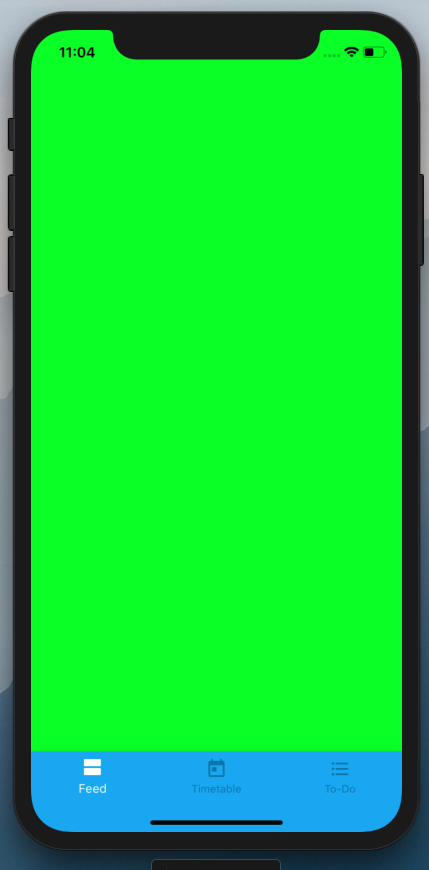
添加标签view.addSubview(label)时
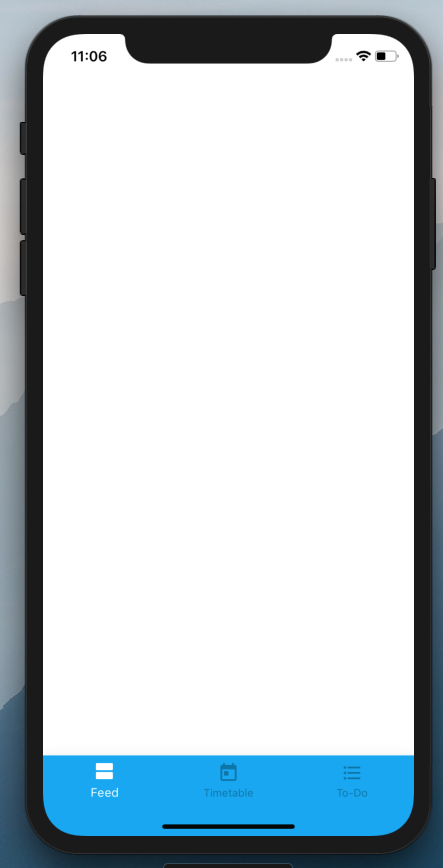
提前谢谢你!!
更新:
当通过故事板添加视图并试图访问它时,应用程序崩溃,表示标签为零。
FeedViewController:
import UIKit

class FeedViewController: UIViewController {

@IBOutlet weak var test: UILabel!

override func viewDidLoad() {
    super.viewDidLoad()

    view.backgroundColor = UIColor.green
    print(test.text ?? "unable to fetch")
}

}
错误:致命错误:在展开可选值时意外找到零
回答 1
Stack Overflow用户
发布于 2018-09-20 00:11:47
试试这个:
override func viewDidLoad() {
    super.viewDidLoad()

    view?.backgroundColor = UIColor.green
    print(test?.text ?? "unable to fetch")
}页面原文内容由Stack Overflow提供。腾讯云小微IT领域专用引擎提供翻译支持
原文链接:
https://stackoverflow.com/questions/52414856
复制相关文章
相似问题
腾讯云开发者

Copyright © 2013 - 2026 Tencent Cloud. All Rights Reserved. 腾讯云 版权所有
深圳市腾讯计算机系统有限公司 ICP备案/许可证号:粤B2-20090059  粤公网安备44030502008569号
腾讯云计算(北京)有限责任公司 京ICP证150476号 | 京ICP备11018762号