
在哪里可以看到HTML日志?
在哪里可以看到HTML日志?
提问于 2018-09-18 08:28:36
如果我在码头上运行sitespeed并获得以下输出:
Google Chrome 63.0.3239.84
Mozilla Firefox 54.0.1
[2017-12-27 18:10:01] INFO: Versions OS: linux 4.9.49-moby nodejs: v8.9.1 sitespeed.io: 6.2.2 browsertime: 2.1.2 coach: 1.1.1
[2017-12-27 18:10:02] INFO: Starting chrome for analysing https://www.google.com/ 3 time(s)
[2017-12-27 18:10:02] INFO: Testing url https://www.google.com/ run 1
[2017-12-27 18:10:18] INFO: Testing url https://www.google.com/ run 2
[2017-12-27 18:10:29] INFO: Testing url https://www.google.com/ run 3
[2017-12-27 18:10:40] INFO: 18 requests, 584.40 kb, backEndTime: 158ms (±6.42ms), firstPaint: 321ms (±3.32ms), firstVisualChange: 389ms (±7.78ms), DOMContentLoaded: 376ms (±3.63ms), Load: 529ms (±91.22ms), speedIndex: 477 (±9.23), visualComplete85: 422ms (±7.90ms), lastVisualChange: 2.65s (±137.82ms), rumSpeedIndex: 321 (±3.32) (3 runs)
[2017-12-27 18:10:43] INFO: HTML stored in /sitespeed.io/reports
[2017-12-27 18:10:43] INFO: Finished analysing https://www.google.com/
HTML日志存储在哪里?‘/sitspeed.io/reports’,我不知道去哪里访问它。
回答 1
Stack Overflow用户
回答已采纳
发布于 2018-09-18 09:44:34
码头枢纽页面中的示例如下:
docker run --shm-size=1g --rm -v "$(pwd)":/sitespeed.io sitespeedio/sitespeed.io http://www.sitespeed.io/ -b chrome- 命令的
--rm部分意味着容器在完成后被移除。所以你不能“进入”容器并访问结果,但是. -v "$(pwd)":/sitespeed.io部分意味着
- `-v`: a `volume` is created
- `"$(pwd)"`: at your working directory
- pointing to the `/sitespeed.io` folder of the container
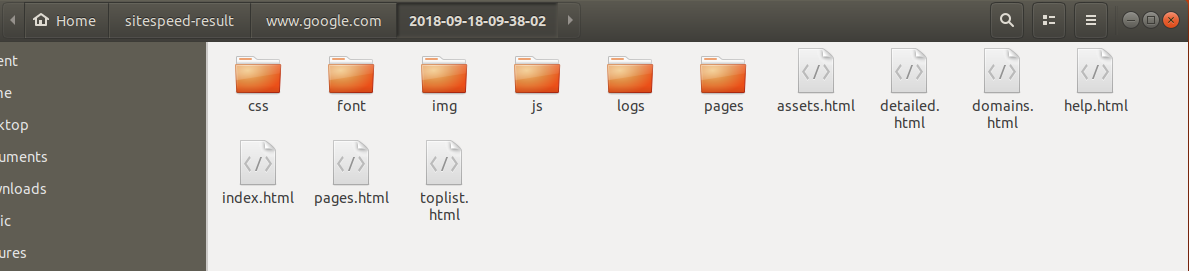
实际上,这意味着如果您在名为/my-docker-tests的目录下运行上述命令(尽管容器已被移除),您将能够在/my-docker-tests/sitespeed-result/上看到主机文件系统上的结果文件。
页面原文内容由Stack Overflow提供。腾讯云小微IT领域专用引擎提供翻译支持
原文链接:
https://stackoverflow.com/questions/52382196
复制相关文章
相似问题
腾讯云开发者

Copyright © 2013 - 2026 Tencent Cloud. All Rights Reserved. 腾讯云 版权所有
深圳市腾讯计算机系统有限公司 ICP备案/许可证号:粤B2-20090059  粤公网安备44030502008569号
腾讯云计算(北京)有限责任公司 京ICP证150476号 | 京ICP备11018762号